Quick answer
Keep a seasonal business website online all year, with its seasonal pages at the same addresses. Google warns against taking a site offline for more than a few days. In the quiet months, switch the main message to pre-booking or a waiting list, update your Google hours, and publish new content well before the season starts.
Ice cream vans, holiday lets, wedding venues, landscapers, Christmas tree farms, outdoor pools and tour operators all share the same problem: a website that is busy for four months and silent for eight. This guide covers what to do with the site in the quiet months so it is ready, and ranking, when the season comes back.
Why seasonal websites lose their rankings
When the season ends, owners often do one of three things: take the site down, hide the seasonal pages, or simply stop touching it. Each causes a different problem.
- Taking the site down tells search engines the business may be gone. Pages can drop out of search results and take time to return.
- Deleting or hiding seasonal pages throws away the history those pages built up. Recreating them at a new address next year starts from zero.
- Leaving it untouched means visitors in the off-season find last year’s prices, a “book now” button that leads nowhere, and no reason to come back.
If your traffic fell off a cliff and you are not sure whether it is just the season, compare it with the same months last year. A drop that matches last year’s pattern is seasonal; one that does not may be something else, and our guide to website traffic that dropped suddenly covers the other causes.
What Google says about pausing a business online
Google has specific guidance for businesses that need to pause or limit their online business. The main points for a seasonal business:
- Keep the site online and limit functionality instead. If you sell online, disabling the cart is described as the simplest approach, and it does not affect visibility in Search.
- Explain the closure on the site with a banner or notice on all pages.
- Avoid disabling the whole site. Google says to keep any full shutdown to a few days at most, and to serve an indexable page for longer closures rather than an error.
- Do not use signals that remove pages, such as 404 or 410 errors, noindex tags, or blocking crawling in robots.txt.
- Update structured data, such as opening hours or event dates, to match the current situation.
Do and don’t for the off-season
| Do | Don’t |
|---|---|
| Keep the seasonal pages live at the same address all year | Delete them and recreate them next spring |
| Change “Book now” to “Pre-book for next season” or “Join the waiting list” | Leave a booking button that fails or shows no dates |
| Add next season’s dates as soon as you know them | Leave last year’s dates and prices on the page |
| Show a clear notice explaining when you reopen | Put the whole site behind a “closed” holding page |
| Update your Google Business Profile hours | Let Google show you as open when you are not |
| Publish useful content before the season | Wait until the first busy week to update anything |
Turn the quiet months into bookings
The off-season is when many customers plan. Couples often look at wedding venues a year or more ahead, families plan summer breaks in the new year, and homeowners think about garden projects on dark February evenings. Give them something to act on:
- Pre-booking with a deposit, or an early-bird date, for next season.
- A waiting list or reminder sign-up, so you can email people the day bookings open.
- Gift vouchers, which suit many seasonal experiences and sell well before Christmas.
- A counter-season offer, if you have one: a landscaper’s winter tree work, a venue’s Christmas parties, a holiday let’s off-peak breaks.
Each of these needs one clear page. If your current site cannot take a new page without a developer, a focused landing page at £199 is often the quickest fix, and our guide on what to do when you cannot update your own website covers the longer-term options.
Your Google Business Profile in the off-season
For many seasonal businesses, the Google profile is seen more often than the website. Keep it accurate. Google’s help page on special hours explains that special hours suit closures of up to six days in a row, and that for closures of seven days or more, or for an unknown period, you should mark the business as temporarily closed. Remember to reopen it when the season starts.
Keep posting occasional updates even when closed: next season’s dates, a behind-the-scenes photo of preparations, early-bird offers. Our Google Business Profile optimisation guide covers the profile in detail.
Publish before the season, not during it
New pages and updates take time to be crawled, indexed and ranked. A page published in the first busy week often starts performing after the peak has passed. Work backwards from your season and publish two to three months ahead.
Google Trends shows when interest in your kind of business rises each year. Its help page explains that Trends data is normalised and rescaled on a 0 to 100 range, so it shows the shape of the year rather than exact search numbers. That shape is what you need: if searches for “wedding venue” in your county start climbing in January, your updated pages need to be live before then.
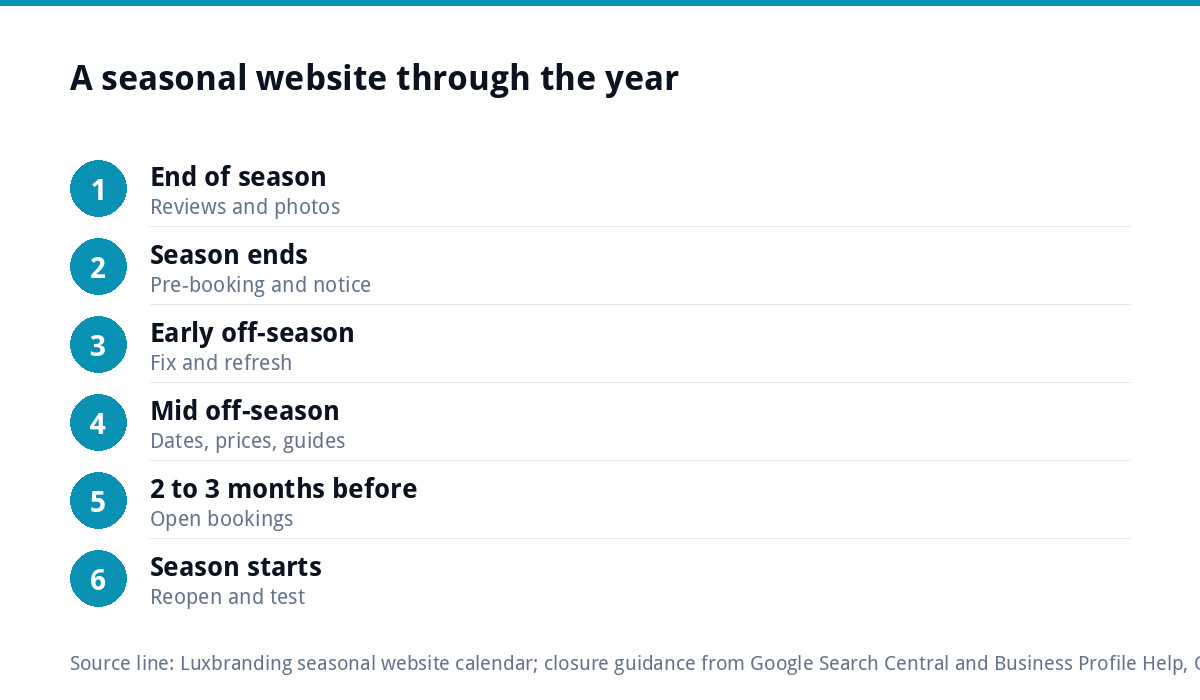
A 12-month website calendar for a seasonal business
| Timing | Website job |
|---|---|
| Last weeks of the season | Ask happy customers for reviews; take photos of your best work |
| Season ends | Switch to pre-booking or waiting list; add closure notice; update Google hours |
| Early off-season | Add new photos and reviews; fix anything that broke in the busy months |
| Mid off-season | Publish next season’s dates and prices; write useful guides customers search for |
| Two to three months before the season | Update seasonal pages; open bookings; email the waiting list |
| Season starts | Remove closure notices; reopen Google profile; check every form and booking tool |
What to write in the quiet months
Off-season content works best when it answers questions customers ask before they book. A holiday let might publish a guide to the best walks nearby by season. A landscaper might explain what to plant in autumn for a spring garden. A wedding venue might answer what is included, how far ahead to book and what happens if it rains. Each page is useful in its own right, keeps the site active, and gives search engines and AI tools detailed information to draw on when the season returns.
If writing is the job that never gets done, our content and blog writing service can produce the pages for you.
Check the basics before the season returns
A month before opening, search your business name and your main service plus town. If the site does not appear where it did last year, our guide to a website not showing on Google walks through the usual causes. Test every booking form and payment on a phone. Check that the dates, prices and photos on every seasonal page are this year’s, not last year’s. Then email your waiting list and pre-booked customers with the opening date, so the first busy week starts with bookings already in the diary.
The eight fixes, in short
- Keep the whole site online all year.
- Keep seasonal pages at the same addresses and update them rather than deleting them.
- Add a clear closure notice that says when you reopen.
- Replace “Book now” with pre-booking, early-bird dates or a waiting list.
- Offer something to buy now: vouchers or a counter-season service.
- Mark your Google profile as temporarily closed for long closures, and reopen it on time.
- Publish useful content in the quiet months, two to three months before the season.
- Test every form, booking tool and payment a month before you reopen.
None of these needs a new website. Most can be done in an afternoon if you can edit your own pages, and together they mean the site starts each season with its rankings intact and a list of people ready to book.
If you would rather someone kept the site ranking all year, our SEO service is £249 a month and covers rankings, content, technical health, link building and reports. Every fixed price we offer is on our pricing page.
Get the UK Website Project Brief Template (free)
A two-page template for briefing any UK web designer: sitemap, integrations, audience and deliverables. Cuts revision rounds in half.
No spam. UK GDPR compliant. We only use your email to send this resource, unless you tick the box to hear from us.
Frequently asked questions
Should I take my website down in the off-season? +
No. Google's guidance on pausing an online business says to keep the site online and limit functionality instead, for example by disabling the cart and adding a notice. It advises keeping any full shutdown to a few days at most and avoiding errors, noindex tags or blocked crawling, which can remove pages from search.
What should a seasonal business website say when closed? +
Show a clear notice on every page saying when you reopen, and replace the booking button with pre-booking, early-bird dates or a waiting list sign-up. Add next season's dates and prices as soon as you know them, and remove last year's, so off-season visitors have a reason to act now.
How do I show my business as closed on Google? +
Google's help page says special hours suit closures of up to six days in a row. For closures of seven days or more, or for an unknown period, mark the business as temporarily closed in your Business Profile, and remember to reopen it before the season starts so customers see you as open.
When should a seasonal business update its website? +
Two to three months before the season starts. New and updated pages take time to be crawled and ranked, so a page published in the first busy week often performs after the peak. Google Trends shows when interest in your kind of business rises each year, which helps you set the date.
Should I delete seasonal pages when the season ends? +
No. Keep them live at the same address all year and update them instead. A page that stays in place keeps the history it has built up in search, while deleting it and recreating it next year at a new address means starting again from nothing.