Quick answer
Showing at least a starting price usually improves lead quality: people who get in touch already accept the ballpark, so fewer enquiries go nowhere. We publish ours, such as £499 for a custom website. Leave prices off only when every job is genuinely different, and even then show typical ranges, worked examples or a calculator.
“Should I put prices on my website?” is one of the most common questions trades and service businesses ask when planning a site. The fear is that a competitor will undercut you, or that a customer will see a number and leave. The counter-argument is that hiding prices fills your phone with people who were never going to afford you. This guide sets out the options, which one suits which kind of business, and how to publish prices without boxing yourself in.
What hiding prices really costs you
Without any price, every visitor has to contact you to find out whether you are in their budget. That produces more enquiries, but a share of them are people shopping for the cheapest quote, people with a budget a fraction of the real cost, and people who simply wanted a number to compare. Each one costs you a phone call, a visit or a written quote.
Some visitors also assume that hidden prices mean high prices, and leave to find someone who tells them upfront. You never see those lost enquiries, which is why the cost of hiding prices is easy to underestimate.
What happens when you show them
A visible price, even a rough one, works as a filter. People who contact you have seen the figure and are still interested, so the conversation starts from “when can you do it?” rather than “how much is it?”. You may get fewer enquiries, but more of them turn into work, and you spend less time on quotes that go nowhere.
It also builds trust. A business confident enough to show its prices looks established and straightforward, which matters for trades where customers worry about being overcharged.
Five ways to handle pricing on a website
| Approach | Example wording | Pros | Cons |
|---|---|---|---|
| No prices | “Contact us for a quote” | Full flexibility | More time-wasting enquiries; some visitors leave |
| “From” prices | “Boiler service from” plus a figure | Sets expectations, easy to maintain | Must be honest about what pushes the price up |
| Typical ranges | “Most single-room jobs fall between” two figures | Works for variable jobs | A wide range can look vague |
| Full price list | A table of fixed services and prices | Clearest for customers, supports online booking | Needs updating when costs change |
| Calculator | An online estimate from a few questions | Engaging, gives a personal figure | Costs more to build; must be accurate |
Our own website cost calculator is an example of the last approach: a visitor answers a few questions and gets a figure before ever contacting anyone.
Which approach suits your business
The right answer depends on how standard your work is. Here is a guide by business type:
| Business type | Best approach | Why |
|---|---|---|
| Salons, barbers, dog groomers | Full price list | Services are standard; customers expect to see prices and book |
| Boiler servicing, MOTs, gutter cleaning | Fixed or “from” prices | Repeatable jobs with predictable time |
| Decorators, cleaners, gardeners | “From” prices or ranges by room or visit | Variable but patterned work |
| Kitchen fitters, builders, landscapers | Typical ranges and past project examples | Every job differs, but customers need a ballpark |
| Solicitors, accountants, consultants | Fixed fees for standard work, ranges for the rest | Standard tasks can be packaged |
| Emergency call-outs | Call-out fee and hourly rate | Customers want certainty under pressure |
A worked example: a decorator’s service page
Picture a decorator whose website says “every job is different, call for a free quote”. Every enquiry means a visit to measure up, and many end with the customer saying it is more than they expected.
Now picture the same page listing typical prices for common jobs: a single bedroom, a hallway and landing, a full exterior. Under each, it explains what is included (preparation, two coats, ceilings or not) and what costs more (wallpaper removal, high ceilings, damaged plaster). The enquiries that arrive now mention a specific job and accept the range. The decorator does fewer wasted visits, and the quotes that follow land close to what the customer expected.
The page can go one step further with two or three recent jobs: a short paragraph and a photo each, with the final price and what drove it. “Three-bedroom semi, hallway, stairs and landing, lining paper needed on the stairwell, four days” tells a customer far more than a range on its own, and shows the work at the same time.
The figures themselves matter less than the explanation around them. That is what turns a price into a reason to call.
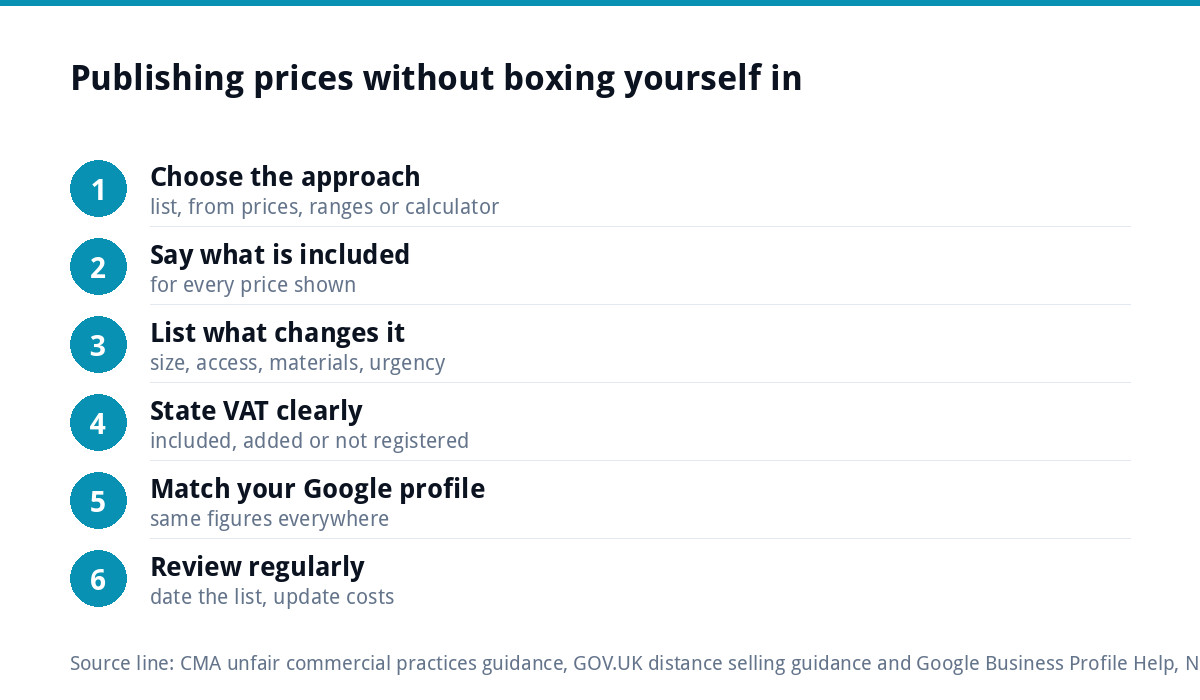
How to publish prices without boxing yourself in
- Use “from” or “typically” for variable jobs, and say what the starting price includes.
- List what changes the price: size, access, materials, urgency, distance.
- State whether VAT is included if you are VAT registered.
- Date your price list or review it every few months, so it never goes stale.
- Show the value next to the price: guarantees, accreditations, what the customer avoids by choosing you.
- Keep the call to action close, so someone happy with the price can act straight away.
Prices, fees and the law
You are not obliged to publish prices on a service website. If you do, they must not mislead. The Competition and Markets Authority’s guidance on unfair commercial practices covers business-to-consumer trading under the Digital Markets, Competition and Consumers Act 2024, and was updated in November 2025 to reflect its guidance on price transparency. A “from” price that almost nobody actually pays, or compulsory extras hidden until the end, is the kind of practice to avoid.
If customers can order and pay online, extra rules apply. GOV.UK’s guidance on online and distance selling says you must give information including the total price, payment methods and delivery terms before the customer orders. This is general information, not legal advice.
Keeping published prices up to date
The main practical objection to publishing prices is that costs change. Materials, fuel and wages rise, and a price list from two years ago becomes a promise you cannot keep. That is a reason to manage prices, not to hide them.
- Put a “prices reviewed” month on the page, and set a reminder to check them every quarter.
- Use “from” prices for anything exposed to volatile material costs.
- Honour the price a customer saw when they enquired, even if you update the page the next day. It costs little and builds goodwill.
- When prices rise, change them everywhere at once: website, Google profile, social media, printed price lists.
Most importantly, make sure you can edit prices yourself. If every change means emailing a web designer and waiting a week, the list will go stale.
Prices on your Google Business Profile
Your website is not the only place customers look. Google’s help page on adding services to a Business Profile says you can add information such as a price and description to each service. Keep these consistent with your website, because a customer who sees two different figures will trust neither. Our Google Business Profile setup and optimisation is £199 if you want the profile set up properly.
Check what your competitors show
Search for your main service in your area and open the first five local websites. Note which show prices, which show ranges and which hide them. If nobody shows prices, publishing yours can make you the obvious first call for customers who hate guessing. If everyone does, hiding yours will look evasive. Either way, you are deciding with evidence rather than gut feeling. Note how they word it, too: a competitor who explains what is included makes a cheaper rival without explanations look risky rather than good value.
Building pricing into your website
A clear price list, a set of “from” prices on service pages, or a simple calculator all need a website you can update easily. A custom WordPress website is £499 one-off for up to 8 pages, with a written CMS walkthrough so you can change prices yourself. A focused landing page for one service is £199. For context on what websites cost, see the UK website cost guide, and every one of our prices is on our pricing page, because we follow our own advice.
Get the UK Website Project Brief Template (free)
A two-page template for briefing any UK web designer: sitemap, integrations, audience and deliverables. Cuts revision rounds in half.
No spam. UK GDPR compliant. We only use your email to send this resource, unless you tick the box to hear from us.
Frequently asked questions
Do prices on a website put customers off? +
They put off people who were never going to afford you, which is usually a good thing. Customers who contact you after seeing a price have already accepted the ballpark, so conversations start from availability rather than cost. Some visitors also leave sites that hide prices, assuming they will be expensive, and you never see those lost enquiries.
How do I show prices when every job is different? +
Use typical ranges or starting prices for common jobs, and explain what is included and what pushes the price up, such as size, access, materials or urgency. Add two or three past project examples with what they involved. A simple online calculator is another option. The aim is a realistic ballpark, not a binding quote.
Will competitors undercut me if I publish my prices? +
They can see your prices either way by asking for a quote, so hiding them rarely protects you. Customers do not choose on price alone: reviews, photos of real work, guarantees and how quickly you respond all matter. Publishing prices with a clear explanation of what is included often wins against a cheaper but vaguer competitor.
Do I have to show prices on my website by law? +
Not on a service website where people enquire for a quote. If you do show prices, they must not mislead, and CMA guidance on unfair commercial practices applies to consumer pricing. If customers order and pay online, distance selling rules require the total price and other information before they order. This is general information, not legal advice.
Should I show prices including VAT? +
If you sell to the public and are VAT registered, show prices including VAT, or state clearly that VAT is added, so the figure a customer sees is the figure they pay. If you mainly sell to VAT-registered businesses, prices excluding VAT are common, but label them clearly. If you are not VAT registered, say prices are final.