
Quick answer
No, not as a rule. Keep old posts that carry reviews, comments, customer photos or proof of your work, because they show a real history. Archive or delete only posts that are now wrong: old prices, ended offers, dropped services, old phone numbers or anything clearly off-brand. Update profile images, bio and pinned posts on launch day.
A rebrand makes the old feed look dated overnight, and the urge to wipe it clean is understandable. But a social media history is evidence: years of finished jobs, happy customers and real activity. A brand-new account with nine perfect posts can look less trustworthy than an older one with a mixed past. This guide shows how to sort old posts into keep, archive, update and delete, what must change on launch day, and when a genuine reset does make sense.
Why deleting everything usually backfires
Old posts do quiet work for you, even when they look tired:
- Proof of trading. A feed going back years tells a cautious customer you are established and not going anywhere.
- Proof of work. Photos of finished jobs are still photos of finished jobs, whatever the logo looked like at the time.
- Social proof. Comments, thanks and tags from customers cannot be recreated once deleted.
- Search and discovery. Older posts and their hashtags can still be found, and links to them may sit in old emails and messages.
Customers understand that businesses change their look. What they notice is not old branding in a three-year-old post; it is out-of-date information presented as current, or a profile that suddenly appears to have no history.
Keep, archive, update or delete
Work through the feed with four decisions in mind. Some platforms let you hide a post from your profile without deleting it; Instagram, for example, has an Archive option for this. Check what each platform you use offers before you start.
| Type of old post | Decision | Why |
|---|---|---|
| Finished jobs and project photos | Keep | Still the best proof of your work |
| Posts with customer comments or thanks | Keep | Social proof you cannot recreate |
| Team, milestones and community posts | Keep | Shows the people and the history behind the name |
| Expired offers and seasonal deals | Archive | No longer valid; could confuse customers |
| Old prices or price lists | Archive or delete | Risk of customers expecting old prices |
| Services you no longer offer | Archive | Attracts enquiries you will turn down |
| Old phone numbers or addresses | Delete or edit the caption | Sends customers to the wrong place |
| Low-quality or off-tone posts | Archive | Out of step with the new brand |
| Posts showing customers who asked to be removed | Delete | Respect the request promptly |
Where a caption can be edited, editing beats deleting: correct the phone number, add “this offer has ended”, and the post keeps its comments and likes.
What must change on launch day
The old feed can stay. These elements cannot, because people see them first and assume they are current:
- Profile picture. Use the icon or simplified version of the new logo, sized for a small circle.
- Cover and header images on Facebook, LinkedIn, X and YouTube.
- Bio and about text, including services, area and tone of voice.
- Links in bios, buttons and link pages, especially if your domain or web address is changing.
- Pinned posts and story highlights, which act as a shop window. Replace them with new-brand content.
- Contact details and booking buttons, checked on every platform.
It helps to work from a single list, platform by platform, so nothing is missed:
| Channel | Update on launch day | Easy to forget |
|---|---|---|
| Profile picture, bio, link, highlight covers | Pinned posts still showing the old look | |
| Profile picture, cover image, about section | Call-to-action button and page name | |
| Company page logo, cover image, tagline | Staff profiles listing the old name | |
| Google Business Profile | Photos, description, website link | The name, once the new one is in real use |
| YouTube | Channel picture, banner, description | Old video thumbnails with the old logo |
| Website and email | Logo, favicon, colours, signatures | Social preview image shown when links are shared |
Ask staff to update their own profiles and email signatures on the same day. A mix of old and new across the team looks more confusing to customers than any old post on your grid.
Do all of these on the same day, alongside the website, email signature and Google Business Profile. Our guide on how to announce a rebrand to customers sets out a one-day switch-over and the announcement itself.
Changing your name or handle
If the rebrand includes a new business name, the order matters. For a limited company, GOV.UK’s page on company changes you must report notes that a new company name does not take effect until Companies House registers it, so do not switch public channels before that.
Your Google Business Profile needs care too. Google’s help page on editing your Business Profile says the name should match your real-world signage and branding, that changes are reviewed before going live, and that changing a verified business name may mean verifying again. Update it when the new name is genuinely in use on your signage, vehicles and website, not before.
For social handles, check availability on every platform before you commit to the new name, and keep the old handle where you can, so old links do not fall into someone else’s hands. Our business name checker is a quick first step.
Posts that show customers or staff
Old posts often include people: customers with their new kitchen, staff who have since left, children at a community event. A person’s name or image can be personal data; the ICO’s guidance on what personal data is confirms a name identifying a living individual counts. A rebrand audit is a good moment to remove posts featuring former staff who would rather not appear, and to act promptly on any request from a customer to be taken down.
Old prices and offers
An expired “20% off this month” post from three years ago is harmless to most viewers, but some will screenshot it and ask for the deal. Old price lists are worse, because they look current. Archive anything with a price or offer that no longer applies, or add a clear note to the caption that it has ended. If you publish prices now, link people to the current page rather than repeating figures in posts that will age.
Add a “formerly known as” bridge
For a few months after a name change, help people connect the two identities. Add “formerly [old name]” to your bio, pin a short post explaining the change, and mention it in your Facebook about section. People searching the old name still find you, and regulars are not left wondering whether you have closed or been taken over.
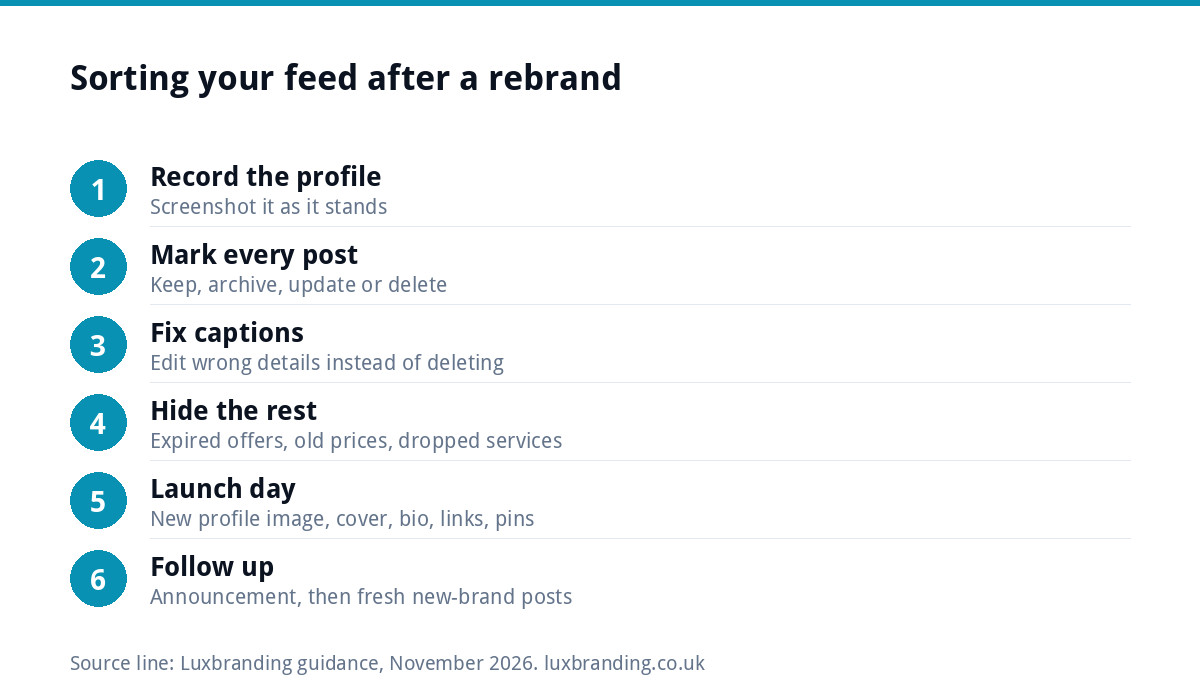
An afternoon audit, step by step
- Export or screenshot your profile as it stands, so you have a record.
- Scroll the feed from newest to oldest and mark each post keep, archive, update or delete.
- Edit captions where only a detail is wrong.
- Archive the rest, rather than deleting, unless there is a clear reason to remove it.
- Update profile, cover, bio, links and pinned content on launch day.
- Post your announcement, then follow it with fresh new-brand posts over the next few weeks.
Hiding rather than deleting, where the platform allows it, keeps your options open if you later want an old project back on view.
When a full reset does make sense
A clean start is the right call in a few situations: you have bought a business and the old content belongs to a different operation; the account was badly run and is full of spam or poor-quality posts; the old brand is tied to a reputation you are deliberately leaving behind; or you are launching a genuinely separate business. Even then, consider archiving rather than deleting, and keep anything with genuine customer praise.
For most small businesses, though, the better route is a sharp new profile on top of an honest history.
Getting the new look right
A refreshed feed only looks consistent if the brand underneath is clear. Brand Identity Design is £299 for the logo, colours, typography, imagery and brand guidelines, and social media design turns that into templates for posts and profile images. For a full change of name and identity across every touchpoint, our Rebrand Package is £1,999. If you are still deciding whether the change is worth it, read when to rebrand. Every fixed price is on our pricing page.
Get the UK Branding Budget Worksheet (free)
A printable worksheet: decide what your brand needs now and price it against fixed published prices and the IPO trademark fee.
No spam. UK GDPR compliant. We only use your email to send this resource, unless you tick the box to hear from us.
Frequently asked questions
Should I delete my old Instagram posts after rebranding? +
Usually not. Old posts showing finished work, customer comments and real activity prove you are an established business. Hide or delete only posts that are now wrong or misleading, such as expired offers, old prices, dropped services and old contact details, and update your profile picture, bio and pinned posts on launch day.
Will old posts with my old logo confuse customers? +
Rarely. Customers expect older posts to look older. Confusion comes from out-of-date information presented as current, such as an old phone number in a bio or a pinned post with old prices. Fix the profile, links and pinned content first, and add a short note explaining the change.
When should I start a completely new social media account? +
A fresh account makes sense when you have bought a business and the content belongs to a different operation, when the old account is full of spam or poor-quality posts, or when you are launching a genuinely separate business. Otherwise, a refreshed profile on top of your existing history is usually stronger.
Do I need to change my business name on Google when I rebrand? +
Only when the new name is actually in use. Google says your Business Profile name should match your real-world signage and branding, that edits are reviewed before going live, and that changing a verified business name may mean verifying again. Update signage, vehicles and website first, then the profile.
What should I post first after a rebrand? +
Start with a short announcement explaining the new look or name and what stays the same, pinned to the top of your profile. Follow it over the next few weeks with new-brand posts of real work, so the most recent part of your feed shows the new identity in use, not just a logo reveal.