Quick answer
A sales sheet is one A4 page that sells one product or service to a buyer comparing suppliers. Put a clear headline and outcome at the top, three to five benefits with proof, what is included or key specifications, one strong photo, prices or “from” prices if you can, and a single way to order or enquire.
Trade buyers, facilities managers, shop owners and event visitors all ask the same thing: “Have you got something I can take away?” A sales sheet, also called a sell sheet or one-pager, is that something. It is cheaper than a brochure, quicker to update, and easier to email than a website link the buyer has to explore. This guide covers what belongs on the page, the order it goes in, the rules your claims must follow, and how to produce both a print and a digital version.
Sales sheet, brochure or credentials deck?
| Document | Length | Job | Best moment to use it |
|---|---|---|---|
| Sales sheet | One page, sometimes double-sided | Sell one product, service or package | After a first conversation, at a trade counter, at an event |
| Brochure | Folded sheet or several pages | Show the range of what you do | When the buyer wants the full picture |
| Credentials deck | Usually 8 to 12 pages | Prove you are a safe supplier for bigger contracts | Tenders, framework applications, larger clients |
| Flyer | One page | Attract new customers with an offer | Door drops, counters, local marketing |
The difference between a flyer and a sales sheet is the reader. A flyer grabs a stranger’s attention; a sales sheet helps someone who is already interested to compare, decide and justify the choice to a colleague.
Who uses sales sheets
They suit any business that sells to people who compare options before buying:
- Manufacturers and food producers pitching to shops, delis and wholesalers.
- Trades offering a defined package to letting agents or facilities managers, such as gas safety checks across a portfolio.
- Service firms selling a fixed package, such as commercial cleaning contracts or maintenance plans.
- Anyone exhibiting at a trade show who needs something to hand over.
- Businesses sending follow-up material after a site visit or a call.
If you sell several distinct products or services, make one sheet for each rather than one crowded sheet for everything. Buyers want the page that matches their question.
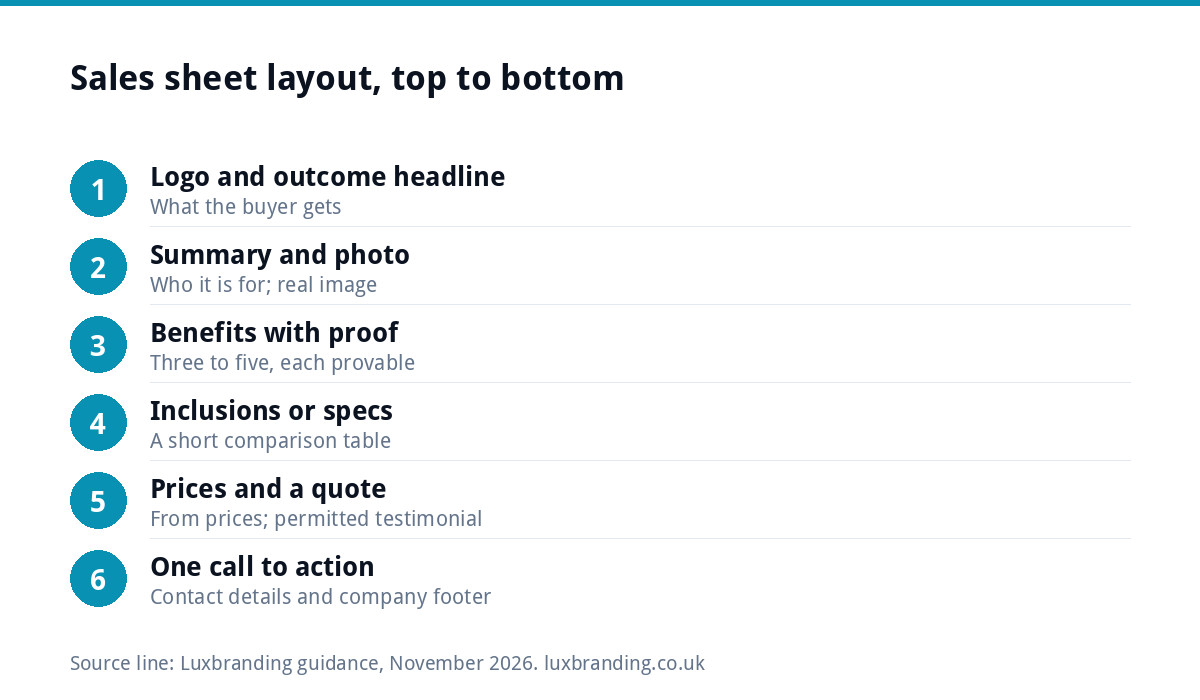
The layout, top to bottom
- Your logo and a headline that states the outcome, not just the product: “Gas safety certificates for your whole portfolio, in one visit” beats “Gas Safety Services”.
- One sentence of summary under the headline, saying who it is for and why it is different.
- One strong photo of the product or the work, real rather than stock.
- Three to five benefits, each with a short proof point: a timescale, an accreditation, a guarantee you genuinely offer.
- What is included or key specifications, ideally as a short table: sizes, materials, lead times, minimum orders, coverage area.
- Prices, or “from” prices and what affects them, if your market allows it.
- A short quote from a customer, used with their permission.
- One call to action with contact details: phone, email, web address, and a QR code if it helps.
On a double-sided sheet, keep the front for the sale (points 1 to 4 and 8) and use the back for detail, specifications and pricing.
Writing claims you can stand behind
A sales sheet is marketing, and the advertising rules apply. Section 3 of the UK CAP Code says marketers must hold documentary evidence to prove claims that consumers are likely to regard as objective, and that testimonials need permission. In practice:
- “Fastest in Yorkshire” or “cheapest in the area” needs evidence; “most jobs completed within two working days” needs your records to back it.
- Use specifics you can prove, such as accreditations, lead times and warranties you actually provide.
- Get written permission before quoting a customer, and keep it on file.
Specific, provable claims are also more persuasive. Buyers skim past “excellent service”; they stop at “same-week installation across Leeds and Bradford”.
Company details you must include
If your sheet works as an order form, or you send it as part of a business letter, the company rules apply. GOV.UK’s guidance on signs, stationery and promotional material says that for a limited company, business letters, order forms and websites must show the registered number, the registered office address, where the company is registered and the company’s limited status, usually by giving the full name with “Limited” or “Ltd”. Put these in a small footer line. It costs nothing and looks professional.
Design rules that keep it readable
- One clear hierarchy. The headline is biggest, benefits next, details smallest. If everything shouts, nothing is heard.
- White space. Resist filling every corner. A calm page reads as confident and is easier to scan.
- Brand consistency. Same logo, colours and fonts as your website and vans, so the sheet looks like it comes from the same business.
- Readable sizes. Keep body text comfortably large, and never put small text over a busy photo.
- Scannable structure. Short headings, bullet points and a table let a buyer find the answer in seconds.
Print and PDF versions
Most sales sheets live two lives: printed for handing over, and a PDF for email. For print, A4 on a good silk or uncoated stock feels substantial; check bleed, CMYK colours and image resolution before sending files. Our guide to print-ready artwork covers the checklist, and if a printer has already rejected your file, see what to do when artwork is rejected.
For the digital version, GOV.UK’s guidance on publishing accessible documents is worth borrowing from: use proper heading styles rather than bold text, check colour contrast, avoid putting important text inside images, and run the built-in accessibility checker in your software. It also notes that PDFs often work poorly with screen readers, so put the same information on a page of your website and link to the PDF from there.
A worked example: a small chutney maker
Picture a small producer in Devon trying to get a new chutney stocked in farm shops and delis. The buyer at each shop sees dozens of products a month and has a few seconds to decide whether to read on. Her sales sheet works like this:
- Headline: “A Devon chutney that sells itself on the cheese counter”, with one line beneath on who it is for: independent delis and farm shops.
- Photo: one jar on a cheese board in natural light, taken in her kitchen, not a stock image.
- Benefits with proof: made in small batches with local apples, a long shelf life stated on the label, and a tasting display she can supply.
- Specifications table: jar size, case quantity, shelf life, lead time, minimum order and delivery area.
- Prices: trade price per case and the recommended retail price, dated.
- Call to action: “Order a sample case” with a phone number, email and a QR code to the trade page of her website.
The back of the sheet carries a short story about the kitchen, a permitted quote from an existing stockist, and the company details in the footer. A buyer can decide, compare and pass it to a colleague without a single phone call, which is exactly the job.
A quick checklist
| Check | Done when |
|---|---|
| One product or service per sheet | The headline names a single offer |
| Outcome-led headline | It says what the buyer gets, not just what you sell |
| Proof for every claim | You could show evidence if asked |
| Specs or inclusions | A buyer can compare you without phoning |
| Single call to action | One clear next step with contact details |
| Company details | Registered name, number and office in the footer |
| Print-ready and PDF versions | Both checked before use |
Common mistakes
- Squeezing the whole company onto one page.
- A product photo that is dark, small or obviously stock.
- Prices that are out of date, with no date or version on the sheet.
- Three different calls to action competing for attention.
- Claims nobody could prove, such as “the best in the UK”.
Put a small version date in the footer, so you always know which sheet a buyer is holding.
Getting a sales sheet designed
Our leaflet and flyer design covers single-page sales material, and if you already have a layout that needs preparing for press, our Print-Ready Artwork service is £49. If the sheet is part of a bigger push for trade or commercial work, our guide to winning commercial contracts covers the rest of the pack, and Brand Identity Design at £299 sets the colours, typography and guidelines every document follows. Every fixed price is on our pricing page.
Get the UK Print-Ready Artwork Checklist (free)
A one-page checklist for any UK designer or printer covering CMYK, bleed, fonts and resolution. Saves you the pre-press fix-up fees.
No spam. UK GDPR compliant. We only use your email to send this resource, unless you tick the box to hear from us.
Frequently asked questions
What should be on a one-page sales sheet? +
Your logo, an outcome-led headline, a one-sentence summary, one strong real photo, three to five benefits with proof, what is included or key specifications, prices or from prices if you can share them, a customer quote used with permission, and one clear call to action with contact details.
What is the difference between a sales sheet and a flyer? +
A flyer grabs a stranger's attention, usually with an offer, and is used for door drops and counters. A sales sheet is for someone already interested: it helps them compare suppliers, check specifications and justify the decision to a colleague. It carries more detail and fewer promotional flourishes.
Do I need my company details on a sales sheet? +
If it works as an order form or is sent as part of a business letter, yes. GOV.UK says a limited company's letters, order forms and websites must show its registered number, registered office address, place of registration and limited status. A small footer line covers it.
Can I say we are the best or the cheapest on a sales sheet? +
Only if you can prove it. The CAP Code requires marketers to hold documentary evidence for claims consumers are likely to see as objective. Specific, provable statements, such as accreditations, lead times and warranties you genuinely offer, are safer and usually more persuasive than broad superlatives.
Should a sales sheet be a PDF or printed? +
Both, usually. Print it on A4 for handing over at counters, events and site visits, and keep a PDF for email. Because PDFs often work poorly with screen readers, put the same information on a page of your website too and link to the PDF from there.