
Quick answer
Yes, but less than most people think. UK hosting (ours is £20 a month) answers UK visitors faster than a US server, but page weight, caching and hosting quality usually matter more. Google calls server location a signal about your audience, not a definitive one, and keeping data in the UK makes data protection simpler.
When a small business site feels slow, the hosting location is often the first suspect, especially when someone discovers the server is in Virginia or Texas. Sometimes that really is the problem. More often it is one part of a bigger picture. This guide explains how distance affects speed, how it compares with the other causes of a slow site, whether it changes your Google rankings, the data protection angle, and how to choose or move hosting sensibly.
Why distance affects speed at all
When someone opens your website, their phone or computer has to contact your server, wait for a reply, then request the page and everything on it: styles, scripts, images and fonts. Each request and reply is a round trip. Data travels fast, but not instantly, and a round trip from Manchester to a server in the United States takes noticeably longer than one to a server in London.
A single round trip is a tiny delay. The problem is that loading a page involves many of them, especially on the first visit, when a secure connection has to be set up before anything else happens. The extra delay adds up most on the very first response, which is measured as time to first byte (TTFB).
How location compares with other causes of a slow site
| Cause | Typical impact | Fix |
|---|---|---|
| Server far from visitors | Slower first response on every page | Host near your customers, or use a CDN |
| Cheap, overloaded shared hosting | Slow and inconsistent responses, worse at busy times | Better quality hosting |
| No page caching | The server rebuilds every page for every visitor | Enable caching at server or site level |
| Oversized images | Heavy pages, especially on mobile data | Resize, compress and serve modern formats |
| Bloated theme or page builder | Lots of code to download and run | Leaner build, fewer plugins |
| Too many third-party scripts | Chat widgets, trackers and embeds delay loading | Remove what you do not use; load the rest later |
A well-built site on a US server can feel faster than a bloated site on a UK one. Location is worth fixing, but rarely the only fix, and hosting quality often matters more than the country the server sits in. Our guide to website speed for small businesses covers the fixes in order of impact.
How to measure whether location is your problem
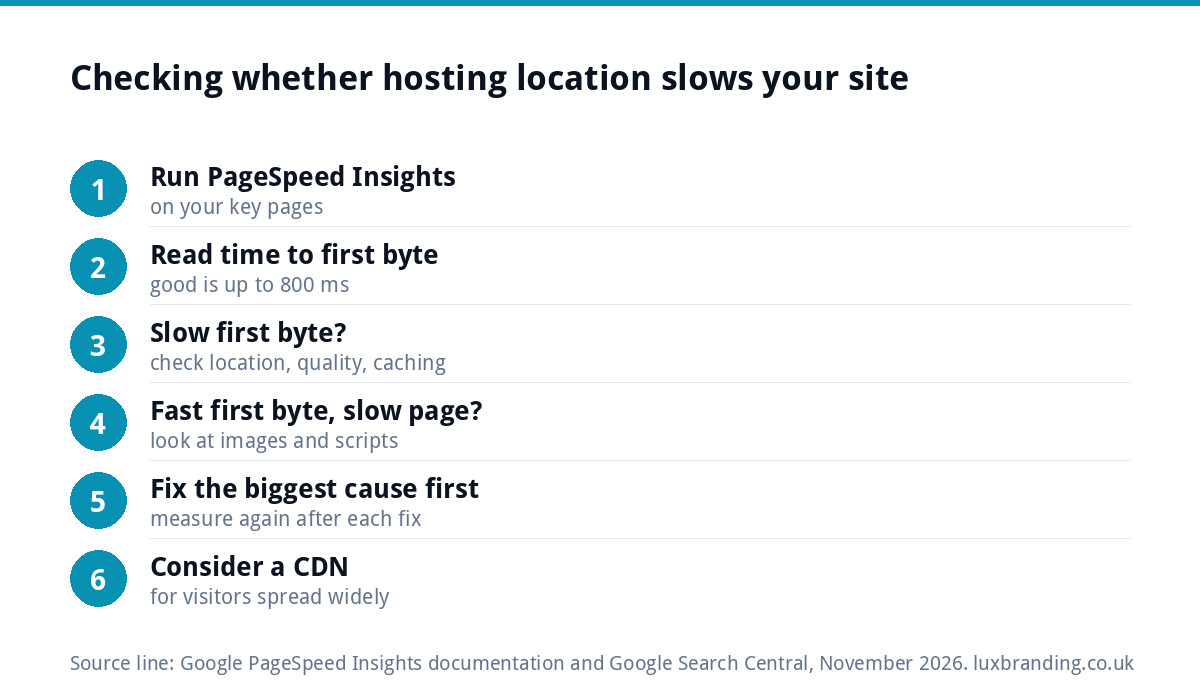
Google’s PageSpeed Insights is the free place to start. Its documentation on field and lab data explains that field data captures real visitors’ experience from the Chrome User Experience Report, while lab data is collected in a controlled environment and is useful for debugging. It reports time to first byte with these thresholds:
- Good: up to 800 milliseconds.
- Needs improvement: 800 to 1,800 milliseconds.
- Poor: over 1,800 milliseconds.
If your time to first byte is poor but the rest of the page loads quickly once it starts, the server (its location, its quality or its lack of caching) is the likely culprit. If the first byte is fine but the page still takes ages, look at images, scripts and the theme instead.
A worked example: a café site on a US server
Picture a café in Leeds whose website was set up years ago on a budget plan with a US data centre. The owner notices the menu page is sluggish on her phone and assumes the server location is the whole story.
PageSpeed Insights shows a time to first byte in the “needs improvement” band, and a page weighed down by a dozen full-size photos straight from a camera. Moving to UK hosting with caching switched on brings the first response down into the good range. But the bigger visible improvement comes from resizing the photos and removing an old slider and an unused booking widget, which together made up most of the page’s weight.
Both changes were worth making. The point is the order: measure first, then fix whatever the measurement shows is largest. Moving host alone would have helped, but the page would still have felt slow on mobile data.
What a CDN changes
A content delivery network (CDN) keeps copies of your site’s files on servers in many locations and serves each visitor from a nearby one. With a CDN, a site hosted in the US can deliver images and styles to UK visitors from a European location, which removes much of the distance penalty for those files.
A CDN helps most with static files such as images, styles and scripts. Pages that are generated fresh for each visitor, such as a basket or an account area, still come from the main server, so its location and quality still matter for a shop or booking site.
Does server location affect Google rankings?
Not in the way many people fear. Google’s guidance on managing multi-regional sites says server location can be a signal about your site’s intended audience, because servers are often near their users, but that it is not a definitive signal, partly because of CDNs and other hosting setups.
For a UK business, a .co.uk or .uk domain, UK addresses and phone numbers, UK prices and content written for UK customers say far more about your audience than where the server sits. Speed itself is part of page experience, so a faster site helps visitors first and may help rankings at the margin. Our free SEO audit tool gives a quick view of your site’s technical basics.
The data protection angle
Speed is not the only reason to care where your website lives. Contact forms, quote requests, bookings and orders all store personal data on the server. The ICO’s guide to international transfers describes a restricted transfer as a transfer of personal information to a separate organisation located outside the UK, and explains that transfers can be covered by UK adequacy regulations or other safeguards.
Hosting outside the UK is not automatically a problem, and many large providers have arrangements in place. But keeping the website, its backups and its form submissions with a UK host removes a question you would otherwise need to answer, which is one less thing to worry about for a small business without a data protection adviser. Remember that email, backups and form plugins can store data elsewhere too.
Which location suits your business
| Your customers | Sensible hosting | Notes |
|---|---|---|
| Local or UK-wide | UK hosting | Fastest for your visitors; simplest for data protection |
| UK and Europe | UK or nearby European hosting | Add a CDN if visitors are spread widely |
| UK and North America | Host near the larger audience, plus a CDN | The CDN covers the other side |
| Mainly overseas | Host near that audience | Check data protection for UK customers’ data |
Finding out where your site is hosted
Your hosting invoice or control panel usually states the data centre location. If someone else set up the site, a free IP lookup tool will show roughly where the server is, though a CDN can hide the true origin. Your domain’s settings show which company controls the DNS, which is often a clue to the host. Our domain names guide explains how domains, DNS and hosting fit together.
Moving host without breaking things
If the site is genuinely slow because of an overloaded or distant host, moving can help. Plan it properly: take a full backup, copy the site to the new host, test it on a temporary address, then switch the domain over at a quiet time. Email often runs through the same provider, so check that mailboxes and email records move or stay intact. Keep the old hosting account running for a week or two after the switch, until you are sure nothing was missed, then cancel it. Our website hosting cost guide explains what you get at each price point.
UK hosting and speed help from us
Our website management and hosting is £20 a month, with UK hosting, SSL, daily backups, security monitoring, automatic updates and up to 3 business email mailboxes. If the hosting is fine but the site is still slow, our website speed optimisation is £99. All our prices are on the pricing page.
Get the UK Website Project Brief Template (free)
A two-page template for briefing any UK web designer: sitemap, integrations, audience and deliverables. Cuts revision rounds in half.
No spam. UK GDPR compliant. We only use your email to send this resource, unless you tick the box to hear from us.
Frequently asked questions
Is UK hosting faster for UK visitors? +
Generally yes, because each request between a visitor and the server travels a shorter distance, so the first response arrives sooner. The difference is real but often smaller than the effect of slow, overloaded hosting, missing caching or oversized images. Measure time to first byte before assuming location is the main problem.
Does server location affect Google rankings in the UK? +
Only slightly, if at all. Google says server location can be a signal about a site's intended audience but is not a definitive one, partly because of CDNs. A UK domain, UK contact details, UK prices and content written for UK customers tell Google far more about your audience than where the server sits.
Will a CDN fix a slow overseas server? +
Partly. A CDN serves copies of images, styles and scripts from locations near each visitor, which removes much of the distance delay for those files. Pages generated fresh for each visitor, such as baskets, checkouts and account areas, still come from the main server, so its location and quality still matter for shops and booking sites.
Is it a GDPR problem to host my website outside the UK? +
Not automatically. The ICO describes a restricted transfer as sending personal data to a separate organisation outside the UK, and such transfers can be covered by adequacy regulations or other safeguards. Many large hosts have arrangements in place. Keeping the site, backups and form data with a UK host simply removes the question.
What is a good time to first byte? +
PageSpeed Insights treats up to 800 milliseconds as good, 800 to 1,800 milliseconds as needing improvement, and anything over 1,800 milliseconds as poor. If your first byte is slow but the page loads quickly once it starts, look at the server: its location, quality and caching. If not, look at images and scripts.