Quick answer
Choosing badly can mean a £99 speed fix later. For most small business homepages, a sharp still photo of real work beats a background video: it loads faster on phones, does not distract from the headline and is easier to get right. Use video only when movement shows something a photo cannot, and keep it short, muted and compressed.
The hero is the large image or video at the top of a homepage, behind or beside the headline. It is the first thing every visitor sees, so the choice between a photo, a video and a rotating slider matters more than most design decisions. This guide compares the three on speed, cost, accessibility and results, and sets out when video genuinely earns its place.
What the hero has to do
Whatever you put there, the hero has one job: help a visitor understand in a few seconds what you do, that you are real, and what to do next. The media supports the headline and the button; it should never compete with them.
That gives a simple test for any hero: if you covered the headline, would the image or video on its own suggest the right business? A photo of a finished kitchen says “kitchen fitter” instantly. A generic video of people shaking hands in an office says nothing at all, however polished it looks.
Photo, video or slider compared
| Still photo | Background video | Rotating slider | |
|---|---|---|---|
| Loading speed | Fast when compressed | Slower; large file even when short | Slower; several images plus scripts |
| Works on every phone | Yes | Mostly, if muted and set to play inline | Yes, but often awkward to swipe |
| Distraction from headline | Low | Medium to high | High |
| Cost to produce | Low; a phone and good light can do it | Higher; filming, editing, compressing | Low to medium |
| Accessibility work needed | Alt text | Pause control, no sound, reduced motion | Pause control, keyboard access |
| Best for | Most small businesses | Venues, experiences, processes in motion | Rarely the best choice |
Why speed decides most cases
Google measures how quickly the main content of a page appears with a metric called Largest Contentful Paint. Google’s web.dev guide to Largest Contentful Paint says a good score is 2.5 seconds or less, and lists the kinds of element that can count as the largest: images, video (using the poster image or the first frame, whichever comes first), background images and large blocks of text.
On most homepages, the hero is that largest element. So whatever you put there sets your loading score. A well-compressed photo can appear quickly even on mobile data. A video has to load enough of itself, or its poster image, before anything meaningful shows, and the file is usually several times heavier than a photo of the same size.
Most small business visitors arrive on a phone, often on the move. A hero that takes several seconds to appear is a hero many of them never see. Our guide to website speed for small businesses explains which delays matter, and if your current hero is the culprit, our speed optimisation service is £99.
When video genuinely earns its place
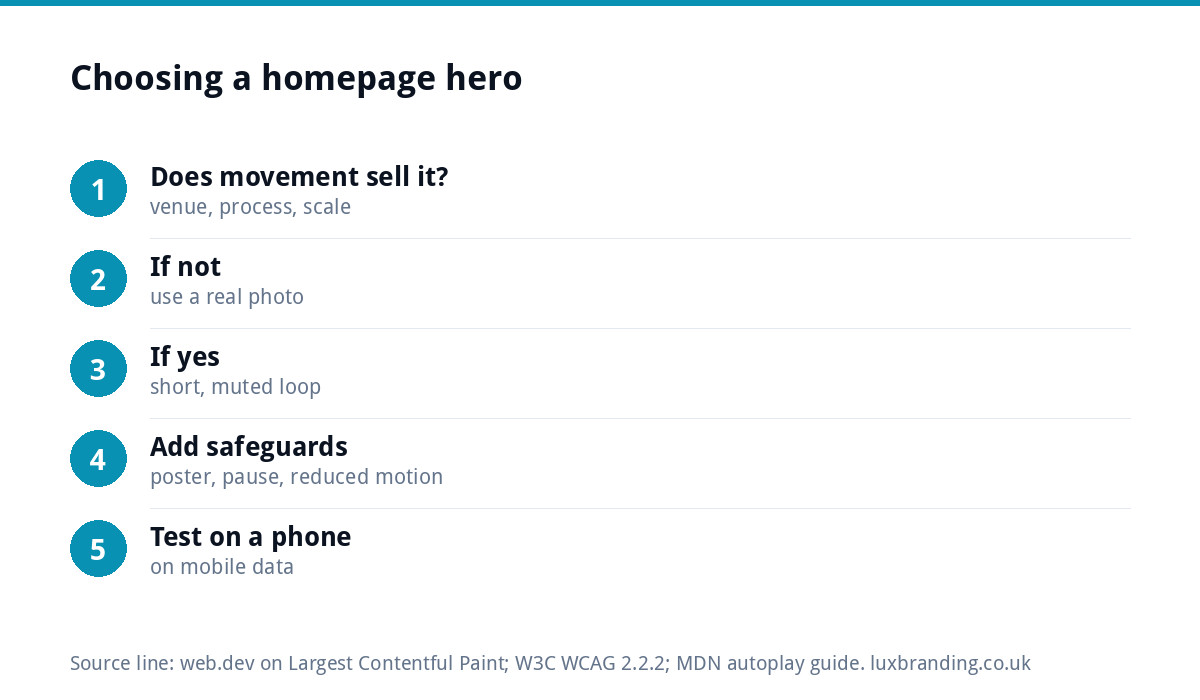
Video is not wrong; it is just usually unnecessary. It earns the extra weight when movement communicates something a still cannot:
- Experiences and venues: a wedding venue, a climbing centre, a restaurant on a busy night. Atmosphere is the product.
- Processes: a dramatic before and after, such as pressure washing a driveway in one continuous pass, or a resin floor being poured.
- Scale: a drone shot showing the size of a landscaping project or a commercial site.
- Craft: hands at work, where the skill is in the movement, such as a furniture maker or a signwriter.
Notice what is missing from the list: an office, a team walking down a corridor, stock footage of a city skyline. If the video could belong to any business, a photo of your own work will do more.
If you use video: the rules
A background video that works well follows a few strict rules.
- Muted, always. Mozilla’s guide to autoplay explains that browsers generally block autoplay with sound until the visitor has interacted with the page, while muted video is generally allowed to play. Its example also notes that the playsinline attribute is needed for autoplay in Safari.
- Short and looping. Five to fifteen seconds is enough for a background loop.
- Compressed hard. Export at the size it displays, not 4K. Modern formats such as WebM or efficient MP4 settings make a large difference.
- A poster image. Set a still frame that shows instantly while the video loads, and choose it as carefully as you would a hero photo, because on slow connections it may be all people see.
- Readable headline. Add a subtle dark overlay so white text stays readable on every frame, not just the first one.
- Consider a still on mobile. Many sites show the poster image on phones and the video only on larger screens with faster connections.
Accessibility: movement needs a pause button
Moving backgrounds can be a real problem for some visitors, including people with attention difficulties, vestibular disorders or migraines. The W3C’s guidance on Pause, Stop, Hide says that moving content which starts automatically, lasts more than five seconds and sits alongside other content needs a way for users to pause, stop or hide it.
In practice, any looping hero video should have a visible pause button. Well-built sites also respect the “reduce motion” setting on a visitor’s device and show the still image instead. A photo needs none of this beyond good alt text, which is another reason it is the simpler choice.
Sliders: the option to avoid
Rotating sliders were everywhere a decade ago and still turn up on templates. They usually work against you. Most visitors see only the first slide before scrolling. The movement pulls attention away from the headline. Each slide adds images and scripts that slow the page. And they are fiddly to use on a phone.
If you have several messages to get across, put the most important one in the hero and give the others their own sections further down the page, where people can read them at their own pace.
Getting the hero photo right
If a still photo is the answer for your business, the photo itself matters a great deal.
- Real over stock. Your own finished work, team or premises beats a stock image every time for a local business.
- Landscape, with space. Leave calm space on one side or across the top for the headline to sit on.
- Check the mobile crop. A wide landscape photo is cropped hard on a phone. Make sure the important part survives in the middle.
- Light and sharpness. Daylight, a clean lens and a steady hand. One excellent photo beats five average ones.
- Sized properly. Exported at a sensible width and compressed, ideally in a modern format such as WebP.
Which suits your business?
| Business type | Suggested hero | Why |
|---|---|---|
| Trades (plumber, electrician, roofer) | Photo of finished work or a team on site | Fast, credible, shows real jobs |
| Professional services (accountant, solicitor) | Photo of the team or office | Trust comes from real people |
| Venue, events or hospitality | Short muted video with a strong poster image | Atmosphere sells the booking |
| Product business or online shop | Photo of the bestseller in use | Shows the product clearly and quickly |
| Landscaping or large projects | Photo, or a short drone loop on desktop only | Scale is the selling point |
Test it the way your visitors see it
Before you sign off a new hero, photo or video, check it the way real visitors will meet it.
- Use your own phone, away from the office Wi-Fi. Load the homepage on mobile data and count how long it takes before the hero and headline are readable.
- Run Google PageSpeed Insights on the homepage and look at Largest Contentful Paint. If the hero is named as the largest element and the time is well over 2.5 seconds, it is worth fixing.
- Check the crop on a small screen. Is the important part of the photo still visible behind the headline?
- Read the headline on every frame. For video, pause it at several points and check the text is still easy to read.
- Ask someone who has never seen the site what the business does after five seconds. If they hesitate, the hero is not doing its job.
Getting it built
The hero is part of a wider homepage that has to load fast and make the next step obvious. Our custom WordPress websites are £499 for up to 8 pages, hand-coded with a mobile-first build, so there is no page builder adding weight around your hero. For a single campaign or offer, a landing page is £199, and a one-page website is £299. Every price is on our pricing page.
Get the UK Website Project Brief Template (free)
A two-page template for briefing any UK web designer: sitemap, integrations, audience and deliverables. Cuts revision rounds in half.
No spam. UK GDPR compliant. We only use your email to send this resource, unless you tick the box to hear from us.
Frequently asked questions
Is a video background bad for website speed? +
It usually makes the page heavier. The hero is often the largest element on the page, which sets the loading score Google measures, and a video file is typically several times larger than a well-compressed photo. If you use video, keep it short, muted and compressed, with a poster image that shows instantly.
Should a homepage video autoplay with sound? +
No. Browsers generally block autoplay with sound until the visitor interacts with the page, and unexpected sound drives people away. Background videos should be muted, set to play inline on phones and short enough to loop. If sound matters, let the visitor press play on a separate video further down the page.
Are image sliders good for a homepage? +
Rarely. Most visitors only see the first slide, the movement distracts from the headline, and the extra images and scripts slow the page. Put your most important message in a single hero and give other messages their own sections further down, where people can read them properly.
Does a hero video need a pause button? +
Yes, if it loops for more than five seconds. W3C accessibility guidance says moving content that starts automatically, lasts more than five seconds and sits alongside other content needs a way to pause, stop or hide it. Showing a still image to visitors who prefer reduced motion is good practice too.
How much does Luxbranding charge for a website? +
Our custom WordPress websites are £499 for up to 8 pages, hand-coded without page builders and built mobile-first. A landing page is £199 and a one-page website is £299. If your current site is slow because of a heavy hero, website speed optimisation is £99. All prices are on our pricing page.