
Quick answer
Track Google Ads leads as conversions in four places: form submissions (a thank-you page or a form event), calls from call assets, calls to a Google forwarding number on your website, and taps on your mobile number. Set a minimum call length, make one action primary per lead type, then test each route with a real enquiry.
If you run Google Ads for a trade or service business, almost every lead arrives as a phone call or a form. Google cannot optimise for either unless you tell it they happened. This guide walks through each tracking route in plain English, the settings that stop you counting rubbish, and a test routine you can run in twenty minutes.
Why tracking comes before bids, keywords and ads
Without conversion tracking, Google Ads reports clicks and cost, and nothing else that matters. You cannot tell which keywords bring jobs and which bring browsers, and any automated bid strategy is guessing. Google’s own page on conversion measurement says measuring conversions shows which keywords, ads and campaigns drive valuable actions and lets you use Smart Bidding. That is the whole point: the system learns from what you count.
The flip side is that it learns from mistakes too. If a page view or a two-second call is counted as a lead, Google will happily buy more of them. Good tracking is less about adding tags and more about deciding what a real enquiry looks like for your business.
The five lead actions Google can count
Google’s help page on phone call conversion tracking lists the call routes; forms are tracked as website conversions. For most small businesses, these five cover every lead.
| Lead action | How it is tracked | What you need | Best for |
|---|---|---|---|
| Form submitted | Website conversion on a thank-you page or form event | Google tag on the site, a confirmation page or event | Quote requests, bookings |
| Call from the ad | Calls from call assets or call ads, above a minimum length | Call reporting switched on | Emergency trades, mobile searches |
| Call from the website | A Google forwarding number swapped onto your site | Google tag plus the website call snippet | Visitors who read first, then ring |
| Tap on a mobile number | Click on a tel: link counted as a conversion | A clickable number and a click event | A rough signal when forwarding numbers are not used |
| Imported lead or sale | Offline conversions uploaded or matched later | A way to record which leads became jobs | Higher-value work with a sales process |
You do not need all five on day one. A form route and one call route covers most trades. Add the others once the basics are proven.
Tracking form leads properly
The cleanest method is a dedicated thank-you page that only loads after a successful submission. Count a conversion when that page loads and nothing else. If your form shows a message on the same page instead, you need a form submission event, which takes a little more setup and is easier to get wrong.
- Check the form actually sends. Submit it yourself and confirm the email arrives. A tracked form that never reaches your inbox is worse than no tracking. Our guide to a contact form that is not working covers the usual faults.
- Create a thank-you page with a clear next step, such as “we reply within one working day”, and keep it out of your menus.
- Add the conversion action in Google Ads as a website conversion based on that page loading, or import it from Google Analytics if that is where you track.
- Count one per click for leads. Someone who submits twice is still one enquiry.
Spam submissions will be counted too, so keep basic spam protection on the form. Otherwise bots teach your campaign to find more bots.
Tracking calls straight from the ad
When someone taps the phone number in a call asset or a call-only ad, Google can record the call without it ever touching your website. Google’s help page says these calls count as conversions if they meet a minimum call length, and that call reporting must be switched on.
This is often the biggest source of leads for emergency trades, because people searching “boiler engineer near me” on a phone rarely want to fill in a form. If you show your number in ads, track it. If you do not want calls at certain hours, schedule the call asset rather than leaving the phone unanswered.
Tracking calls from your website
Plenty of people click the ad, read your page, then ring the number on it. To catch those calls, Google swaps your normal number for a Google forwarding number when the visitor came from an ad. Calls forward to your real line, and Google records the call and its length.
Setup needs the Google tag on every page plus a website call snippet that tells Google which number to replace. Google’s page notes that tracking calls from ads and from your website both rely on Google forwarding numbers, which are not offered in every country, so check its list before you plan around them. Your real number stays the same for everyone who did not come from an ad, so printed materials and your Google Business Profile are unaffected.
Taps on a mobile number
If forwarding numbers are not an option, you can count taps on a clickable number on your mobile site. Treat this as a weak signal: a tap shows intent, not a conversation. Keep it as a secondary action so it informs you without steering the bidding.
Set a call length that means a real enquiry
A call that lasts eight seconds is usually a wrong number or a hang-up. Google lets you set a minimum call length for a call to count. Pick it from your own experience: how long does a genuine first call last before you know whether it is a job? Many service businesses find a minute is a sensible starting point, then adjust after a month of looking at call logs.
Also check your hours. If calls go to voicemail at weekends, short weekend calls will be counted as failed leads in practice, even when Google counts them as conversions. Answering the phone is part of the tracking.
Primary and secondary actions: avoid counting twice
Google Ads lets you mark conversion actions as primary, which are used for bidding and the main Conversions column, or secondary, which are reported but not optimised for. A common mistake is having the same enquiry counted by both a Google Ads tag and an imported Analytics goal, both primary. Your reported leads double and the bidding chases a figure that is not real.
A simple rule: one primary action per type of lead (form, call from ad, call from site), and everything else secondary. If you track page views of your contact page, scroll depth or button clicks, keep them all secondary.
Go further: which leads became jobs
Not every lead is equal. A kitchen fitter wants £15,000 projects, not “how much for a tap washer”. Google’s page on enhanced conversions describes a variant for leads that attributes offline sales that began as website leads back to the campaign, using hashed customer details such as the email address from the form.
You do not need this on day one. Once you have steady volume, recording which enquiries turned into paid work and feeding that back lets Google favour the searches that produce jobs rather than enquiries. It is worth it for higher-value services with a quote stage.
Testing that every route works
Tracking that has never been tested should be assumed broken. Run this check after setup and again after any website change.
| Check | How to test | Pass looks like |
|---|---|---|
| Tag present | Use Google’s Tag Assistant on your homepage and contact page | Google tag fires on every page |
| Form conversion | Click your own ad or a tagged link, submit the form | Conversion shows within a day; email arrives |
| Website call | Visit from an ad on a phone, check the number has changed, ring it | Call connects to you; call appears in reporting |
| Call from ad | Search your own term on a phone, tap the call button (do not click repeatedly) | Call recorded with its duration |
| Status | Look at each action in Goals, then Conversions | No “Inactive” or “Unverified” status |
Google’s call tracking page notes that an “Inactive tag” status usually means the setup is incomplete. Fix that before spending another pound.
When the tracking problem is really a website problem
Sometimes the tags are fine and the leads still do not come. The usual culprits are on the page, not in the account: a slow mobile page, a number that is not clickable, a form with twelve fields, or an ad that promises one thing and lands on a generic homepage. A focused landing page built around one service and one call to action often lifts results more than any bid change. Ours are £199 one-off, and a full custom WordPress website is £499 one-off with Google Analytics included.
If you would rather hand the account over, our Google Ads management starts with tracking before anything else, and every price is on our pricing page. Trades businesses may also find our guide to branding for trades useful, because a recognisable van and website make the ad click easier to trust.
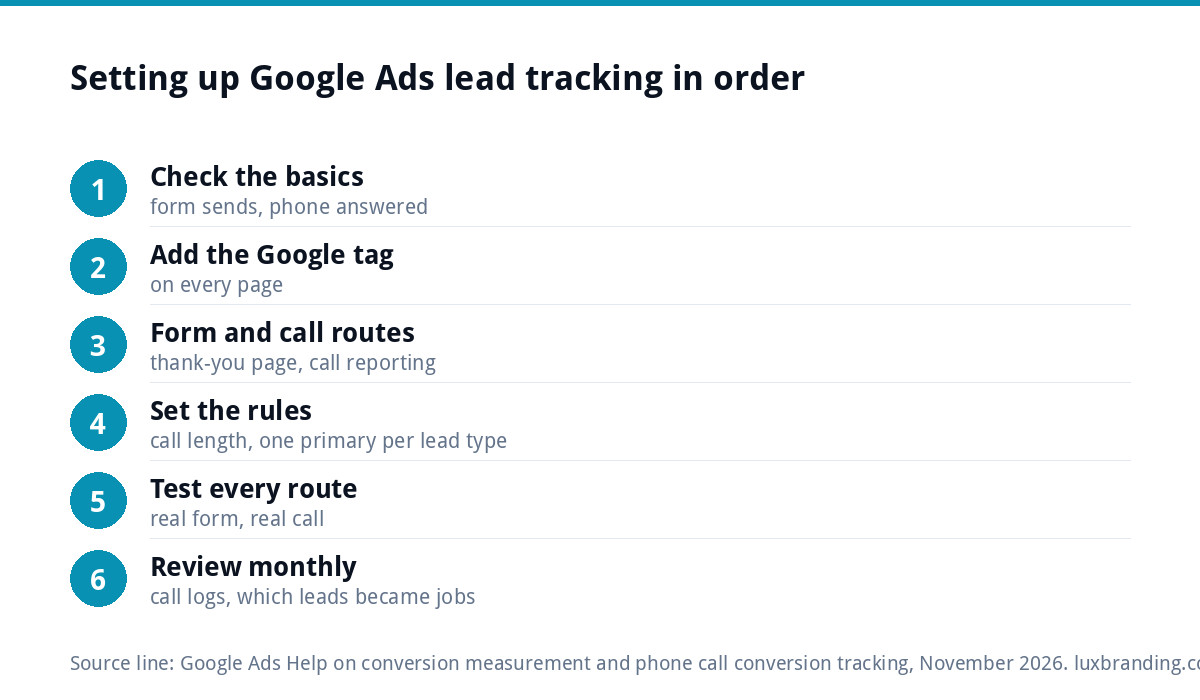
A simple order of work
- Confirm the form sends and the phone is answered.
- Add the Google tag to every page.
- Set up the form conversion and one call route.
- Choose a minimum call length and mark one primary action per lead type.
- Test every route with a real submission and a real call.
- After a month, review call logs and enquiries, adjust the call length and consider importing which leads became jobs.
Done in that order, your Google Ads account stops guessing and starts learning from the enquiries that pay your bills.
Get the UK SEO DIY Audit Checklist (free)
A 32-point checklist UK SMEs can run against their own website in an afternoon. Surfaces the quick wins before paying for a paid audit.
No spam. UK GDPR compliant. We only use your email to send this resource, unless you tick the box to hear from us.
Frequently asked questions
How do I track phone calls from Google Ads? +
Switch on call reporting so calls from call assets and call-only ads are recorded, then set a minimum call length so short calls do not count. To catch people who click the ad and ring the number on your website, add the Google tag and the website call snippet, which shows a Google forwarding number to ad visitors.
What is the best way to track form submissions? +
Send people to a dedicated thank-you page after a successful submission and count a conversion when that page loads. It is simple, reliable and easy to test. If your form shows a message on the same page, you need a form submission event instead, which takes more setup and should be tested carefully.
What minimum call length should I set? +
Base it on how long a genuine first enquiry takes in your business. Many service businesses start at around a minute, then review call logs after a month and adjust. Too short and wrong numbers count as leads; too long and quick but genuine bookings are missed. The aim is a figure that matches a real conversation.
Why are my Google Ads conversions doubled? +
Usually the same enquiry is being counted twice, for example by a Google Ads tag and an imported Analytics goal, both set as primary. Keep one primary action per lead type and make everything else secondary. Also set form conversions to count one per click, so a person who submits twice is recorded once.
Do I need enhanced conversions for leads? +
Not at the start. Get forms and calls tracked and tested first. Once you have steady volume, enhanced conversions for leads lets you tell Google which enquiries became paid work, using hashed details from the form. It is most useful for higher-value services with a quote stage, where lead quality varies a lot.