Quick answer
Call-only ads are no longer an option for new campaigns. Google stopped new call ads, the successor to the old call-only format, from February 2026, and existing ones stop showing in February 2027. Local service businesses should add their phone number as a call asset on responsive search ads, show it in opening hours and track calls as conversions.
This guide explains what is changing, why call-only ads suited trades so well, and how to rebuild the same phone-first approach with call assets so the phone keeps ringing after the switch.
What call-only ads were
For years, Google offered an ad format built to make the phone ring rather than send people to a website. Originally called call-only ads and later renamed call ads, they showed on phones, and tapping the ad opened the dialler with your number. For a plumber, locksmith or tow truck firm, that was ideal: someone with a burst pipe at 11pm does not want to browse a website, they want to talk to someone.
Google’s help page on call ads describes them as ads that encourage people to call your business, appearing only on devices that can make phone calls, with a business name, phone number, headlines and description lines, and an optional link to a webpage.
What is changing, and when
The same help page now sets out a phase-out. These are the dates as published at the time of writing, November 2026.
| Date | What happens | What it means for you |
|---|---|---|
| February 2026 | All options to create new call ads were removed | You cannot start a new call-only campaign |
| February 2026 | Phone numbers must be added to responsive search ads as call assets | Call assets are now the way to get calls from search ads |
| February 2027 | Existing call ads stop receiving impressions | Any old call ads still running will go quiet |
If you still have call ads running, they may look fine today. But they will stop, and it is far better to switch in a quiet month on your own timetable than discover it when the phone stops ringing.
Were call-only ads worth it?
For the right business, yes. They worked best for:
- Emergency trades: locksmiths, emergency plumbers, drainage, glaziers, roadside recovery.
- Quick bookings: taxis, takeaways, mobile mechanics.
- Businesses with weak websites: a call ad sidestepped a slow or confusing site.
They worked less well for considered purchases, such as kitchens, extensions or solar panels, where people want to see photos, reviews and prices before calling. For those, a strong landing page usually wins.
The good news is that the main advantage, a call button on mobile, is still available through call assets. What changes is that your ad now also carries a link to your website, so the page behind it matters more than before.
Call ads vs call assets
| Question | Call ads (being retired) | Call assets on search ads |
|---|---|---|
| Main action | Tap to call only, or an optional link | Call button plus a click to your website |
| Devices | Phones only | Shown where calls are possible; the ad still runs elsewhere |
| Landing page needed | Optional | Yes, the ad links to a page |
| Opening hours control | Through ad scheduling | Can be set to show only during business hours |
| Future | No new ones; existing stop February 2027 | The supported route |
Google’s page on call assets explains that they show your phone number with your ads as a call button or a “Call us” option, and can be set to appear only during business hours.
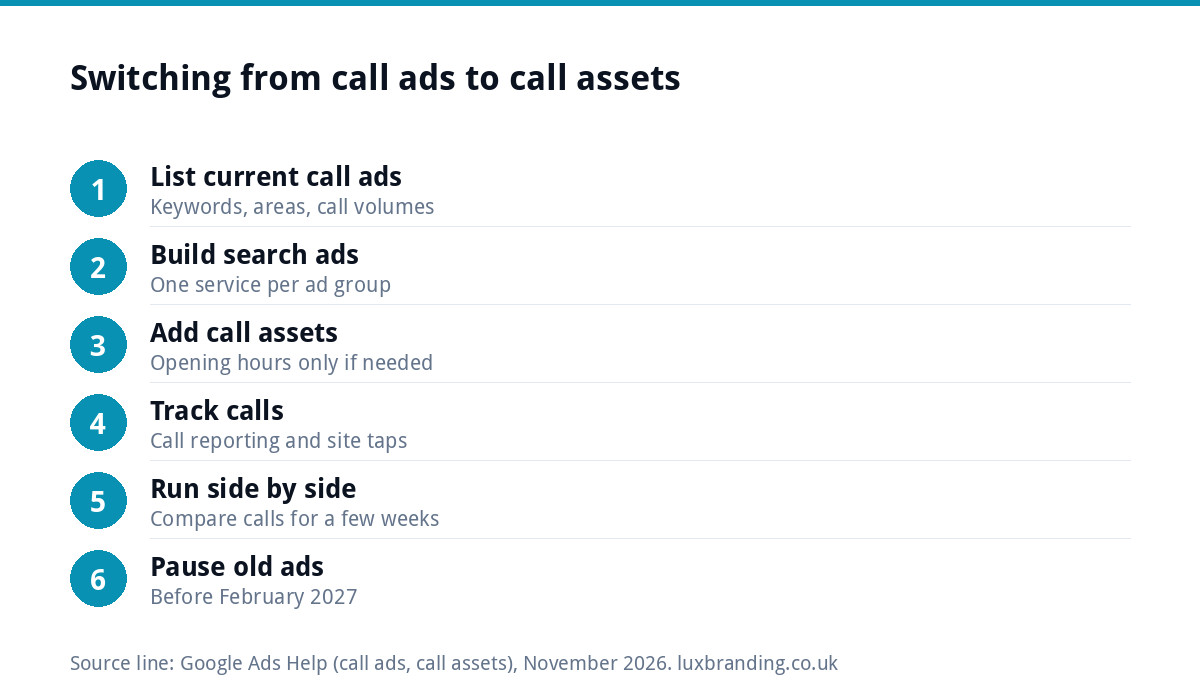
How to switch in seven steps
- List what your call ads were doing. Note the keywords, locations, schedules and how many calls they brought each month.
- Create or tidy a responsive search ad campaign for the same services and areas, with one service per ad group.
- Add your number as a call asset at campaign or account level, and set it to show during opening hours only if nobody answers after hours.
- Turn on call reporting. Google says this uses Google forwarding numbers and lets you count calls as conversions.
- Point each ad at a matching, fast page with your number at the top as a tap-to-call link.
- Run both side by side for a few weeks while the old call ads still serve, then compare calls.
- Pause the old call ads once the new campaign is bringing a similar number of calls.
Make calls count as conversions
Tracking is what made call-only campaigns easy to judge, and it is the part most likely to get lost in the switch. Google’s call assets page says you can count calls as conversions by turning on call reporting, and warns that counting call conversions might affect your bids if you use automated bidding.
Track calls from two places:
- Calls from the ad itself through call reporting.
- Calls from your website after someone clicks the ad, by tracking taps on your phone number as a conversion.
Without both, the campaign looks worse than it is, and automated bidding will chase the wrong things. If forms are part of the picture too, make sure they work. Our guide to contact forms that stop working covers the usual faults.
The landing page now matters more
Because every ad now links to a page, a slow or confusing site costs you twice: some people leave, and Google’s view of your landing page experience drops. Google’s page on Ad Rank lists the quality of your landing page and the expected impact of assets among the factors that decide where your ad shows.
For an emergency trade, the page should load fast on a phone, show the phone number at the top, say clearly which areas you cover and when you answer, and show a few real reviews. Our landing page design is £199 if your current site has nothing suitable, and speed optimisation is £99 if the site is simply slow.
A worked example: a 24-hour locksmith
A locksmith in Leicester ran a call-only campaign for lockouts and lock changes, scheduled 24 hours a day. When the change came, she built a search campaign with two ad groups, “locked out” and “lock replacement”, each with ads naming the city and the response promise. Her number went on as a call asset, with call reporting turned on, and both ad groups pointed to a single-screen page with the number, her coverage area, prices from her own price list and three reviews.
For a few weeks the old call ads and the new campaign ran together. Once the new campaign was bringing a similar number of calls, the old ads were paused. Some customers now visit the page before calling, which also means fewer calls from people outside her area.
Mistakes to avoid during the switch
- Pausing the old ads first. Build and test the new campaign while the call ads are still running, so there is no gap in calls.
- Sending everyone to the home page. A lockout searcher should land on a lockout page, not a general welcome message.
- Showing the number when nobody answers. If calls go to voicemail at night, schedule the call asset to opening hours, or make sure out-of-hours calls are actually picked up.
- Counting every call the same. A five-second wrong number is not a lead. Review call reports and set your call conversions so short calls do not count.
- Forgetting negative keywords. Without a call-only format filtering intent, terms like “jobs”, “training” and “how to” can creep in. Add them as negatives from day one.
- Judging too quickly. A new campaign needs a few weeks of data before its cost per call settles. Compare like with like, month against month.
Do not forget your Business Profile
For “near me” searches, the call button on your Google Business Profile often brings as many calls as ads do, at no cost per click. Make sure your profile has the right number, opening hours and categories. Our guide to optimising your Google Business Profile walks through it, or we can do it for you with profile setup and optimisation for £199.
Getting the switch done for you
If your account still relies on call ads, our Google Ads management is from £199 a month, with your ad spend paid directly to Google and no markup on it. We rebuild call campaigns as search campaigns with call assets, set up call tracking and line each ad group up with a page built to get calls. Every price is on our pricing page.
Get the UK SEO DIY Audit Checklist (free)
A 32-point checklist UK SMEs can run against their own website in an afternoon. Surfaces the quick wins before paying for a paid audit.
No spam. UK GDPR compliant. We only use your email to send this resource, unless you tick the box to hear from us.
Frequently asked questions
Can I still create call-only ads in Google Ads? +
No. Google's help page on call ads says all options to create new call ads were removed in February 2026, and that phone numbers must be added to responsive search ads as call assets instead. Existing call ads continue until February 2027, when they stop receiving impressions.
What replaces call-only ads? +
Call assets on responsive search ads. They show your phone number as a call button or a Call us option alongside a normal search ad, and can be set to show only during business hours. The difference is that the ad also links to a page on your website, so that page needs to be fast and clear.
Were call-only ads good for tradespeople? +
For emergency and quick-booking trades, such as locksmiths, emergency plumbers and recovery services, they worked well because people wanted to talk, not browse. For considered jobs like kitchens or extensions, a strong landing page usually performed better. Call assets keep the call button while adding the page.
How do I track calls from Google Ads? +
Turn on call reporting, which uses Google forwarding numbers and lets you count calls from your ads as conversions. Also track taps on the phone number on your website as a conversion, so calls from people who visited the page first are counted. Google warns that call conversions can affect automated bidding.
Can Luxbranding switch my call ads over? +
Yes. Our Google Ads management is from £199 a month, with your ad spend paid directly to Google and no markup. We rebuild call campaigns as search campaigns with call assets, set up call tracking and match each ad group to a page built for calls. A new landing page is £199.