
Quick answer
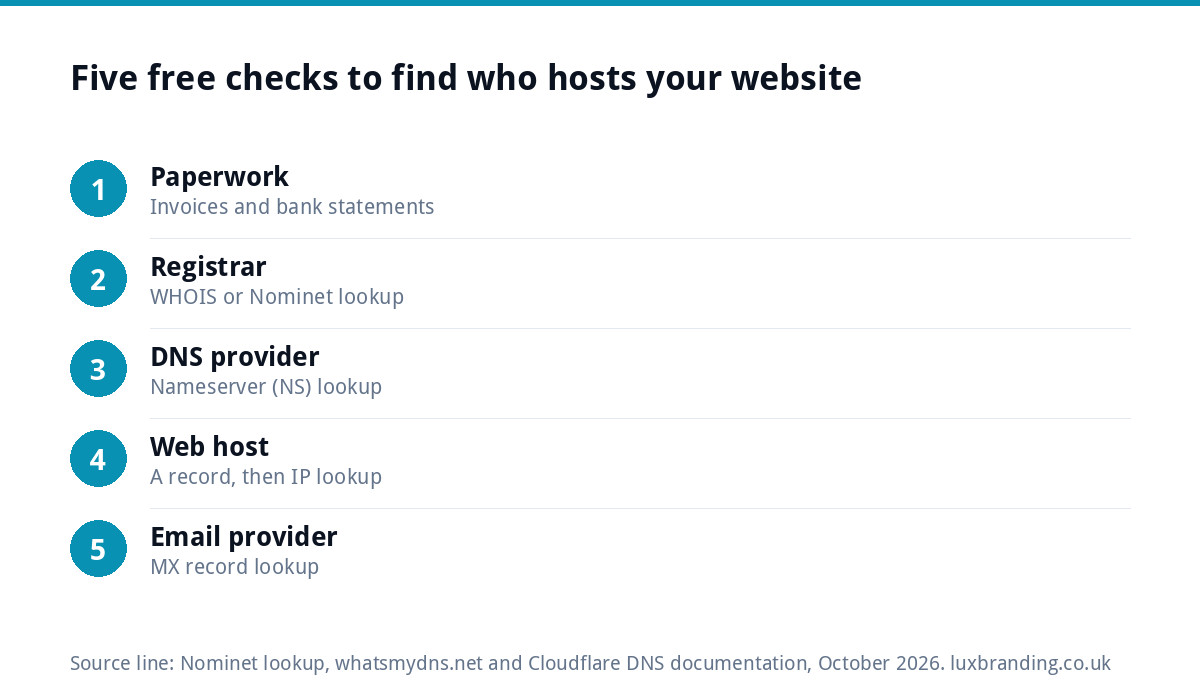
To find out who hosts your website, look up your domain’s nameservers and its IP address with a free DNS lookup tool, then check who owns that IP address. Check the domain registrar separately with a WHOIS lookup, such as Nominet’s for .uk domains. Your old invoices and bank statements usually confirm the answer within minutes.
Many small businesses only discover they do not know who hosts their website when something goes wrong: the site is down, the designer has vanished, or a renewal email arrives from a company nobody recognises. This guide shows how to identify every company involved, which is often more than one, and how to work out who holds the logins.
Four jobs, often four different companies
“Who hosts my website?” usually hides four separate questions, and each can have a different answer.
| Layer | What it does | How to find it |
|---|---|---|
| Domain registrar | Where the domain name is registered and renewed | WHOIS lookup (Nominet for .uk) |
| DNS provider | Where the records pointing your domain at the site and email are managed | Look up the nameservers |
| Web host | The server where the website’s files and database live | Look up the IP address in the A record |
| Email provider | Where your business mailboxes are hosted | Look up the MX records |
A small business might register its domain with one company, use a second for DNS, host the website with a third and run email through Microsoft 365 or Google Workspace. Knowing all four is what lets you fix problems and move suppliers safely.
Step 1: check your paperwork first
Before using any tools, search your email and bank statements for recurring payments with words such as hosting, domain, server, renewal, WordPress or the names of large hosting companies. Annual payments are easy to miss, so look back at least two years. If your web designer bills you for hosting, the host may be the designer’s own account, which matters later when you ask for logins.
Paperwork tells you who you pay. The tools below tell you where things actually are. Sometimes they disagree, for example when you still pay for hosting you no longer use.
Step 2: find the domain registrar
For domains ending in .uk, such as .co.uk, use the Nominet lookup, which gives information about an existing domain, including the registrar. For .com and other endings, search for a WHOIS lookup from a reputable registrar or registry. Note three things:
- the registrar (the company you renew with);
- the expiry date;
- the nameservers, if shown.
Personal details of the registrant are often hidden for privacy, which is normal. If you suspect the domain is registered in your designer’s name rather than yours, that is a separate problem worth fixing promptly; our guide to UK domain names covers ownership and transfers.
Step 3: find the DNS provider from the nameservers
Nameservers are the servers that hold the authoritative answers for your domain; Cloudflare’s explanation of nameservers describes how resolvers rely on them for the final answer. Their names usually reveal the company: something like ns1.examplehost.com points to that host.
Use a free tool such as whatsmydns.net, enter your domain, and choose the NS record type. Whoever runs those nameservers is where your DNS records are edited, which is where you would go to point the domain at a new website or new email.
Step 4: find the web host from the IP address
In the same tool, choose the A record type. The result is an IP address, a set of four numbers. Search that IP address in an IP WHOIS or “IP lookup” tool and it will usually show the company that owns that block of addresses, which is normally your web host.
Two common complications:
- A content delivery network or security service. If the IP belongs to a service such as Cloudflare, it is sitting in front of your real host and hiding it. The real host is then found through your Cloudflare account, your paperwork or your designer.
- Website builders. If the site is built on Wix, Squarespace or Shopify, the “host” is that platform, and you manage it through your account with them. Viewing the page source in your browser often shows the platform’s name.
Step 5: find your email provider
Choose the MX record type in the lookup tool. The result shows where your email is delivered: names containing outlook or protection.outlook.com mean Microsoft 365, google or googlemail mean Google Workspace, and others usually point to your web host or a separate email company. Email is the part most likely to break during a move, so note it carefully before anyone changes anything.
What your findings mean, and what to do next
| What you find | What it means | Next step |
|---|---|---|
| Registrar and host are the same company, and you have the login | The simplest set-up | Record the logins safely and diary the renewal |
| Host is a company you have never paid | Your designer or a past supplier hosts it in their account | Ask them for access or a full copy of the site |
| Domain registered in someone else’s name | You do not fully control your address or email | Request a registrant transfer in writing |
| Nameservers belong to a security or CDN service | Your real host is hidden behind it | Find the account that manages it |
| Website builder platform | The platform hosts everything | Find the account email and recover the login |
| Nothing matches your paperwork | Records may have changed or an old account was moved | List everything and ask a professional to map it |
A worked example: the renewal email nobody recognised
Consider a hypothetical decorating firm in Swindon that receives a renewal notice from a company it has never heard of. The original website was built six years ago by a friend of the owner, who has since moved abroad. Here is how the checks unfold:
- Paperwork. The bank statements show an annual payment to the friend’s own business, described only as “web services”.
- Registrar. The Nominet lookup shows the .co.uk domain is with a large UK registrar and expires in five weeks. That is the renewal notice.
- Nameservers. The NS lookup shows the same registrar’s nameservers, so DNS is managed in the registrar account.
- Web host. The A record points to an IP address owned by a different hosting company, which the friend pays for under their own account.
- Email. The MX records point to Microsoft 365, which the owner set up separately and does control.
The picture is now clear: the owner controls email, but the domain and hosting sit in a former supplier’s accounts. The priorities are to get the domain registered to the business before it expires, then to obtain a full copy of the website so it can be moved into an account the business owns. Without the checks, the owner might have ignored the renewal notice as spam and lost the website and email address together.
Getting control of the logins
Knowing the company is only half the job; you need access. For each layer, the account should be in the business’s name, with an email address the business controls, and two-factor authentication switched on. If a former designer controls the hosting, ask politely in writing for either a login, a transfer into your own account, or a full backup of the site files and database. If you cannot edit your website at all, our guide to when you cannot update your own website covers your options.
Keep every login in a password manager the business owns, and note the renewal dates for the domain and hosting so nothing lapses by accident.
When it is time to move host
Once you know where everything is, you can decide whether to stay. Common reasons to move are slow loading, poor support, surprise renewal prices or a host only one former supplier can access. Our guide to website hosting costs gives typical UK prices, and if the site is also slow, website speed for small businesses explains what hosting can and cannot fix. Plan any move so that email records are copied first and the old hosting is not cancelled until the new site is confirmed working.
Let us look after it
Our Website Management & Hosting is £20 a month and includes UK hosting, SSL, daily backups, security monitoring, automatic updates and up to three business email mailboxes, with the accounts kept in your name. If the website itself needs replacing, a Custom WordPress Website is £499 and you own the code. All prices are on our pricing page, and you can email support@luxbranding.co.uk with what you have found.
Get the UK Website Project Brief Template (free)
A two-page template for briefing any UK web designer: sitemap, integrations, audience and deliverables. Cuts revision rounds in half.
No spam. UK GDPR compliant. We only use your email to send this resource, unless you tick the box to hear from us.
Frequently asked questions
How do I find out who hosts my website for free? +
Use a free DNS lookup tool to find your domain's A record, which gives the IP address, then search that IP address in an IP lookup tool to see which company owns it. Check your invoices and bank statements as well, since they usually confirm the host and show who is paying for it.
Is my domain registrar the same as my web host? +
Not necessarily. The registrar is where the domain name is registered and renewed; the host is where the website's files live. Many small businesses use one company for both, but they can be different, and email and DNS may sit with further companies again. Check each one separately.
How do I find out who my domain is registered with in the UK? +
For domains ending in .uk, including .co.uk, use Nominet's lookup tool, which shows information about an existing domain such as the registrar and expiry date. For .com and other endings, use a WHOIS lookup from a reputable registrar or registry.
Why does my website's IP address belong to Cloudflare? +
Because a security or content delivery service sits in front of your real host and hides it. The real web host is then found through the account that manages that service, your hosting invoices, or whoever set the website up. This is a common and legitimate arrangement.
Can Luxbranding host my website instead? +
Yes. Website Management and Hosting is £20 a month and includes UK hosting, SSL, daily backups, security monitoring, automatic updates and up to three business email mailboxes. We plan moves so email keeps working. Email support@luxbranding.co.uk with what your checks found.