
Quick answer
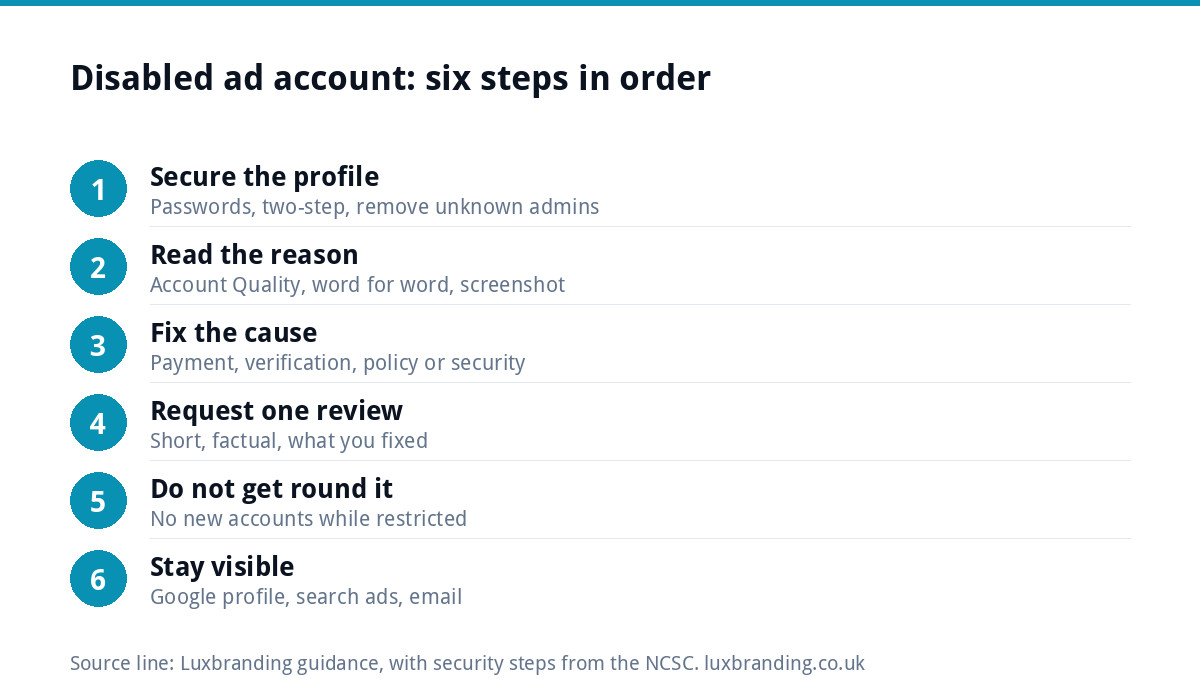
Do not open a new ad account and do not appeal straight away. First secure your Facebook profile and Business portfolio, then read the exact reason in Meta’s Account Quality area, fix the cause (payment, verification, hacked access or a policy problem) and only then request a review, once, with a clear explanation.
A disabled ad account is different from a rejected ad. A rejected ad is one piece of creative that broke a rule; a disabled account means Meta has stopped the whole account from advertising, sometimes along with the page, the Business portfolio or the person who runs it. The fix depends on why it happened. Below are the usual causes, the six steps in order, what to do while you wait and how to stop it happening again.
Disabled account or rejected ad?
| What you see | What it usually means | Where to start |
|---|---|---|
| One ad marked rejected, others running | That ad broke an advertising policy | Edit the ad or request a review of that ad |
| Ad account shown as disabled or restricted | The account itself is blocked from advertising | Account Quality and the steps below |
| Your personal profile restricted from advertising | The person, not just the account, is restricted | Secure and verify your profile first |
| Payment failed, ads paused | A billing problem, often fixable quickly | Payment settings, then settle the balance |
Meta’s Business Help Centre has a dedicated page on how to troubleshoot a disabled or restricted account, and the wording in your own Account Quality area is the most reliable guide to which situation you are in.
Why ad accounts get disabled
- Suspicious activity: a login from a new device or country, a sudden jump in spend, or new admins added. Often this is a hacked profile being used to run ads.
- Payment problems: a failed card, a disputed charge or an unpaid balance.
- Repeated policy problems: several rejected ads in a short time can lead to an account-level restriction.
- Verification: Meta asking for identity or business verification that has not been completed.
- Linked assets: a restriction on the page, the Business portfolio or a person with admin access spreading to the ad account.
Small businesses are often caught by the first two. A new account that suddenly spends far more than usual, or a card that fails on a busy day, can look like fraud to automated systems even when nothing is wrong.
A typical example: a kitchen fitter clicks a convincing “copyright warning” message, signs in on a fake page, and within hours someone else is running ads for products he has never sold, on his card. Meta disables the account. Nothing about his own advertising was wrong; the fix starts with security, not with the ads.
Step 1: secure the people and the profile
If there is any chance of a hack, deal with it before anything else. The NCSC’s guidance on recovering a hacked account sets out the order: use the provider’s own recovery route, check your email for forwarding rules an attacker may have added, change passwords, log out all other devices, turn on two-step verification and check your bank for payments you did not make.
Then check who has access to your Business portfolio and ad account. Remove anyone you do not recognise, and make sure at least two trusted people in the business are admins, so one restricted profile cannot lock you out entirely.
Step 2: read the exact reason
Open Meta’s Account Quality area for the ad account and read what it says, word for word. Note the date, the reason given and whether a “request review” option is offered. Take screenshots. The reason decides the fix, and guessing wastes your one best chance at a review.
Step 3: fix the cause before you appeal
- Payment: update the card, settle any outstanding balance and check the billing details match the business.
- Verification: complete any identity or business verification Meta has asked for, using documents that match your business name and address.
- Policy: remove or edit ads that were rejected, and check your landing pages say exactly what the ads promise.
- Security: finish everything in step 1, and remove any ads or payment methods an intruder added.
Landing pages matter more than people expect. A page that is slow, shows security warnings or makes claims the ad does not can count against you. If your site shows a “Not secure” warning, our guide to a website showing as not secure explains the fix, and if it was compromised, follow what to do when your website is hacked.
Step 4: request a review, once, properly
When the cause is fixed, use the request-review option in Account Quality. Keep the explanation short and factual:
- Who you are: business name, what you sell and where.
- What happened, if you know: for example, a hacked profile ran ads you did not create.
- What you have fixed: passwords changed, two-step verification on, unknown admins removed, billing updated.
- A polite request to restore advertising.
Do not send several reviews in a row, argue, or threaten. One clear, complete request is better than five angry ones.
A review request you can adapt
“We are [business name], a [trade] business based in [town], advertising our own services to local customers. On [date] our ad account was disabled. We believe this followed unauthorised access to an admin profile, which ran ads we did not create. Since then we have changed all passwords, turned on two-step verification for every admin, removed two people we did not recognise, removed the payment method that was added and deleted the ads concerned. We would be grateful if you could review the account and restore advertising.”
Adjust it to your real situation. If it was a payment problem, say the card was replaced and the balance settled; if it was a policy issue, say which ads you removed and what you changed on the landing page.
If the review is turned down
Read the outcome carefully. Sometimes it names a different cause from the one you fixed, which tells you what to work on next. If an option to ask again is offered later, use it only once you have something new to say. Keep advertising through other channels in the meantime, and keep a record of every message and date in case you need to escalate through Meta’s business support.
Step 5: do not try to get round it
The tempting shortcut is a new ad account, a new Business portfolio or a friend’s profile. Avoid it. Opening new accounts to keep advertising while one is restricted is likely to be treated as getting round the restriction, which can turn a temporary problem into a permanent one across everything linked to you. Wait for the review outcome.
Step 6: keep the business visible while you wait
A review can take days. Meanwhile, customers still need to find you:
- Google Business Profile: for local businesses, a complete profile brings calls without ad spend. Our Google Business Profile Setup & Optimisation is £199.
- Search ads: if paid ads are essential, Google Ads campaigns reach people who are already searching.
- Organic posts and email: your page can usually still post, and your customer list does not depend on Meta at all.
The rules apply off Meta too
Meta’s policies are not the only rules on ads. In the UK, the ASA’s non-broadcast advertising code is described as the rule book for non-broadcast advertisements, sales promotions and direct marketing, and must be followed by all advertisers, agencies and media. Ads that are honest, clearly priced and match their landing page are much less likely to run into trouble on any platform.
Prevention: a ten-minute checklist
| Check | Why it matters |
|---|---|
| Two trusted admins on the Business portfolio | One restricted profile cannot lock you out |
| Two-step verification on every admin profile | Stops most account takeovers |
| Business verification completed early | Avoids a block when Meta asks at a bad moment |
| A backup payment method | A failed card does not pause everything |
| Spend increased gradually | Sudden jumps can look like fraud |
| Landing pages that match each ad | Fewer rejections, fewer strikes on the account |
Where we fit
If you would rather not manage ad accounts yourself, our Meta (Facebook and Instagram) ads service runs campaigns for you, and a clean, fast landing page at £199 gives every ad somewhere trustworthy to send people. All our published prices are on the pricing page.
Get the UK SEO DIY Audit Checklist (free)
A 32-point checklist UK SMEs can run against their own website in an afternoon. Surfaces the quick wins before paying for a paid audit.
No spam. UK GDPR compliant. We only use your email to send this resource, unless you tick the box to hear from us.
Frequently asked questions
Why has my Facebook ad account been disabled? +
Common reasons are suspicious activity such as a hacked profile running ads, payment problems like a failed card or unpaid balance, repeated policy rejections, incomplete identity or business verification, and restrictions spreading from a linked page, Business portfolio or admin profile. The reason shown in your Account Quality area is the most reliable guide to which applies.
Should I appeal a disabled ad account straight away? +
No. Fix the cause first. Secure the profile if there is any chance of a hack, update payment details, complete any verification Meta has asked for and remove problem ads. Then request a review once, with a short factual explanation of what happened and what you have fixed. Several rushed requests rarely help.
Can I just open a new ad account? +
It is best not to. Opening new accounts, Business portfolios or using someone else's profile to keep advertising while one is restricted is likely to be treated as getting round the restriction. That can turn a temporary problem into a permanent one across everything linked to you. Wait for the review outcome instead.
How do I keep getting customers while my ad account is disabled? +
Lean on channels Meta does not control. A complete Google Business Profile brings local calls without ad spend, search ads reach people already looking, and your page can usually still post organically. Email your existing customers too. Our Google Business Profile Setup and Optimisation is £199 if the profile needs work.
How do I stop my ad account being disabled again? +
Keep two trusted admins on the Business portfolio, turn on two-step verification for every admin, complete business verification early, add a backup payment method, raise spend gradually rather than in sudden jumps and make sure every landing page matches what its ad promises. Those steps prevent most account-level problems.