Quick answer
Both Zapier and Make have free plans, so testing costs £0. Zapier is easier for simple “when this happens, do that” automations and counts each completed action as a task, with 100 free a month. Make suits multi-step, branching workflows and includes 1,000 free credits a month. Choose by complexity first, then by volume.
Most small businesses lose hours each week copying details between a website form, an inbox, a spreadsheet, a calendar and an invoicing tool. Connector tools such as Zapier and Make join those apps together without writing code. This guide compares the two for a UK small business, explains how each counts usage, works through a typical enquiry automation and shows when you have outgrown both. Prices and allowances are from the providers’ own pages at the time of writing, November 2026; Zapier sets its prices in US dollars, and both change their plans from time to time.
What Zapier and Make actually do
Both tools watch for an event in one app, called a trigger, and then carry out actions in other apps. For example:
- A quote request arrives through your website form.
- The details are added to a spreadsheet or CRM.
- You get a text or a message in your team chat.
- The customer gets a confirmation email.
Zapier calls these automations Zaps. Make calls them scenarios. The idea is the same; the differences are in how you build them, how complex they can get and how you are charged.
How each one charges you
This is where most people get caught out, so it is worth understanding before you build anything.
Zapier counts tasks. Its pricing page says a task is counted whenever Zapier successfully completes a unit of work for you. Failed actions do not count, and triggers and Zapier’s built-in tools such as Formatter and Paths do not count either. So a Zap with one trigger and three actions uses three tasks each time it runs.
Make counts credits. Make’s help centre says credits are now its billing unit and that most actions use one credit, with some AI features using more. Router and error-handler modules do not consume credits. Make’s pricing page lists 1,000 credits a month on the Free plan.
| Plan detail | Zapier | Make |
|---|---|---|
| Free allowance | 100 tasks a month | 1,000 credits a month |
| What uses allowance | Each successful action; triggers do not count | Most actions use one credit; routers and error handlers do not |
| Entry paid plan | Professional: $19.99 a month billed annually, or $29.99 monthly, for 750 tasks | Core, then Pro and Teams; prices shown in Make’s plan selector |
| Team plan | Team from $69 a month billed annually, 2,000 tasks | Teams plan available |
| Annual billing | Discounted against monthly | Cheaper than paying monthly |
| Currency | Set in USD; billing in local currencies at the exchange rate | Check the plan selector for your currency |
Zapier also notes that annual billing is discounted by a third against the monthly rate, and that recurring charges in other currencies can vary between billing periods because of exchange rates.
Zapier vs Make: the practical differences
| Factor | Zapier | Make |
|---|---|---|
| Learning curve | Gentle; step-by-step builder | Steeper; visual flowchart builder |
| Simple two-app automations | Quick to set up | Works, but more set-up than needed |
| Branching and complex logic | Possible with Paths and filters | A natural fit; routers split flows visually |
| Handling lists and bulk data | Workable for modest volumes | Often better suited to processing many items |
| Free allowance | Smaller | Larger |
| Best for | Owners who want it working this afternoon | Someone comfortable with logic, or a developer |
Both connect to the apps most UK small businesses use, including common accounting, email, calendar, spreadsheet and form tools. Before choosing, check that the specific apps you rely on are supported, and that the actions you need, not just the app name, are available.
A worked example: one enquiry automation
Take a plumbing firm whose website form receives about 120 enquiries a month. They want each enquiry to:
- Add a row to a shared spreadsheet.
- Send the customer a confirmation email.
- Post an alert to the owner’s phone.
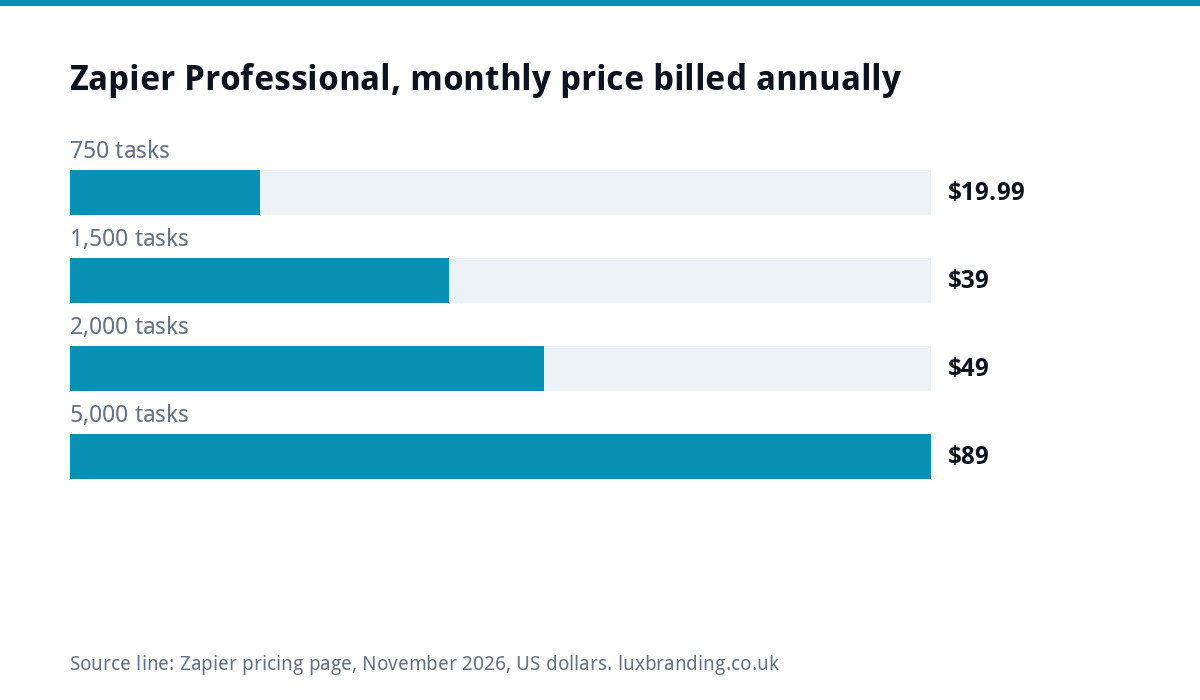
On Zapier, the trigger is free and the three actions use three tasks per enquiry. That is 360 tasks a month, which is beyond the 100-task Free plan, so the firm would need the 750-task Professional tier at $19.99 a month billed annually, at the time of writing.
On Make, the same three actions use roughly three credits per enquiry, around 360 credits a month, which fits inside the 1,000-credit Free plan. Check how your specific trigger is counted, because how a scenario checks for new data can affect usage.
The lesson is not that one is always cheaper. It is that you should count your actions per run, multiply by your monthly volume, and compare that number with each plan before you build.
Five automations worth setting up first
- Enquiry capture. Every form submission lands in one list, so nothing is lost in an inbox.
- Instant alerts. A message to your phone when a high-value enquiry arrives.
- Review requests. A polite email a few days after a job is marked complete.
- Invoice follow-ups. A reminder when an invoice passes its due date, if your accounting tool does not already do this.
- New customer set-up. Creating the folder, the calendar entry and the welcome email in one go.
Check your existing software first. Many accounting and booking tools already send reminders and follow-ups, and switching on a built-in feature beats paying for a connector. Our guide to booking system costs covers what those tools typically include.
Common mistakes that waste money
- Building before counting. A busy automation can burn a monthly allowance in days.
- No error alerts. When a connected app changes its login or settings, automations can stop quietly. Turn on failure notifications.
- Personal accounts. Build business automations on a business account, so they do not vanish when a staff member leaves.
- Customer data everywhere. Each connected app is another place personal data lives. Note them in your privacy policy and keep the list short.
- Automating a broken process. If the manual process is muddled, automating it just makes the muddle faster.
When you have outgrown both
Connector tools are brilliant up to a point. Signs you have reached it:
- Your monthly bill keeps climbing with volume, and the automations are central to how the business runs.
- You have a dozen fragile Zaps or scenarios that only one person understands.
- You need logic the tools struggle with, such as pricing rules, stock checks or customer accounts.
- The apps you rely on do not offer the actions you need.
At that point a small piece of custom software, such as a portal or a dashboard that holds the logic in one place, can be cheaper and more reliable over a few years. Our guides to client portals and web app development costs explain what that involves.
Keeping automations reliable
An automation that silently stops is worse than none, because you assume enquiries are being handled when they are not. A few habits prevent most trouble:
- Name everything clearly. “Website form to spreadsheet and alert” beats “My Zap 3” when you come back to it in six months.
- Keep a one-page list of every automation, what triggers it, which apps it touches and who set it up.
- Test after changes. When you edit your website form, rename a spreadsheet column or change email provider, send a test enquiry through and check every step still fires.
- Review monthly. Glance at the run history and usage, so a spike or a string of failures does not go unnoticed.
Ten minutes a month here saves the far more expensive discovery that a week of enquiries went nowhere.
How to choose in ten minutes
- List the automations you want and the apps involved.
- Count the actions in each, and multiply by how many times a month it will run.
- If the flows are simple and the total is small, start with Zapier’s free plan.
- If the flows branch or the volume is higher, try Make’s free plan.
- Build one automation, run it for a fortnight, then decide whether to pay.
Where we fit in
Automations start with good inputs. Every custom WordPress website we build, £499 one-off for up to 8 pages, includes contact forms connected to your inbox and Google Analytics, so enquiries arrive in a clean, consistent format that Zapier or Make can pick up. When the logic outgrows connectors, our web applications start from £1,999 and our custom business software service builds dashboards, portals and booking systems around how you work; larger tools are quoted in writing before any work starts. See our pricing page for every fixed price.
Get the UK Website Project Brief Template (free)
A two-page template for briefing any UK web designer: sitemap, integrations, audience and deliverables. Cuts revision rounds in half.
No spam. UK GDPR compliant. We only use your email to send this resource, unless you tick the box to hear from us.
Frequently asked questions
Is Make cheaper than Zapier? +
Often, for higher volumes, because Make's free plan includes 1,000 credits a month against Zapier's 100 tasks, and most Make actions use one credit. But it depends on your workflows. Count the actions in each automation, multiply by monthly runs, and compare that total with each provider's current plans before deciding.
What counts as a task in Zapier? +
Zapier's pricing page says a task is counted whenever Zapier successfully completes a unit of work for you. Failed actions do not count, and neither do triggers or built-in tools such as Formatter and Paths. A Zap with one trigger and three actions therefore uses three tasks each time it runs.
Do I need a developer to use Zapier or Make? +
Not for simple automations. Zapier's step-by-step builder is designed for non-technical users, and many owners set up form-to-spreadsheet or alert automations themselves. Make's visual builder has a steeper learning curve. A developer helps when flows branch heavily, handle lots of data or need custom logic.
Are Zapier prices in pounds? +
Zapier sets its prices in US dollars and says billing is available in local currencies converted at the exchange rate at the time of payment, so the amount you pay in pounds can vary between billing periods. At the time of writing, the Professional plan starts at $19.99 a month billed annually for 750 tasks.
When should I replace automations with custom software? +
Consider it when your connector bill keeps rising with volume, when the business depends on fragile automations only one person understands, or when you need logic such as pricing rules or customer accounts. A small custom portal or dashboard can then be cheaper and more reliable over a few years.