Quick answer
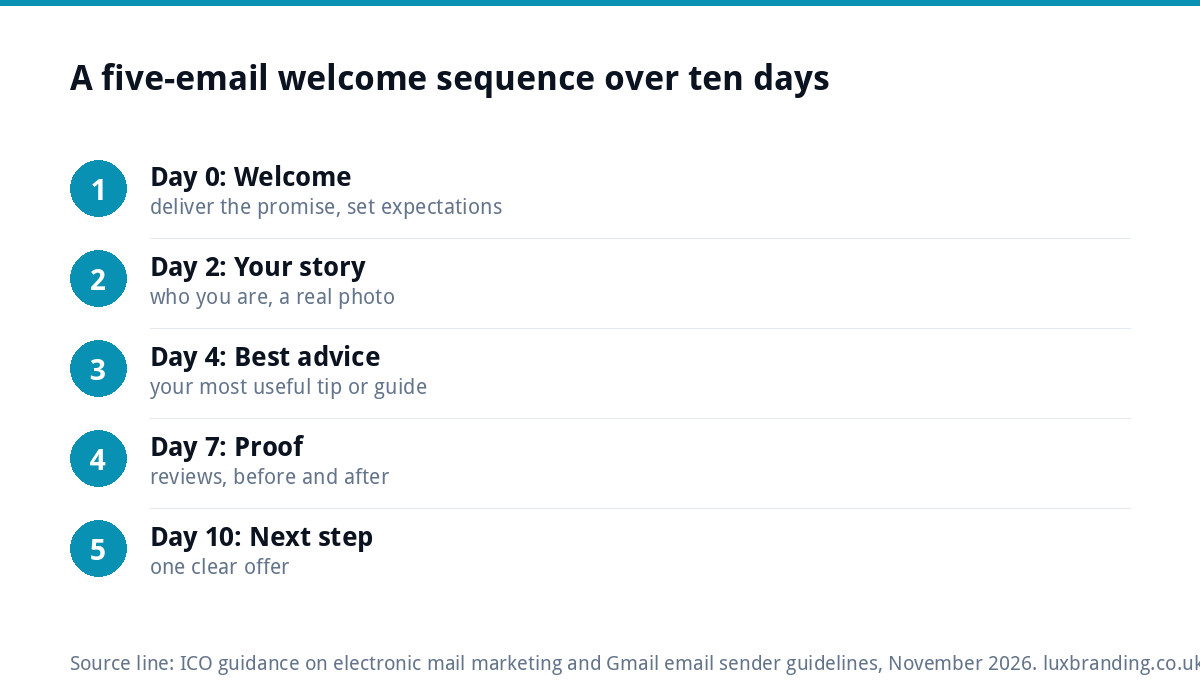
A small business welcome sequence works well as five emails over about ten days: deliver what you promised and set expectations, tell your story, share your most useful advice, show proof from customers, then make one clear offer. Each email has one job and one link. Send only to people who opted in, with an unsubscribe in every email.
The welcome email arrives at the exact moment someone has chosen to hear from you, which makes it one of the best-placed messages a business ever sends. Most small businesses waste it with a one-line “thanks for subscribing” or nothing at all. This guide sets out what each email in a welcome sequence should say, with timings, examples for trades and local businesses, and the UK rules you need to follow.
Why a sequence beats a single welcome email
One email can only do one thing well. A sequence lets you deliver the freebie, introduce yourself, earn trust and ask for the sale, in that order, without cramming everything into one long message nobody finishes. It runs automatically, so every new subscriber gets the same good introduction whether they join on a Tuesday morning or at midnight on a bank holiday.
It also tells your email provider and the inbox services that people want your mail. Early opens and clicks from engaged subscribers are a healthy start; a list that never hears from you until a sales blast months later is far more likely to ignore or report you.
The five-email welcome sequence
| When | Its one job | What to include | Single call to action | |
|---|---|---|---|---|
| 1. Welcome | Immediately | Deliver and set expectations | The promised guide or discount, what you will send and how often | Download, or use the code |
| 2. Your story | Day 2 | Make you human | Who you are, why you started, what you care about, a photo of real work | Read the about page or reply |
| 3. Best advice | Day 4 | Prove you know your stuff | Your most useful tip, checklist or how-it-works guide | Read the full guide |
| 4. Proof | Day 7 | Build trust | Two or three customer reviews, before-and-after photos, a short case story | See more work |
| 5. Next step | Day 10 | Ask for the business | A clear offer or the easiest way to book, quote or buy | Book, quote or shop |
The timings are a starting point. A café might run the whole thing over a week; a kitchen fitter whose customers take months to decide might space it over three weeks and add a sixth email answering common worries.
Email 1: the welcome
This email arrives while interest is at its highest, so it has to land straight away and deliver exactly what the sign-up form promised. If you offered a 10 percent discount code, the code goes in the first lines, not at the bottom. Then set expectations: what kind of emails will follow and how often. People who know what is coming are less likely to unsubscribe or mark you as spam.
Keep it short. A friendly subject line that says what is inside, such as “Your garden planting guide is here”, beats anything clever.
Email 2: your story
Small businesses win on being real people. Tell subscribers who is behind the business, how it started and what you are proud of. A dog groomer might explain why she went mobile; an electrician might mention his years on site before going it alone. Add one genuine photo: you at work, your van, your workshop. Invite replies. Replies are a strong positive signal to inbox providers and often turn into enquiries.
Email 3: your most useful advice
Give away something genuinely helpful that relates to what you sell. A plumber: “Five things to check before you call out a plumber”. A bakery: “How to store sourdough so it lasts”. A bookkeeper: “The self-assessment dates to put in your diary”. This positions you as the expert to call when the reader needs help, without a hard sell. If you already have a good blog post, link to it rather than rewriting it.
Email 4: proof
By now subscribers know who you are; this email shows that other people trust you. Pick two or three short reviews that answer the doubts your customers usually have: tidy, on time, fair price, good communication. Before-and-after photos work brilliantly for trades. A short story about one job, from problem to finished result, is often more persuasive than a page of testimonials.
Email 5: the next step
Now ask. Make one clear offer and make it easy: book a slot, request a quote, use the welcome code before it expires. Explain what happens next, so the reader knows clicking the button does not commit them to anything scary. Then move subscribers onto your regular emails. If you send nothing for months after the welcome sequence, you lose the goodwill you have just built.
The UK rules for welcome emails
Marketing emails to individuals are covered by the Privacy and Electronic Communications Regulations. The ICO’s guidance on electronic mail marketing says you must not send them unless the person has specifically consented, unless the “soft opt-in” applies. Regulation 22 sets out that exception: you got their details during a sale or negotiations for a sale, you only market your own similar products and services, and they were given a simple way to refuse when their details were collected and in every message.
In practice, for a welcome sequence:
- Use a sign-up form with a clear statement of what people are signing up for. No pre-ticked boxes.
- Say who you are in every email, and include a valid contact address.
- Include an easy unsubscribe link in every email, and honour it promptly.
- Do not add people who only sent an enquiry to a marketing sequence without the right basis.
Getting into the inbox, not spam
Gmail’s email sender guidelines require all senders to set up SPF or DKIM authentication for their sending domain and to keep spam rates reported in Postmaster Tools below 0.3 percent, with a recommended target below 0.1 percent. Senders of more than 5,000 messages a day to Gmail accounts must also set up DMARC and support one-click unsubscribe for marketing messages. Most small businesses are nowhere near that volume, but setting all three up is good practice anyway. If your emails already go to spam, our guide to business emails going to spam covers the fixes.
Checklist before you switch it on
| Check | Why it matters |
|---|---|
| Sign-up form says exactly what people will receive | Clear consent and fewer unsubscribes |
| Email 1 delivers the promise in the first lines | It is the email most people open |
| One link and one call to action per email | Choices dilute clicks |
| Sending domain authenticated with SPF and DKIM | Required by Gmail for all senders |
| Unsubscribe link and contact address in every email | Required under UK rules |
| Tested on a phone in light and dark mode | Most emails are read on a phone |
| Subscribers move to regular emails afterwards | Keeps the relationship going |
What to measure after a month
Open rates have become unreliable because some email apps load images automatically, which records an “open” whether or not anyone read the email. Clicks, replies, unsubscribes and, above all, enquiries or sales that follow are better signals. Look at each email in the sequence separately:
- High unsubscribes after one email usually means it did not match what the sign-up promised. Rewrite it.
- Few clicks on the advice email may mean the topic missed. Try your most-asked customer question instead.
- Clicks but no bookings from the final email often points to the page it links to, not the email. Check that page works well on a phone.
Change one email at a time and give each change a few weeks of new subscribers before judging it.
Where the sign-ups come from
A welcome sequence only works if people join the list. A sign-up form on your website with a genuine reason to join, such as a useful guide, a first-order discount or seasonal reminders, does most of the work. A landing page for the offer, at £199 one-off, gives ads and social posts somewhere focused to send people. Every custom WordPress website we build, from £499, includes contact forms connected to your inbox.
If you would rather have the sequence written and set up for you, our email marketing and automation service covers it, and our guide to inconsistent branding explains why emails should look and sound like the rest of the business. All prices are on our pricing page.
Get the UK SEO DIY Audit Checklist (free)
A 32-point checklist UK SMEs can run against their own website in an afternoon. Surfaces the quick wins before paying for a paid audit.
No spam. UK GDPR compliant. We only use your email to send this resource, unless you tick the box to hear from us.
Frequently asked questions
How many emails should a welcome sequence have? +
Five is a good starting point for most small businesses: welcome and deliver, your story, your best advice, proof from customers, then a clear next step. Spread them over about ten days. Businesses with long decision times, such as kitchen or bathroom fitters, can space them further apart and add an email answering common worries.
What should the first welcome email say? +
Deliver exactly what the sign-up form promised in the first lines, such as the guide or discount code, then tell people what you will send and how often. Keep it short, with a subject line that says what is inside. It arrives while interest is highest, so do not bury the point.
Do I need consent to send welcome emails in the UK? +
Yes, for marketing emails to individuals, unless the soft opt-in applies. That covers people whose details you got during a sale or negotiations for a sale, for your own similar products and services, who were offered a simple way to opt out then and in every message. Always include an unsubscribe link.
Why are my welcome emails going to spam? +
Common causes are an unauthenticated sending domain, a new list with low engagement, or content that looks like bulk promotion. Gmail requires all senders to set up SPF or DKIM and keep reported spam below 0.3 percent. Authenticate your domain, send only to people who opted in and invite replies.
Can you set up a welcome sequence for me? +
Yes. Our email marketing and automation service writes and sets up sequences like this. For the sign-up side, a landing page for your offer is £199 one-off, and every custom WordPress website we build, from £499, includes contact forms connected to your inbox. All prices are on our pricing page.