Quick answer
A 503 Service Unavailable error means your web server is running but refusing requests for now, usually because it is overloaded, hitting its hosting limits or stuck in maintenance mode. Check whether it affects every page, look for a leftover WordPress .maintenance file, disable plugins, then ask your host about resource limits.
A 503 is one of the more alarming errors to see on your own site, because visitors get a blank page and you get no explanation. The good news is that it is almost always temporary and almost always fixable without rebuilding anything. This guide explains what the error means, the usual causes on small business sites, the order to check things in, and when the problem is really your hosting plan.
What a 503 error actually means
Every time a browser asks for a page, the server answers with a status code. A 200 means “here it is”. A 404 means “that page does not exist”. A 503 means “I am here, but I cannot deal with you right now”.
Mozilla’s developer documentation describes the 503 Service Unavailable status as a sign the server “is not ready to handle the request”, and lists the common causes as a server that is down for maintenance or overloaded. It also notes that some server software deliberately rejects requests with a 503 when memory, CPU or connection limits are reached, to prevent a worse failure.
That distinction matters. A 500 error usually means something is broken in the code. A 503 usually means something is temporarily full, paused or switched off. You are looking for a bottleneck, not a bug.
The seven usual causes
On small business sites the same handful of causes come up again and again. Here they are with the clue that points to each one.
| Cause | The clue | Usual fix |
|---|---|---|
| Stuck WordPress maintenance mode | Message says “Briefly unavailable for scheduled maintenance” | Delete the .maintenance file in the site root |
| Hosting resource limits reached | Error comes and goes, worse at busy times | Find the heavy process or move to a bigger plan |
| A plugin or theme overloading the server | Started after an update or a new plugin | Disable plugins, re-enable one at a time |
| Traffic spike | Followed a promotion, a mention or an email send | Caching, then capacity |
| Bots or an attack | Server logs full of the same few addresses or URLs | Firewall rules and rate limiting |
| Host or server maintenance | Several sites on the same host down at once | Check the host’s status page and wait |
| A firewall or CDN in front of the site | Error page carries the CDN’s branding | Check the CDN dashboard and origin health |
The first ten minutes: what to check
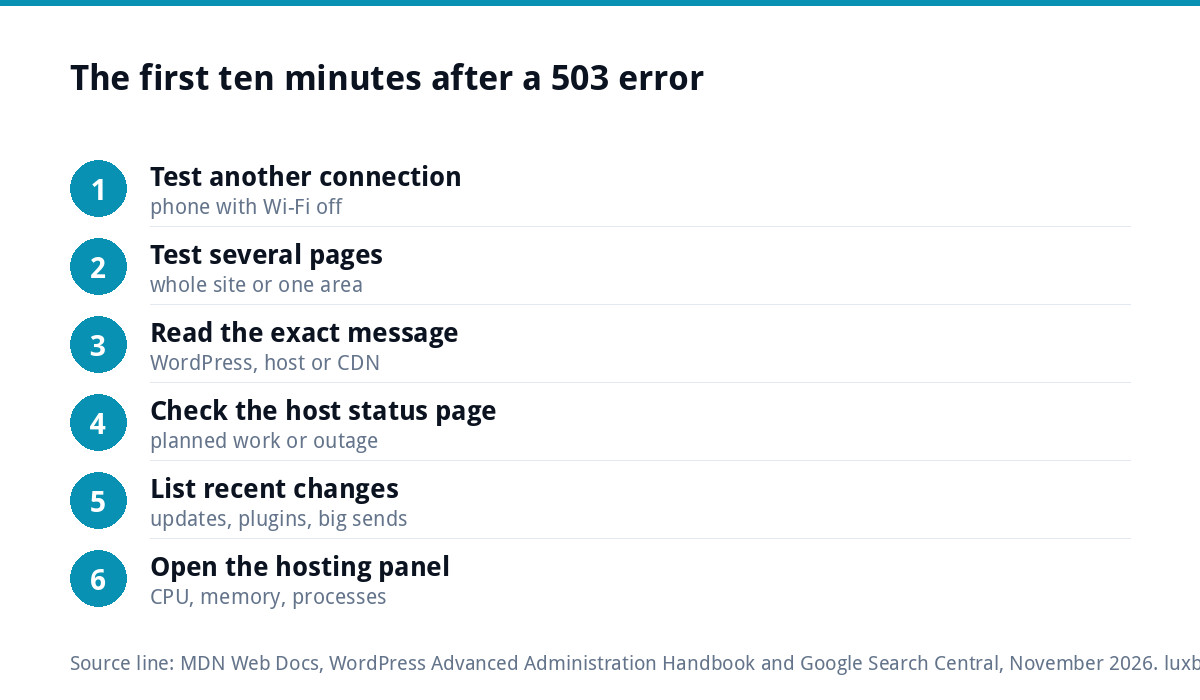
Work through these in order. Each step either finds the cause or rules out a big chunk of possibilities.
- Check from another connection. Load the site on your phone with Wi-Fi switched off. If it works there, the problem may be local to your network.
- Check every page, not just the homepage. If only the admin area or checkout fails, the cause is narrower than the whole server.
- Read the exact message. “Briefly unavailable for scheduled maintenance” points straight at WordPress. A page branded by your host or CDN points at them.
- Check your host’s status page and inbox. Planned maintenance is often announced by email and forgotten.
- Look at what changed. An update, a new plugin, a newsletter send or a social post that took off in the last day is your prime suspect.
- Open the hosting control panel. Most panels show CPU, memory and process usage. A graph pinned at the limit tells you a lot.
WordPress: stuck maintenance mode and plugins
WordPress puts itself into maintenance mode while it installs updates. The WordPress common errors guide explains that it creates a .maintenance file during an update and that, if the file is not removed properly, visitors see “Briefly unavailable for scheduled maintenance. Please check back in a minute.” The fix is to delete that file from the site root using your host’s file manager or FTP.
If that is not it, a plugin is the next suspect. When you cannot reach the dashboard, the same guide describes renaming the wp-content/plugins folder (for example to plugins_old), which switches every plugin off at once. If the site comes back, rename the folder back and re-enable plugins one at a time until the error returns. The last one you switched on is your culprit.
Heavy plugins do not always break a site outright. More often they push memory or processing over the host’s limit at busy moments, which is exactly when a 503 appears. Our guide to WordPress maintenance covers the routine that stops updates causing this in the first place.
When the host is throttling your site
Cheap shared hosting puts a large number of sites on one server and gives each a ceiling for CPU, memory and simultaneous processes. When your site reaches its ceiling, the server starts turning visitors away, often with a 503 or a closely related “resource limit reached” message.
Signs this is your problem:
- The error appears at busy times of day and clears on its own.
- The control panel shows usage repeatedly hitting the limit.
- Your host emails you about “excessive resource usage”.
The answer is not always a bigger plan. A site that serves uncached pages, runs a slow database query or has a plugin doing heavy jobs on every visit will eat any amount of capacity. Fixing the cause is usually cheaper than paying for more room. Our guide to what website hosting costs in the UK explains what you get at each price level if you do need to move.
Is it a traffic spike or an attack?
A genuine spike is good news with bad timing: a local news mention, a post that took off or a big email send. An attack, or simply a swarm of aggressive bots, looks similar from the outside but behaves differently.
- Genuine spike: lots of different visitors, mainly hitting the page you promoted, with enquiries or sales arriving.
- Bots or attack: repeated requests to the login page, xmlrpc.php, search or the same URL, often from a small number of addresses, and no real enquiries.
Your host can read the access logs for you if the panel does not show them. If the traffic is hostile, firewall rules and login protection are the fix, and our WordPress security guide covers the basics. If it is real, page caching is the quickest way to serve more people from the same server.
What a 503 does to your Google rankings
A short outage is unlikely to hurt you. Google expects servers to have bad moments. Its documentation on HTTP and network errors says 5xx errors make its crawlers temporarily slow down, and that pages already in the index are preserved, “but eventually dropped” if the errors persist.
In practice an afternoon of 503s costs you visitors and sales rather than rankings. A site that keeps returning 503s for days, or every busy evening for weeks, risks pages falling out of Google. If your traffic dropped after a run of outages, our guide to a sudden drop in website traffic explains how to confirm the cause in Search Console.
Fixes by situation
Who should fix it depends on where the cause sits. Use this as a quick guide.
| Situation | Who fixes it | Typical route |
|---|---|---|
| Leftover .maintenance file | You, in five minutes | Delete the file via the file manager |
| One faulty plugin | You or your developer | Rename the plugins folder, re-enable one by one, replace or remove the culprit |
| Resource limits at busy times | Developer, then host | Add caching and fix slow pages before upgrading the plan |
| Bot traffic or attack | Host and developer | Firewall, login protection, rate limiting |
| Host-wide outage | The host | Wait, and keep the status page link for your records |
| Repeated outages on cheap shared hosting | You decide | Move to managed hosting with monitoring |
How to stop it happening again
- Use page caching. Serving a saved copy of each page takes a fraction of the work of building it fresh for every visitor.
- Remove plugins you do not use. Fewer moving parts means fewer surprises after updates.
- Update on a schedule, with a backup first. Updates should happen when someone is watching, not overnight with nobody checking.
- Set up uptime monitoring. A monitoring service can email you within minutes of an outage, so you hear before your customers tell you.
- Warn your host before big pushes. If you are about to email your whole list or launch an advert, a quick check that the plan can cope is worth it.
- Speed the site up. A faster site needs less server work per visit, which leaves headroom for busy periods. Our website speed optimisation service is a one-off £99 job.
When to hand it over
If you have removed the .maintenance file, ruled out plugins and the error keeps coming back, the cause is usually in the hosting setup or the build itself, and chasing it yourself costs more time than it is worth.
Our website management and hosting plan is £20 a month and includes UK hosting, SSL, daily backups, security monitoring, automatic updates and up to three business email mailboxes. That covers the two things behind most 503s on small sites: updates nobody watches and hosting that runs out of room. If the site itself is the problem, a rebuild as a hand-coded custom WordPress website starts at £499. Every price is on our pricing page, and you can order online or email us at support@luxbranding.co.uk with your site address.
Get the UK Website Project Brief Template (free)
A two-page template for briefing any UK web designer: sitemap, integrations, audience and deliverables. Cuts revision rounds in half.
No spam. UK GDPR compliant. We only use your email to send this resource, unless you tick the box to hear from us.
Frequently asked questions
Is a 503 error my fault or my host's? +
It can be either. A leftover WordPress maintenance file or a heavy plugin is on your side of the fence. A host-wide outage or planned server work is on theirs. Resource limits sit in between: the host sets the ceiling, but your site decides how quickly it reaches it. Check the host's status page first, then your own recent changes.
How long does a 503 error last? +
A stuck maintenance file lasts until someone deletes it, so it can run for days if nobody notices. Overload errors usually clear when the busy period ends, then return the next time traffic rises. Host maintenance normally lasts minutes to a few hours. If a 503 keeps coming back, treat it as a recurring fault rather than waiting for it to pass.
Will a 503 error hurt my Google rankings? +
A short outage is unlikely to. Google's documentation says server errors make its crawlers slow down and that indexed pages are kept at first, but are eventually dropped if the errors persist. An afternoon of downtime costs visitors rather than rankings. Repeated outages over days or weeks put pages at risk of falling out of the index.
What is the difference between a 500 and a 503 error? +
A 500 Internal Server Error usually means something is broken, such as faulty code or a damaged .htaccess file. A 503 Service Unavailable usually means the server is working but temporarily cannot cope, because it is overloaded, paused for maintenance or held back by hosting limits. With a 500 you look for a fault; with a 503 you look for a bottleneck.
Do I need better hosting to fix a 503? +
Not always. Many 503s come from a site doing too much work per visit: no caching, slow plugins or bots hammering the login page. Fix those first, because they will fill a bigger plan too. If the site is well built and still hits its limits at busy times, moving to managed hosting with more headroom is the sensible next step.