Quick answer
A staging site is a private copy of your live website where updates, redesigns and new features are tested before customers see them. You need one if your site takes payments, bookings or regular enquiries, or changes often. A small brochure site can usually manage with good backups. Always keep staging password-protected and out of Google.
Most small business owners only hear the word “staging” when something has gone wrong on the live site and a developer says, “we should have tested that first”. This guide explains what a staging site is, how it differs from a backup, whether your business needs one, how changes move from staging to live without losing orders, and the mistakes that let staging sites leak into Google or email real customers.
What a staging site actually is
Your live website, the one customers visit, is often called “production”. A staging site is a near-identical copy running at a separate, private address, such as a subdomain or a folder your host sets up. It uses the same theme, plugins and content, so anything that works there should work on the live site.
WordPress itself recognises the idea. Its developer documentation for wp_get_environment_type lists four environment types: local, development, staging and production, and falls back to production if none is set. Well-built themes and plugins can use that setting to behave differently on staging, for example by not sending emails.
Staging, backup and local copy compared
| Staging site | Backup | Local copy | |
|---|---|---|---|
| What it is | A working copy online at a private address | A saved snapshot of files and database | A working copy on a developer’s computer |
| Main job | Test changes before they go live | Restore the site after something goes wrong | Build and experiment |
| Can you click around it? | Yes, on any device | No, it must be restored first | Only on that computer |
| Same server as live? | Usually, so results are realistic | Stored separately | No, so results can differ |
| Can you share it for sign-off? | Yes, with a password | No | Not easily |
They do different jobs, and a well-run site has a backup routine whether or not it has staging. Staging prevents problems; backups recover from them.
Does your business need one?
| Your site | Staging? | Why |
|---|---|---|
| Five to eight page brochure site, rarely changed | Nice to have | Backups before updates usually cover the risk |
| Site with a booking system or quote forms you rely on | Recommended | A broken form can cost leads for days before anyone notices |
| Online shop | Yes | Payments, stock and order emails are too important to test live |
| Site with member logins or a client portal | Yes | Login and permission changes can lock people out |
| Redesign of any site | Yes | You need to review the new design before it replaces the old one |
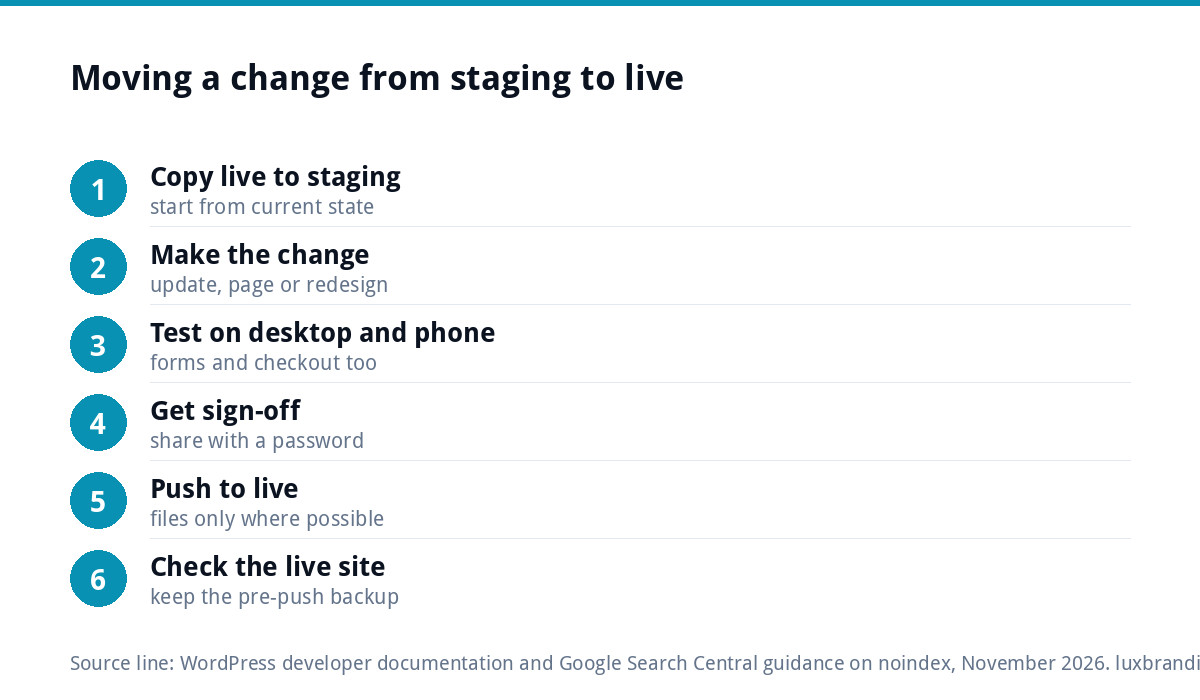
How changes move from staging to live
- Copy live to staging so staging matches what customers currently see.
- Make the change on staging: an update, a new page, a new plugin or a redesign.
- Test it on desktop and phone, including forms and checkout.
- Get sign-off from whoever needs to approve it.
- Push the change to live, using the method that suits the change (see the next section).
- Check the live site straight away, and keep the pre-push backup until you are sure.
WordPress’s own debugging guide makes the same point for troubleshooting: it recommends against using debug tools on live sites and suggests local or staging environments instead.
The database problem: do not overwrite new orders
This is the trap that catches most people. Your website has two parts: files (theme, plugins, images) and a database (pages, settings, orders, enquiries, customer accounts). While you were testing on staging, the live site kept taking orders and enquiries. If you push the whole staging database to live, those new records can be overwritten.
- For updates and design changes to files, push files only, or simply repeat the tested update on live.
- For content changes, recreating a few pages on live is often safer than pushing the database.
- For shops and booking sites, never push a full database without first stopping new orders or using a tool that merges selectively.
A worked example: a booking site update
Picture a dog groomer whose website takes appointments through a booking plugin. A major version of that plugin is released, along with a WordPress update. Without staging, the owner clicks update on the live site on a Monday morning, the booking calendar stops loading, and nobody notices until a regular customer phones on Wednesday to ask why the page is blank. Two days of bookings have quietly gone elsewhere.
With staging, the same updates are run on the private copy first. The calendar breaks there, where no customer sees it. The owner, or whoever looks after the site, checks the plugin’s changelog, finds a setting that needs re-saving after the upgrade, fixes it on staging, confirms a test booking goes through and the confirmation email arrives in a test inbox, then repeats exactly the same steps on the live site in a quiet hour. Total customer impact: none.
That is the whole value of staging in one story. It does not stop updates going wrong; it moves the moment they go wrong to somewhere private.
Keeping staging out of Google
A staging site that gets indexed is a duplicate of your live site, with test content, broken pages and sometimes a different domain in the results. It also lets customers stumble on half-finished work.
Google’s guidance on blocking search indexing with noindex explains that a noindex rule makes Google drop a page from results, but only if Google can crawl the page and see it. If robots.txt blocks the crawler, it never sees the noindex, and the page can still appear when other pages link to it. Our recommendation is simpler: put the whole staging site behind a password, so neither people nor crawlers can reach it, and add noindex as a second layer.
When you push changes live, check that the noindex setting has not come across with them. A live site accidentally set to noindex will slowly disappear from Google; our guide to a website not showing on Google covers how to spot it.
Other staging gotchas
- Real emails from a test site. A staging copy of a shop can send order or reminder emails to real customers. Disable outgoing email or route it to a test inbox.
- Live payment keys. Switch payment gateways to test mode on staging.
- Analytics. Remove or disable tracking so test visits do not pollute your figures.
- Scheduled tasks. Automated jobs such as subscription renewals or stock syncs should not run on staging.
- Stale copies. Refresh staging from live before each round of testing, or you are testing an out-of-date site.
How to get a staging site
Many hosts offer one-click staging in their control panel, which copies the site to a private address and offers a push-to-live button. Some backup and migration plugins can do the same. If your site was built by a developer, ask whether they already keep a staging copy and where it lives. The approach matters less than the habit of using it. Ask one practical question before choosing: can the staging copy be refreshed from live in a single step? If refreshing takes an afternoon, nobody will do it, and an out-of-date staging site gives false confidence.
If you are comparing hosts partly for this feature, our website hosting cost guide explains what to expect at each price level.
What to test on staging before going live
A quick, repeatable list catches most problems. Our website launch checklist is a fuller version. At minimum, check that:
- Every page template loads, including blog posts, service pages and any shop pages.
- The menu opens and works on a phone.
- Contact and quote forms deliver to the right inbox.
- The checkout or booking completes in test mode, and the confirmation email arrives.
- Images load at the right size and nothing looks stretched.
- No placeholder text or “test” pages are left visible.
For regular updates, our WordPress maintenance guide sets out a monthly routine that fits around staging.
Getting help
If you would rather not manage this yourself, our website management and hosting is £20 a month, with UK hosting, SSL, daily backups, security monitoring, automatic updates and up to 3 business email mailboxes. If you are planning a new site, a custom WordPress website is £499 one-off for up to 8 pages, typically delivered in 2 to 4 weeks. All prices are on the pricing page.
Get the UK Website Project Brief Template (free)
A two-page template for briefing any UK web designer: sitemap, integrations, audience and deliverables. Cuts revision rounds in half.
No spam. UK GDPR compliant. We only use your email to send this resource, unless you tick the box to hear from us.
Frequently asked questions
What is a staging site in WordPress? +
It is a private copy of your live WordPress site, usually on a subdomain or separate folder, with the same theme, plugins and content. You test updates, new features or a redesign there first, then push the tested changes to the live site. WordPress recognises local, development, staging and production as environment types.
Is a staging site the same as a backup? +
No. A backup is a saved snapshot you restore after something goes wrong; you cannot click around it until it is restored. A staging site is a working copy you use before changes go live, to stop things going wrong. A well-run site keeps backups whether or not it also has staging.
Will a staging site hurt my SEO? +
Only if Google can find and index it, creating a duplicate of your live site. The safest approach is to password-protect the whole staging site and add noindex as a second layer. Remember that if robots.txt blocks crawling, Google cannot see a noindex rule, so a blocked page can still appear when linked from elsewhere.
Can pushing staging to live lose orders? +
Yes, if you push the whole database. While you tested on staging, the live site kept taking orders, enquiries and accounts, and a full database push can overwrite them. For most updates and design changes push files only, or repeat the tested change on live. Shops should never push a full database without a plan.
Does a small brochure website need a staging site? +
Usually it is a nice extra rather than essential. A small site that changes rarely can manage with a backup taken immediately before each update and a quick check afterwards. Staging becomes important when the site takes payments, bookings or regular enquiries, has member logins, or is being redesigned.