Quick answer
For most small businesses, an online brochure works best as a web page, not a PDF: it reads properly on phones, can be found in search, is easier to make accessible and can be updated in minutes. Keep a PDF version only for people who want to print or forward it, and make sure it is the same content.
Brochures used to mean print. Now most people meet your brochure on a phone, sent as a link or a WhatsApp attachment, or found through a search. That changes what works. This guide compares the three common formats for an online brochure (a PDF, a page-turning flipbook and a web page), shows which suits which job, and gives you a checklist for making whichever you choose easy to read and act on.
The three formats compared
| Factor | Flipbook viewer | Web page | |
|---|---|---|---|
| Reading on a phone | Lots of zooming and scrolling | Often small text inside a frame | Adapts to the screen |
| Found in Google | Can be indexed, but rarely ranks well for sales searches | Often poorly | Yes, like any page |
| Updating a price or photo | Re-export and re-send | Re-upload | Edit and save |
| Accessibility | Hard to get right | Varies; often weak | Easiest to get right |
| Tracking interest | Downloads only | Views, sometimes pages | Full analytics per section and click |
| Printing | Excellent | Usually via a PDF | Possible, but layout varies |
| Feels like a “brochure” | Yes | Yes, with page-turn effect | Less so, but reads better |
Why web pages usually win
The Government Digital Service made the case plainly when explaining why GOV.UK content should be published in HTML and not PDF: compared with HTML content, information in a PDF is harder to find, use and maintain, and unless created with sufficient care PDFs can be bad for accessibility. It also notes that PDFs generally need a lot of zooming and scrolling to read on a mobile phone.
There is a practical cost too. A large PDF attached to an email can be slow to download on mobile data, may be blocked by some inbox size limits, and gives you no idea whether anyone opened it. A link to a page avoids all three problems.
That reasoning applies just as well to a joinery firm’s kitchen brochure or a wedding venue’s packages. If most people will read it on a phone, a web page is kinder to them, and kinder to you when the prices change.
What a brochure page should include
- A one-line summary of what you do and for whom.
- Your main services or products, each with a photo and a short description.
- Prices, “from” prices or a clear explanation of how you price.
- Proof: recent work, a short testimonial or two, accreditations.
- How it works, from first contact to finished job or delivery.
- Your service area, contact details and a clear next step.
That is essentially the content of a good printed brochure, reorganised for a screen.
When a PDF still makes sense
- Print-first material. A brochure you also hand out at shows or leave with customers after a home visit.
- Formal documents. Specifications, price schedules or tender documents that buyers file and share internally.
- Offline reading. Customers who want to read on a train or print for a meeting.
- A fixed version. Where it matters what was said on a particular date.
Even then, it is worth having the same content on a web page and offering the PDF as a download from it. Google lists PDF among the file types it can index, so a PDF can appear in search, but a well-built page is far better at turning a search into an enquiry.
What about flipbooks?
Page-turning flipbook viewers look impressive in a sales demo. In practice, on a phone they often shrink a double-page spread into a small frame, the text becomes hard to read, and the content sits inside a viewer rather than on your own site. If you like the look, use one as an optional extra for desktop visitors, not as the only way to see your brochure.
Accessibility is part of the decision
Some of your customers use screen readers, magnification or keyboard-only navigation. The government’s guidance on publishing accessible documents was updated to clarify that PDF and PDF/A are never fully accessible to every type of assistive technology. A web page built with proper headings, alternative text and readable contrast reaches more people with less effort.
If you do publish a PDF, export it from the design file with tagged headings, a real document title, alternative text for images and a logical reading order, rather than scanning a printed copy.
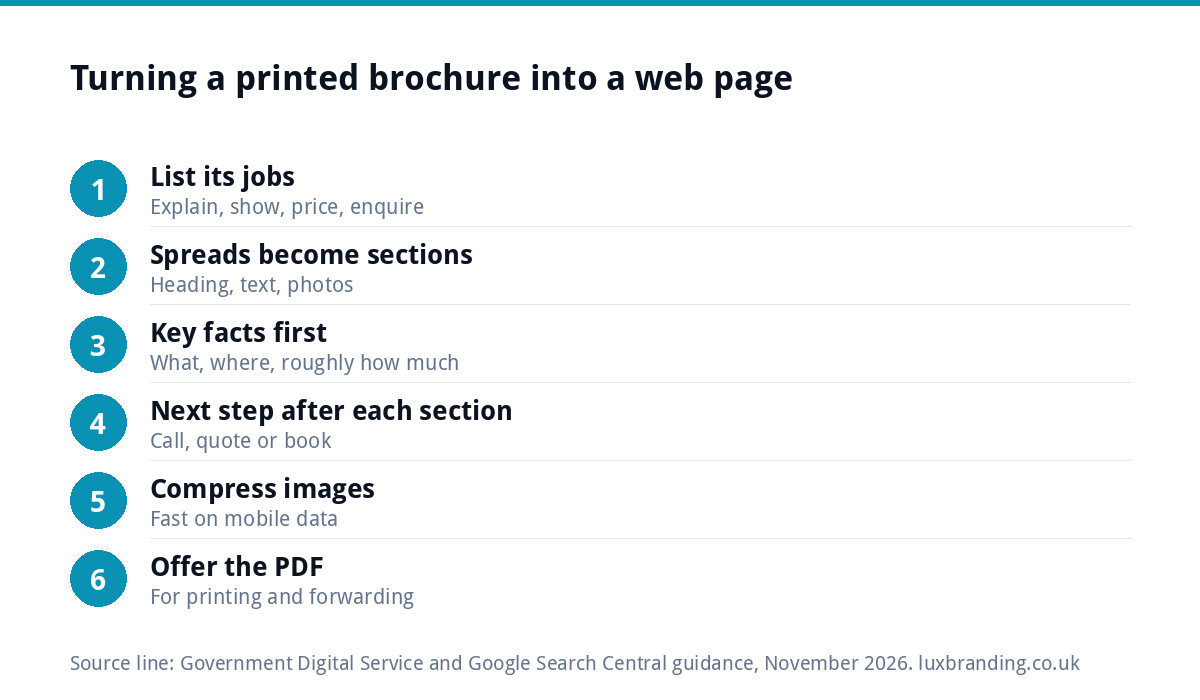
How to turn a printed brochure into a web page
- List what the brochure is for. Usually: explain what you offer, show examples, give prices or price guides, and get an enquiry.
- Turn each spread into a section with a clear heading, a short paragraph and one or two strong photos.
- Put the key facts first. What you do, where you work and roughly what it costs, before the history of the business.
- Add a clear next step after every main section: call, request a quote or book a visit.
- Compress the images so the page loads quickly on mobile data.
- Offer the PDF as a download for people who want to print it.
- Give it a short, memorable address you can put on cards, vans and emails.
Checklist: a brochure page that converts
| Check | Why it matters |
|---|---|
| Phone number and quote button visible on mobile | Interested readers act straight away |
| Prices or “from” prices where possible | Stops people leaving to ask |
| Real photos of your work | Builds trust better than stock images |
| Short sections with headings | Easy to scan on a phone |
| Fast loading | Slow pages lose readers before they see anything |
| Same branding as your printed material | People recognise you across every channel |
| Downloadable PDF of the same content | Serves people who want to print or forward it |
If your pages are slow, our guide to website speed for small businesses covers the fixes.
A worked example
Picture a hypothetical kitchen fitter in Chelmsford who has a twelve-page printed brochure, emailed as a 20MB PDF to anyone who asks. On a phone it opens slowly, the double-page layouts need constant pinching and zooming, and the price guide on page eleven is two years out of date. Rebuilt as a single brochure page on the website, the same content becomes six sections: kitchen styles, worktops, appliances, a gallery of recent installs, a “from” price guide and how a project runs from survey to handover. A “Book a free survey” button sits after each section. The PDF is still there as a download for customers who like to print and compare. Now, when someone asks for the brochure, the fitter sends a short link that opens instantly, and when prices change, one edit updates it for everyone.
Sharing your online brochure
A brochure page only works if people reach it. Give it a short, memorable address and use it everywhere:
- In your email signature and in replies to enquiries.
- On your Google Business Profile as a link or in a post.
- On printed cards, leaflets and vans, with a QR code for people who prefer to scan.
- Pinned to your social profiles.
- In quotes, as “see examples of our work”.
Because it is a web page, you can see in your analytics how many people opened it, how far they read and whether they clicked the quote button, which a PDF attachment can never tell you.
Keeping print and online in step
The biggest practical risk with brochures is two versions saying different things: last year’s prices in the PDF, this year’s on the website. Pick one source of truth, usually the web page, update it first and re-export the PDF whenever the content changes. Date the PDF in its footer so you can tell versions apart.
If you still print, the design file needs to be set up properly for the printer. Our guide to print-ready artwork explains bleed, CMYK and resolution, and our poster design guide covers large-format pieces for shows and shop windows.
Get your brochure online properly
A single brochure-style page is often all a small business needs. Our Landing Page is £199, our One-Page Website is £299, and our custom WordPress websites start at £499 for up to eight pages. For printed leaflets, see our flyer and leaflet design service, and if you already have a design that needs preparing for the printer, our Print-Ready Artwork service is £49. Every price is on our pricing page.
Get the UK Print-Ready Artwork Checklist (free)
A one-page checklist for any UK designer or printer covering CMYK, bleed, fonts and resolution. Saves you the pre-press fix-up fees.
No spam. UK GDPR compliant. We only use your email to send this resource, unless you tick the box to hear from us.
Frequently asked questions
Is a PDF brochure bad for SEO? +
Not bad, but limited. Google can index PDFs, so they can appear in search, but a well-built web page is far better at matching what people search for and turning a visit into an enquiry. The best approach for most small businesses is a brochure-style web page with the PDF offered as a download from it.
What is the best format for a digital brochure? +
For most small businesses, a web page: it adapts to phones, can be found in search, is easiest to make accessible and can be updated in minutes. Keep a PDF version for people who want to print or forward it. Flipbook viewers look impressive on desktop but are often hard to read on a phone.
Are PDFs accessible? +
They can be made more accessible with tagged headings, alternative text, a proper title and a logical reading order, but the UK government's guidance on publishing accessible documents states that PDF and PDF/A are never fully accessible to every type of assistive technology. A well-built web page reaches more people with less effort.
How do I turn a printed brochure into a web page? +
Turn each spread into a section with a clear heading, short text and strong photos. Put what you do, where you work and rough prices first, add a call or quote button after each main section, compress images for mobile, and offer the PDF as a download. Give the page a short address for cards and vans.
Should I still print brochures? +
If you hand them out at shows, leave them after home visits or sell to buyers who file paperwork, yes. Keep the web page as the single source of truth, update it first and re-export the print version when content changes, so prices and details never disagree between the two.