
Quick answer
Google picks local pack results on three things: relevance, distance and prominence, and you cannot pay to rank higher. If missing, check in order: the profile is verified and not suspended, the primary category matches the search, the searcher is near you, and your reviews, details and website are stronger than those of the businesses that do appear.
The local pack is the map with three businesses that appears above the ordinary results for searches like “electrician near me” or “dog groomer Swindon”. For a local trade it is often worth more than the first organic position. This guide explains why a business can be missing from it, how to diagnose the cause in the right order, and a 30-day plan to fix it.
How Google decides who shows in the local pack
Google is unusually open about this. Its help page on improving your local ranking says local results are mainly based on three factors:
- Relevance: how well a Business Profile matches what someone is searching for.
- Distance: how far each business is from the person searching. If the searcher has not shared a location, Google uses what it knows about where they are.
- Prominence: how well-known a business is, which includes links to your business across the web, reviews and ratings.
The same page states plainly that there is no way to request or pay for a better local ranking. Anyone selling a guaranteed map pack position is selling something Google says does not exist.
First, check you are really missing
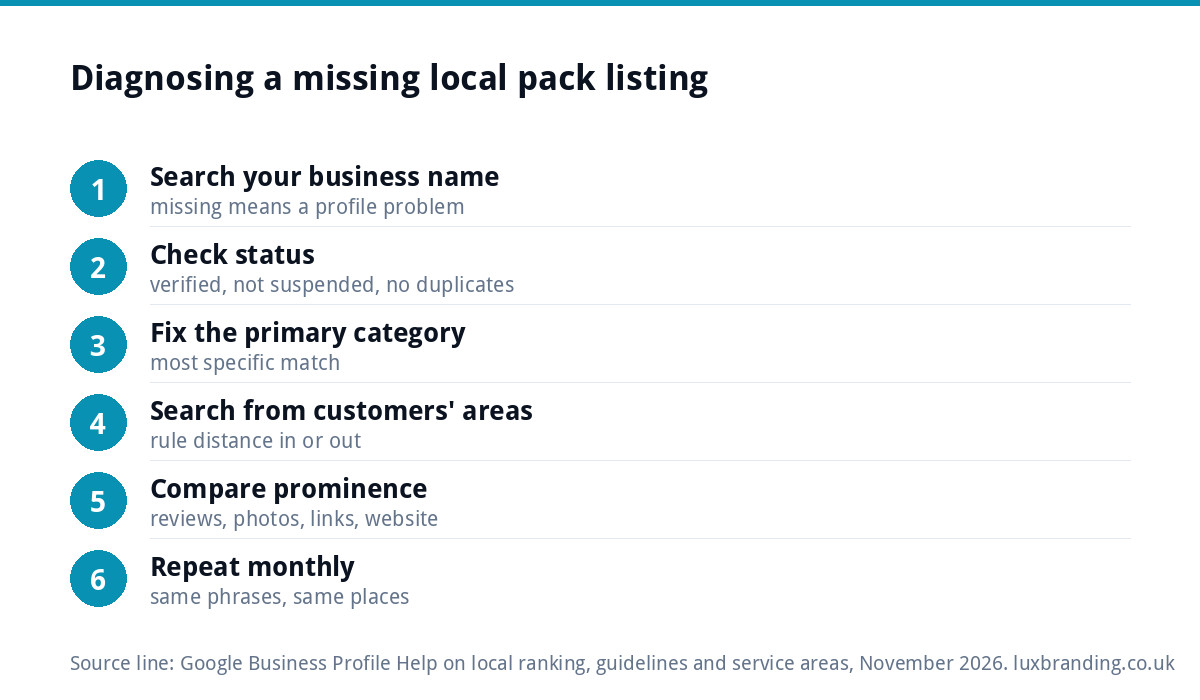
Before changing anything, make sure the problem is real. The local pack changes depending on where the searcher is standing, so searching from your own office tells you very little about what a customer ten miles away sees.
- Search in a private browser window, so your history does not colour the results.
- Search the exact phrases customers use, with and without a town name.
- Ask a friend or customer in the area you want to win to search on their phone and send a screenshot.
- Check the full map results (click “more places”), not just the top three. Position four or five is a different problem from not appearing at all.
- Search your business name. If you do not appear even for that, the profile itself has a problem.
Symptoms, likely causes and fixes
| What you see | Likely cause | Fix |
|---|---|---|
| Not found even for your own business name | Profile unverified, suspended or duplicated | Check status in your profile; resolve verification or suspension first |
| Found for your name, never for your service | Primary category wrong or too broad | Pick the category that matches your main job |
| Show near your base, vanish a few miles away | Distance | Normal; win further out through prominence and your website |
| Show at position 4 to 10 | Prominence gap | More recent reviews, better photos, stronger website and local links |
| Dropped suddenly after an edit | Edit under review, or a guideline problem | Check for pending edits or warnings in the profile |
| Competitors with keyword-stuffed names outrank you | Their names break the guidelines | Report them through Google; never copy the tactic |
Profile not verified, suspended or duplicated
An unverified profile will not compete properly, and a suspended one will not appear at all. If you have two profiles for the same business, perhaps one created years ago by a previous owner, they can split your signals. Google’s Business Profile guidelines say each business should have only one profile, and that multiple profiles can cause display problems on Maps and Search.
If your profile has been suspended, our guide to a suspended Google Business Profile covers the reinstatement route. Fix this before anything else; nothing below matters until the profile is live.
Wrong or thin categories
Your primary category is one of the strongest relevance signals you control. A plumber whose primary category is “Contractor” will struggle to appear for “plumber near me”. Choose the most specific category that describes your main service, then add secondary categories for other genuine services.
Relevance also comes from the rest of the profile: services listed with descriptions, accurate hours, attributes and a description written in plain language. Google’s guidance is to keep your address, hours, category and attributes complete and current. Our free Google Business Profile checklist walks through every field.
Distance and the service-area trap
Distance is the factor you can change least. A business based in Bolton will rarely show in the local pack for a searcher standing in central Manchester, however good the profile.
Many trades assume that adding towns as service areas makes them rank there. It does not work that way. Google’s help on setting service areas allows up to 20 areas, named by city, postcode or region rather than a radius, and advises keeping the area within about two hours’ drive. Service areas tell customers where you work; they do not cancel out distance.
To win work further from your base, the realistic routes are organic rankings for your website’s service pages, paid ads, and building enough prominence that you appear at the edge of your patch.
Reviews, prominence and your website
When several businesses are equally relevant and close, prominence separates them. Google lists reviews and ratings, and links to your business from other websites, as part of prominence. In practice that means:
- A steady flow of genuine reviews, rather than a burst followed by silence.
- Replies to reviews, which Google recommends.
- Recent photos of real jobs, which Google also suggests uploading.
- A website with a clear page for each main service, your business name, address and phone number matching the profile exactly.
- Mentions and links from local sources: suppliers, trade bodies, local news, sponsorships.
The website matters more than many trades expect. A profile that links to a homepage with one line about “all aspects of building work” gives Google little to connect with a search for “loft conversion”. A page that explains that service, the areas you cover and recent examples gives both Google and the customer a reason to choose you.
If reviews have vanished from your profile recently, read why Google reviews disappear before asking customers for more.
Compare yourself with the three that do appear
The quickest way to see your gap is to study the businesses Google already prefers for your search. Open each of the three profiles in the pack and note, in a simple table of your own:
- Their primary category, which you can usually see under the business name.
- How many reviews they have, how recent the latest ones are and whether they reply.
- How many photos they have, and whether they show real jobs or stock images.
- Whether their website has a dedicated page for the service you searched.
- How far their base is from where the search was made.
Patterns appear quickly. If all three share a category you do not use, that is your first fix. If they all sit within a mile of the searcher and you are eight miles away, distance is the cause and profile tweaks will not solve it. If they have three times your recent reviews, prominence is the gap, and a steady review routine is the answer. Repeat the exercise for two or three of your most valuable searches, because the cause can differ from one service to the next.
Business name rules: do not stuff keywords
It is tempting to change “Smith and Sons” to “Smith and Sons Plumber Bristol Emergency Boiler Repair”. Google’s guidelines say your name should reflect your real-world business name, and that adding unnecessary information such as service descriptions or locations is not permitted and may lead to suspension. Some competitors get away with it for a while. When they are reported or caught, they often lose the profile entirely.
A 30-day plan to get into the local pack
| Week | Actions |
|---|---|
| Week 1 | Confirm verification and no suspension; remove duplicates; fix the primary category; check name, address and phone match your website |
| Week 2 | Complete every profile field: services with descriptions, hours, attributes, service areas, a plain description |
| Week 3 | Upload recent job photos; set up a simple review request after each job; reply to every existing review |
| Week 4 | Improve the website service pages that match your categories; ask suppliers and trade bodies for a listing or link |
Then measure from the customer’s location, not yours, every month. Local rankings move slowly, and most of the work compounds.
When to get help
If you would rather hand this over, our Google Business Profile setup and optimisation is £199 one-off and covers categories, keywords, photos, a review strategy and tracking. For the website side, our SEO service is £249 a month. The full optimisation guide explains the work in more depth, and all our prices are on the pricing page.
Get the UK SEO DIY Audit Checklist (free)
A 32-point checklist UK SMEs can run against their own website in an afternoon. Surfaces the quick wins before paying for a paid audit.
No spam. UK GDPR compliant. We only use your email to send this resource, unless you tick the box to hear from us.
Frequently asked questions
Why does my business not show on Google Maps for my service? +
Usually one of four things: the profile is unverified or suspended, the primary category does not match the search, the searcher is too far from your base, or competitors have stronger reviews, details and websites. Search your own business name first. If you do not appear even for that, fix the profile status before anything else.
Can I pay Google to appear in the local pack? +
No. Google's own help page says there is no way to request or pay for a better local ranking. Paid ads can appear above or within map results and are labelled as sponsored, but the unpaid local pack is decided by relevance, distance and prominence. Be wary of anyone promising a guaranteed map position.
Do service areas help me rank in other towns? +
Not directly. Service areas tell customers where you work, and Google allows up to 20 of them, named by town, postcode or region. They do not cancel out distance, which is one of the three ranking factors. To win work further away, rely on your website's service pages, prominence and, where it pays, advertising.
How long does it take to get into the local pack? +
Profile fixes such as the right category or a resolved suspension can show within days or weeks once edits are approved. Prominence, built from reviews, photos, links and a stronger website, takes months and keeps compounding. Measure monthly from your customers' locations, not your office, so you see real progress rather than a misleading local view.
Should I add keywords to my Google Business Profile name? +
No. Google's guidelines say your name should reflect your real-world business name and that adding service descriptions or locations is not permitted and may lead to suspension. Competitors who stuff keywords sometimes rank for a while, but they risk losing the profile entirely. Put your services in the categories and services sections instead.