Quick answer
To create a LinkedIn company page, sign in to your LinkedIn account on desktop, open the For Business menu and choose Create a Company Page. Pick the Company page type, add your name, public URL, website, industry, size and type, upload a 400 x 400 pixel logo, confirm you can act for the business and click Create page.
A LinkedIn page takes about fifteen minutes to set up and costs nothing. The harder part is making it look like a real, active business rather than an empty shell. This guide covers the official steps, the image sizes LinkedIn asks for, who should be an admin and what a small business should actually post.
Does a small business need a LinkedIn page?
Not every business does. A domestic cleaner or a mobile dog groomer will find more customers on Google and Facebook. LinkedIn earns its place when your buyers are other businesses:
- Trades chasing commercial work from main contractors, facilities managers and housing associations
- Consultants, accountants, recruiters and other professional services
- Manufacturers and suppliers selling to the trade
- Any business that wants staff to be able to list it as their employer
For commercial trades, a tidy LinkedIn page is part of looking credible when a buyer checks you out before a tender. Our guide to winning commercial contracts as a trades business covers the rest of that picture.
What you need before you start
Gather these first so you can finish the page in one sitting. LinkedIn’s image specifications set the sizes.
| Item | What LinkedIn asks for | Our advice |
|---|---|---|
| LinkedIn account | You must have one to create a page | Use your own; the page is linked to it as admin |
| Company name | Required | Match your trading or registered name exactly |
| Public URL | Required | Short and close to your domain |
| Website | Requested | Your homepage, not a social profile |
| Industry, size and type | Required on mobile | Pick the closest industry buyers would search |
| Logo | Minimum 268 x 268 px, recommended 400 x 400 px | Use your icon-only or stacked logo, not a wide one |
| Cover image | 1512 x 256 px | A simple brand graphic or photo of real work |
| File type | PNG or JPEG, maximum 3MB | PNG keeps logo edges crisp |
Creating the page step by step
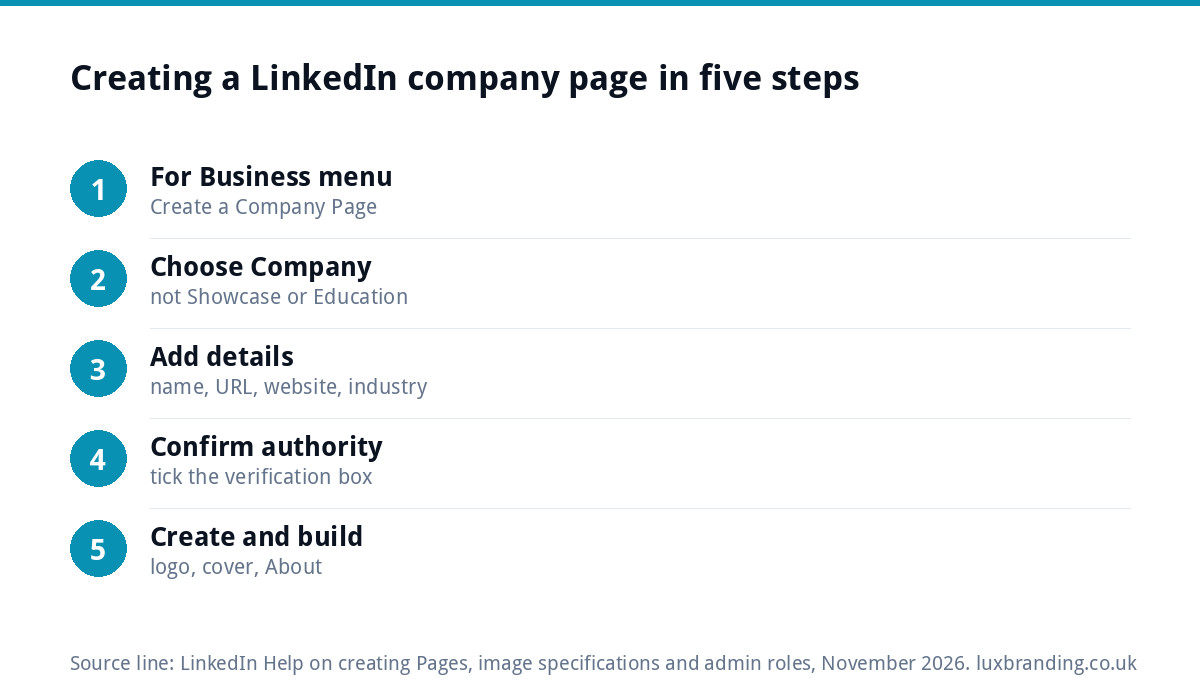
LinkedIn’s help article on creating a LinkedIn Page sets out the process. On desktop:
- Open the For Business menu from your LinkedIn homepage and choose Create a Company Page.
- Select the page type. Choose Company. Showcase pages are for sub-brands and Educational institution is for schools and colleges.
- Fill in the page identity, company details and profile details: name, public URL, website, industry, company size and company type. A tagline is optional but worth adding.
- Tick the verification box to confirm you have the right to act on behalf of the company.
- Click Create page, then start building it out with your logo, cover image and About section.
You can also create a page in the iOS app. LinkedIn says creating a page is not supported on Android devices, so Android users should switch to a computer.
Getting your logo right at 400 pixels
The logo is the part of your page people see most, because it appears next to every post, comment and job listing, often at a very small size. A wide horizontal logo shrinks to an unreadable strip inside LinkedIn’s square frame. Use a stacked or icon-only version of your logo, centred with some space around it, on a solid background.
If you only have one wide version, or only a low-resolution JPG, this is the moment to sort it. Our Logo Design at £129 includes stacked, horizontal and icon-only layouts in every file format, so you have the right shape for every platform.
Writing the tagline and About section
The tagline sits under your name and is the first thing a buyer reads. Say what you do, for whom and where, in plain words: “Commercial electrical contractor for schools and offices across the East Midlands” beats “Powering the future”.
The About section should answer the questions a buyer has before they call:
- What you do and the type of client you work for
- The areas you cover
- Accreditations and memberships you genuinely hold
- How long you have been trading
- How to get in touch, with your website link
Keep it under a few short paragraphs. Nobody on LinkedIn reads a wall of text from a company they have not heard of.
For the cover image, keep it simple. LinkedIn crops it differently on phones and desktops, and your logo sits over part of it, so avoid putting anything important near the edges. A wide photo of a finished project, your team on site or a plain brand-colour background with plenty of space works far better than a busy collage or a banner crammed with phone numbers.
Choosing page admins
Never leave a business page tied to one person. If that person leaves, you can lose control of the page. LinkedIn’s guide to Page admin roles lists three main roles:
| Role | What it can do | Give it to |
|---|---|---|
| Super admin | Every permission, including editing page details, managing admins and deactivating the page | The owner and one trusted deputy |
| Content admin | Create and manage posts, including boosting them, and events | Whoever posts day to day, or your agency |
| Analyst | View the page’s analytics only | Anyone who reports on marketing |
Give agencies and freelancers the Content admin role rather than Super admin. You keep control; they get what they need to do the job.
What a small business should post
An empty page looks worse than no page. You do not need to post daily; once or twice a week is plenty if it is useful. Ideas that work for trades and small firms:
- Finished projects with a short note on the problem solved
- New accreditations, training and equipment
- Team introductions and apprentices starting
- Practical tips your buyers would value
- Jobs you are hiring for
- Thanks to suppliers and partners you work with
Use photos of real work wherever possible. Stock images of handshakes say nothing about your business.
Getting your first followers
A new page starts with nobody following it, and LinkedIn shows company posts mainly to followers. A few simple moves get you past zero:
- Ask your team to list the business as their employer on their own profiles. Each one then links back to the page.
- Invite your own connections who know your work: past clients, suppliers and contractors you have worked with.
- Add the page link to your email signature, website footer and quotes.
- Share each company post from your personal profile with a line of context, so people who know you but do not yet follow the page see it too. A sentence on why the job mattered makes a share far more interesting than a bare repost.
- Comment helpfully on posts from the buyers and main contractors you want to work with.
Follower numbers matter less than who follows. Fifty facilities managers in your region are worth more than five hundred strangers.
Keep it consistent with the rest of your brand
A buyer who finds you on LinkedIn will usually check your website and Google profile next. If the logo, colours and business name differ between them, it raises doubts. Our guide to fixing a brand that looks inconsistent everywhere shows how to line everything up. If you are starting from scratch, our Brand Identity Design at £299 gives you the logo, colours, typography and guidelines in one go.
Common mistakes to avoid
- Creating a personal profile for the business instead of a company page. LinkedIn profiles are for people.
- Using a wide logo that becomes unreadable in the square frame.
- Leaving the cover image blank, which makes the page look abandoned.
- One admin only, so access is lost when that person leaves.
- No website link, which wastes the most valuable click on the page.
- Posting once and stopping, leaving a last post dated two years ago.
Getting help with LinkedIn
If you want the page to look professional without designing graphics yourself, our Social Media Design templates start from £79, sized for each platform, on-brand and editable in Canva, covering profile images, posts and ad creatives. If you would rather hand over the posting too, our Social Media Management is £249 a month and includes content creation, community management and monthly reports. All our prices are on the pricing page.
Get the UK SEO DIY Audit Checklist (free)
A 32-point checklist UK SMEs can run against their own website in an afternoon. Surfaces the quick wins before paying for a paid audit.
No spam. UK GDPR compliant. We only use your email to send this resource, unless you tick the box to hear from us.
Frequently asked questions
Is a LinkedIn company page free? +
Yes. Creating and running a LinkedIn company page costs nothing. You only pay if you choose to advertise or boost posts. You need a personal LinkedIn account to create the page, and you must confirm that you have the right to act on behalf of the business before LinkedIn will publish it.
Can I create a LinkedIn company page on my phone? +
Partly. LinkedIn says you can create a page on desktop or in the iOS app, but creating a page is not supported on Android devices. If you use an Android phone, switch to a computer. Desktop is also easier for uploading your logo and cover image at the right sizes.
What size should my LinkedIn company logo be? +
LinkedIn recommends 400 x 400 pixels, with a minimum of 268 x 268 pixels. The cover image is 1512 x 256 pixels. All images must be PNG or JPEG files no larger than 3MB. Use a stacked or icon-only version of your logo, because a wide logo becomes unreadable in the square frame.
Who should be an admin on our LinkedIn page? +
Make the owner and one trusted deputy Super admins so you never lose access. Give whoever posts day to day, including any agency, the Content admin role, which lets them create and manage posts. The Analyst role can only view analytics, which suits anyone who reports on marketing results.
How often should a small business post on LinkedIn? +
Once or twice a week is plenty if each post is useful: finished projects, accreditations, team news, hiring and practical tips your buyers value. Consistency matters more than volume. A page whose last post is two years old looks abandoned, which is worse for credibility than posting little but regularly.