
Quick answer
Sitelinks are the extra links to pages on your website that Google sometimes shows under your main search result, usually when someone searches your business name. You cannot add them yourself; Google generates them automatically. You make them more likely with a clear site structure, informative page titles and headings, and short, relevant internal link text.
Sitelinks make a search result bigger, more useful and harder to scroll past. For a small business, they can send someone straight to your services, prices or contact page instead of the homepage. This guide explains how organic sitelinks work, the steps that make them more likely, how to deal with an unwanted one and how sitelinks in Google Ads differ, because those you can control.
What sitelinks are
Google’s documentation on sitelinks describes them as links from the same domain that are clustered together under a text result. Google’s systems analyse the link structure of your site to find shortcuts that save people time getting to the information they want.
Two points from Google’s page matter most. First, sitelinks are currently automated. Second, Google only shows sitelinks for results when it thinks they will be useful to the user. There is no setting, form or fee that switches them on.
Organic sitelinks versus ad sitelinks
People often mix up the two kinds. They look similar but work very differently:
| Feature | Organic sitelinks | Google Ads sitelinks |
|---|---|---|
| Who decides they appear | Google, automatically | You add them; Google decides when to show them |
| Can you choose the pages? | No, only influence them | Yes |
| Can you write the link text? | No, Google picks it | Yes, up to 25 characters in most languages |
| Cost | Free | Free to add; a click costs the same as a headline click |
| How many show | Varies | Up to six on desktop and eight on mobile |
| Typical trigger | Searches for your business name | Searches matching your ad keywords |
Why sitelinks matter for a small business
When someone searches your business name, they already want you. Sitelinks shorten their route to the page they came for: the quote form, the price list, the service they need or the gallery of your work. That saves a click and removes a chance for them to get distracted by a competitor’s ad or a directory listing.
Sitelinks also make your result take up more of the screen, especially on a phone, which pushes other results down. For businesses that share a name with others, that extra space helps customers find the right one.
Picture a customer who saw your van, remembered the name and searched for it that evening. With sitelinks, they see your homepage plus direct links to “Kitchen Fitting”, “Our Work” and “Get a Quote”. Without them, they see one link and, below it, a directory listing and a competitor’s ad. The first version gets them to your quote form in one tap.
When Google tends to show them
Because Google shows sitelinks when it judges them useful, they appear most often for searches where your site is clearly the answer, such as your business name or your domain. They are much less common for general searches like “plumber in Derby”, where people are comparing several businesses. A new site with few pages and little search history may not get them at all, and they can appear and disappear as Google’s view of your site changes.
If your business does not appear for its own name, that is a bigger problem than missing sitelinks. Start with why your website is not showing on Google.
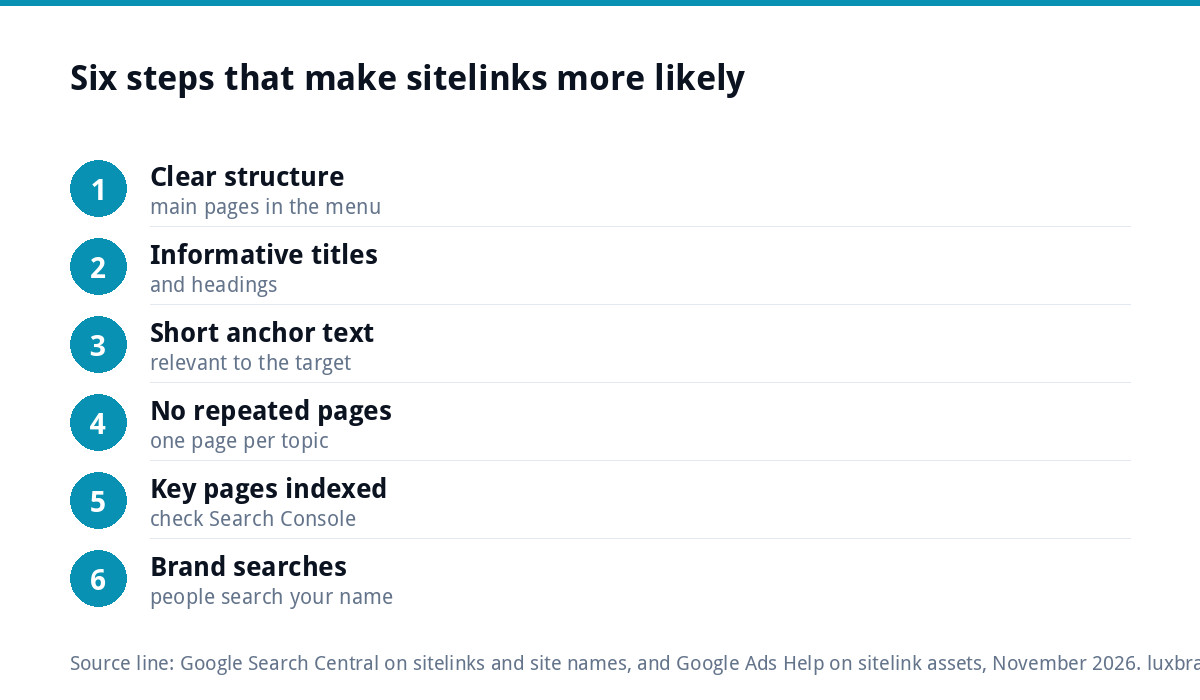
How to make sitelinks more likely in six steps
Google’s best practices boil down to making your site easy to understand. In practice:
- Give your site a clear structure. Link important pages from your main menu and from related pages, so the main sections are obvious.
- Write informative page titles. Google asks for titles and headings that are informative, relevant and compact. “Boiler Servicing” beats “Our Offering”.
- Keep internal link text short and relevant. Google asks that anchor text is concise and relevant to the page it points to.
- Avoid repeated content. Several near-identical pages make it harder for Google to pick clear shortcuts.
- Make sure the key pages are indexed. A page Google has not indexed cannot become a sitelink. Check in Search Console.
- Build up brand searches. The more people search for your business by name, the more often your site is the obvious answer.
None of this guarantees sitelinks, but every step also improves how your site performs in search generally, so it is never wasted effort.
Checking whether you have sitelinks
The quickest check is the obvious one: search for your business name on Google, on both a phone and a computer, signed out or in a private window. Then try your domain name and your business name plus your town. Note which pages appear as sitelinks and whether they are the pages you would choose.
If the wrong pages show, look at your menu and page titles through a stranger’s eyes. Google builds sitelinks from what your structure tells it is important. A “Latest News” page from three years ago appearing as a sitelink usually means it is still linked prominently from every page. Move it out of the main menu, update or retire it, and give your real priorities, such as services, prices and contact, clear titles and prominent links.
Your site name in results
Closely related to sitelinks is the site name Google shows at the top of your result. Google’s documentation on site names says you can indicate your preferred name by adding WebSite structured data to your home page, with a required name property and optional alternate names. Google generates site names automatically, and also looks at the homepage title, headings and other signals. Use the same business name consistently across all of them so Google has one clear answer.
Removing a sitelink you do not want
Sometimes Google picks an odd page as a sitelink: an old offer, a privacy policy or a page you meant to delete. Google’s page says that if you need to remove a sitelink, consider removing the page from your site or using noindex. There is no switch to hide one sitelink while keeping the page in search, so the realistic options are:
- Delete outdated pages and redirect them to the most relevant live page
- Add noindex to pages that have no value in search, such as thank-you pages
- Strengthen the pages you do want, with clearer titles and more internal links
Sitelinks in Google Ads
Ad sitelinks are fully in your control. Google Ads’ guide to sitelink assets says an ad can show up to six sitelinks on desktop and up to eight on mobile in Search campaigns, sitelink text is limited to 25 characters in most languages, and adding them is free: a click on a sitelink costs the same as a click on the ad’s headline. For a local business they are an easy win.
Example ad sitelinks for a roofing business, each within 25 characters:
| Sitelink text | Characters | Links to |
|---|---|---|
| Free Roof Survey | 16 | Survey booking form |
| Flat Roof Repairs | 17 | Flat roofing service page |
| Gutter Cleaning | 15 | Gutter service page |
| Recent Roofing Jobs | 19 | Project gallery |
| What Clients Say | 16 | Testimonials page |
| Call Us Today | 13 | Contact page |
Each sitelink should go to a different, relevant page. Linking four sitelinks to the homepage wastes them. Review them every few months and swap out any that point to old offers or seasonal services.
Common sitelink mistakes
- Vague menu labels such as “Solutions” or “What We Do” that tell Google nothing
- Dozens of thin pages competing for the same topic
- Old pages left live, which then appear as sitelinks
- Inconsistent business names across the homepage, title and profiles
- Paying someone to “add sitelinks” to organic results, which nobody can do
- Running ads without sitelinks, missing free extra space
Getting help
Clear structure is easiest to build in from the start. Every Custom WordPress Website we build at £499 includes an SEO foundation with schema, meta tags and a sitemap. For an existing site, our free SEO audit highlights structural problems, and our monthly SEO at £249 a month covers on-page and technical fixes. If you run ads, our Google Ads management starts from £199 a month. A complete Google Business Profile, set up and optimised for £199, strengthens how your business appears when people search your name. All prices are on our pricing page.
Get the UK SEO DIY Audit Checklist (free)
A 32-point checklist UK SMEs can run against their own website in an afternoon. Surfaces the quick wins before paying for a paid audit.
No spam. UK GDPR compliant. We only use your email to send this resource, unless you tick the box to hear from us.
Frequently asked questions
Can I add sitelinks to my Google search result? +
Not to organic results. Google says sitelinks are currently automated and only shown when it thinks they will be useful. You can make them more likely with a clear site structure, informative page titles and headings, and short, relevant internal link text. In Google Ads, by contrast, you can add sitelinks yourself.
Why does my site not have sitelinks? +
Usually because Google does not yet see your site as the obvious answer to a search, or cannot work out clear shortcuts. New sites, sites with few pages and sites with vague menu labels often have none. They appear most for searches on your business name, so strong structure and growing brand searches both help.
How do I remove a sitelink? +
Google suggests removing the page from your site or adding noindex if you need a sitelink gone. There is no setting to hide a single sitelink while keeping the page in search. Delete or redirect outdated pages, noindex pages with no search value and strengthen the pages you would rather Google showed.
How many sitelinks can a Google ad show? +
Google Ads says an ad can show up to six sitelinks on desktop and up to eight on mobile in Search and Performance Max campaigns. Sitelink text is limited to 25 characters in most languages. Adding them is free, and a click on a sitelink costs the same as a click on the ad's headline.
Can Luxbranding help us get sitelinks? +
Nobody can add organic sitelinks for you, but we can build the structure that makes them likely. Our monthly SEO is £249 a month and covers on-page and technical fixes, and if you advertise, our Google Ads management starts from £199 a month. Try our free SEO audit first to see where your site stands.