
Quick answer
To stop contact form spam without losing leads, add protection in layers, starting with ones real people never notice: a hidden honeypot field, a time trap, server-side validation and rate limits, then a rule that holds link-heavy messages for review. Add a spam filter service next, and a visible challenge such as Cloudflare Turnstile only if spam still gets through.
The aim is not zero spam at any cost. The aim is a clean inbox and no lost enquiries. A form so locked down that a customer gives up has cost you more than a hundred junk messages ever would. This guide works from the gentlest fix to the strictest, so you can stop at the first layer that does the job.
Why bots and people target contact forms
Your contact form is a public box that anyone can post into, and it sends straight to your inbox. That makes it useful to several kinds of sender:
- Link injection bots. Scripts that crawl the web and fill every form they find with links, hoping some site publishes the text or a person clicks.
- SEO and marketing pitches. Real people, or semi-automated tools, offering rankings, leads or a redesign. A challenge will not stop them, because they are human.
- Phishing. Messages dressed as a complaint, a copyright notice or an invoice query, asking you to open a link or a file.
- Relay abuse. If your form sends an automatic copy of the message to whatever email address was typed in, spammers can use your site to send their text to strangers, from your domain.
That last one matters beyond annoyance. Mail sent from your domain to people who never asked for it can damage your sender reputation, which is one reason your own emails might start landing in customers’ spam folders. If your form sends auto-replies, make sure they never repeat the submitted message to the submitted address.
Work out which kind of spam you are getting
Before changing anything, look at the last twenty junk messages. The pattern tells you which layer will help.
- Gibberish, random names, links in every field, sent at all hours: bots. Honeypots and time traps will catch most of it.
- Well-written pitches with a real name, sent one at a time: people. Filters and link rules help; challenges do not.
- Dozens arriving within minutes from one source: a flood. Rate limiting is the fix.
- Messages that pose as complaints or legal notices: phishing. Do not click; delete, and make sure the people who read your inbox know the pattern.
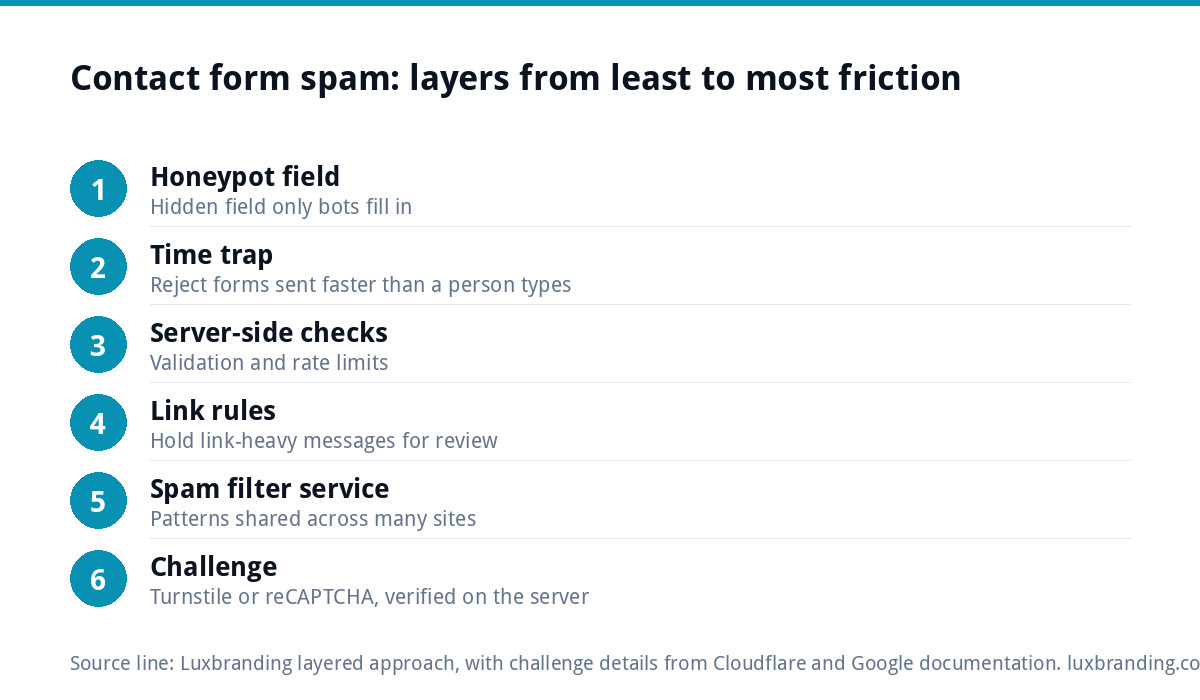
The layered fix, from least to most friction
Each layer below adds a little more protection and, near the end, a little more friction for real people. Add them in this order and stop when the junk stops.
Layer 1: a honeypot field
A honeypot is an extra field hidden from people but present in the page code. Humans never see it, so they leave it empty. Many bots fill every field they find. If the hidden field arrives with anything in it, the submission is quietly discarded. Hide it with CSS rather than removing it from the page, take it out of the keyboard tab order, and turn off autofill on it so a browser does not fill it on a real person’s behalf. Friction for genuine visitors: none.
Layer 2: a time trap
A person takes time to read your page and type a message. A bot submits almost instantly. Record when the form was loaded (in a way the bot cannot fake, such as a signed value checked on the server) and reject anything sent faster than a person could type, for example under three seconds. Also reject a form loaded days earlier and submitted with an old token. Friction: none, unless the page sat open for a very long time, in which case show a friendly “please try again”.
Server-side checks: validation, rate limits and link rules
Anything checked only in the browser can be skipped by a bot that posts straight to your server. The real checks belong on the server:
- Validation. The name field should not contain a web address. The email field should be a valid email. The phone field should look like a phone number. Reject submissions that break these rules.
- Rate limiting. Cap how many messages one visitor can send in a short window. A real customer rarely sends more than two; a flood sends hundreds.
- Link rules. Genuine enquiries rarely contain several links. Rather than deleting messages with two or more links, hold them in a review folder. That keeps the junk out of your main inbox without risking a real lead.
Add a spam filter service
If spam still gets through, a filter service checks each submission against patterns from a shared network of other sites. On WordPress, Akismet is a long-standing option. Filters are good at catching the human-written pitches that slip past honeypots, because they recognise repeat senders and repeat wording across many sites.
Two rules for filters. First, send flagged messages to a spam folder, never straight to deletion. Second, check that folder weekly, and mark any genuine message as not spam so the filter learns.
Add a challenge only if you still need one
A challenge asks the visitor’s browser, or occasionally the visitor, to prove they are human. It is the strongest layer and the one most likely to cost you a lead, so it comes last.
- Cloudflare Turnstile. Cloudflare’s Turnstile documentation describes it as a CAPTCHA alternative that runs small non-interactive browser checks, shows a checkbox only when a visitor looks risky in its recommended mode, and can be embedded on any website without routing traffic through Cloudflare. Its docs also say you must verify the token on your server: the widget alone does not protect the form.
- Google reCAPTCHA v3. Google’s reCAPTCHA v3 documentation says it returns a score for each request without user interaction, from 0.0 (very likely a bot) to 1.0 (very likely a good interaction), with 0.5 as a default threshold. You decide what to do with low scores. At the time of writing, October 2026, that page carries a notice pointing to Google Cloud’s newer documentation, so check which version your form plugin uses.
With a score-based tool, do not reject low scores outright. Send them to the review folder, the same as link-heavy messages.
Cookies and consent: the UK GDPR and PECR angle
A challenge loads a script from a third party and may store or read information on the visitor’s device. In the UK that brings the cookie rules in PECR into play, alongside UK GDPR for any personal data processed. The ICO’s guidance on cookies and similar technologies says you need the user’s consent unless the storage is strictly necessary to provide the service the user requested, and that helpful but non-essential cookies still need consent.
That guidance does not say whether bot detection on a form counts as strictly necessary, and the ICO notes the page is being updated once its revised guidance is finalised. So treat it as a judgement you document, not a box you tick:
- Load the challenge only on the page with the form, not across the whole site.
- Name the provider and the purpose in your privacy and cookie notices.
- If your consent banner blocks the script until accepted, make sure the form still works another way, or visitors who decline cannot contact you at all.
- If you are unsure, take advice. The first two layers involve no third party, which is another reason to start there.
Every method compared
| Method | How it works | Friction for real people | Effort |
|---|---|---|---|
| Honeypot field | Hidden field only bots fill in | None | Low |
| Time trap | Rejects forms sent faster than a person can type | None | Low |
| Server-side validation | Rejects links in name fields, invalid emails and phones | None if rules are sensible | Low to medium |
| Rate limiting | Caps messages per visitor in a short window | None for normal use | Medium |
| Link rules | Holds messages with several links for review | None; held, not deleted | Low |
| Spam filter service | Checks against patterns from other sites | None; occasional false flag | Low |
| Turnstile or reCAPTCHA | Browser checks or a risk score, verified on the server | Low to medium; consent questions | Medium |
How not to block real leads
Every layer above can misfire. The protection against that is simple: nothing is deleted unseen. Hold, flag and review instead. Also:
- Never hide a visible field with the honeypot’s name, and never style the honeypot so a screen reader announces it.
- Avoid blocking words. “Free”, “offer” and “SEO” all appear in genuine enquiries.
- Show a clear message when a submission is rejected, so a real person knows to try again or email you.
- Keep an email address on the contact page as a fallback.
- Send yourself a test enquiry after every change, from a phone and a laptop.
If real messages stop arriving altogether after a change, that is a delivery fault rather than a spam setting. Our guide to a website contact form not working walks through finding it.
Measure it every week
You cannot tell whether a layer works without counting. Keep a simple weekly log for a month after each change:
| Column | What to record | What it tells you |
|---|---|---|
| Total submissions | Every message the form received | Whether attacks are rising |
| Caught as spam | Messages held or filtered | How much each layer stops |
| Spam that reached the inbox | Junk that got through | Whether you need the next layer |
| Real enquiries | Genuine messages in the inbox | Your baseline of leads |
| Real enquiries found in spam | Genuine messages wrongly held | Whether a layer is too strict |
The last column is the one that matters. It should be zero. If it is not, loosen the layer that caught them before adding another.
When to get help
Get help if spam keeps coming after the first four layers, if the form plugin is old or unsupported, or if your form is being used to send mail to strangers. Spam floods often arrive alongside other weaknesses, so it is worth reading our guide to WordPress security for small businesses at the same time.
Every custom WordPress website we build includes contact forms connected to your inbox; the standard build is £499 one-off for up to 8 pages. If spam has been a problem on your current site, say so in your brief. Our website management and hosting at £20 a month includes security monitoring, automatic updates and daily backups. Every price is on our pricing page; order online or email us at support@luxbranding.co.uk.
Get the UK Website Project Brief Template (free)
A two-page template for briefing any UK web designer: sitemap, integrations, audience and deliverables. Cuts revision rounds in half.
No spam. UK GDPR compliant. We only use your email to send this resource, unless you tick the box to hear from us.
Frequently asked questions
Why am I suddenly getting so much spam through my contact form? +
Bots crawl the web and fill every form they find, so a form that has had no protection can be found and hit hard at any time. Sudden floods from one source usually need rate limiting. Steady junk with links in every field is usually bots, which a hidden honeypot field and a time trap will catch without bothering real visitors.
Is a honeypot field enough to stop contact form spam? +
Often it stops most bot spam on its own, because many bots fill every field they see. It will not stop people sending sales pitches by hand. Pair it with a time trap and server-side validation, then add a spam filter service if pitches keep arriving. Add a visible challenge only if those layers are not enough.
Should I use Cloudflare Turnstile or Google reCAPTCHA? +
Both work. Turnstile runs non-interactive browser checks and shows a checkbox only when a visitor looks risky; reCAPTCHA v3 gives each request a score from 0.0 to 1.0 without interaction. Either way, verify the token on your server and send low scores to a review folder rather than rejecting them, so genuine enquiries are not lost.
Do I need cookie consent for a CAPTCHA on my contact form? +
The ICO says consent is needed for storing or reading information on a device unless it is strictly necessary for the service the user asked for. Its guidance does not specifically say whether form bot checks qualify, and it is being revised. Load the challenge only on the form page, list it in your privacy notice and take advice if unsure.
How do I stop spam without losing genuine enquiries? +
Never delete anything unseen. Hold link-heavy or low-scoring messages in a review folder, check it weekly, and count how many genuine enquiries were caught. That number should be zero. Avoid blocking common words such as free or offer, show a clear error when a message is rejected, and keep an email address on the contact page as a fallback.