Quick answer
Most small business websites should show a tap-to-call phone number and a short contact form on every page; our £499 custom WordPress sites include forms connected to your inbox. Add live chat or WhatsApp only if someone can reply within minutes, because an unanswered chat window loses more enquiries than having no chat at all.
Every contact option is a promise: ring and someone answers, fill in the form and someone replies, open the chat and someone is there. The best option is not the newest one; it is the one you can actually keep. This guide compares phone, contact forms and chat or messaging for a UK small business, shows which suits which kind of firm, where to put each on the page, and how to test that every route still works.
The three options at a glance
| Factor | Phone | Contact form | Live chat or messaging |
|---|---|---|---|
| Speed for the customer | Instant, if answered | Slower; waits for your reply | Fast, if staffed |
| Works out of hours | Only with voicemail | Yes | Only with an away message or bot |
| Effort for you | Interrupts work | Reply when convenient | Needs someone watching |
| Detail you receive | Whatever you remember to ask | Exactly the fields you set | Varies; often short |
| Record of the enquiry | None unless you note it | Automatic, in your inbox | Saved in the chat tool |
| Effect on page speed | None | Minimal if built well | Third-party scripts can add weight |
| Best for | Urgent and local jobs | Quotes and considered purchases | Shops and quick pre-sale questions |
The phone: still the first choice for urgent work
When a pipe bursts or a lock jams, people want a person now. For emergency and local trades, a visible phone number is the most important contact option on the site.
- Make it tappable on mobile, so visitors can call with one tap rather than copying digits.
- Show your hours next to the number, so people know whether to expect an answer.
- Plan for missed calls. A voicemail greeting that says when you will call back, and then doing it, keeps the job.
- Use one number everywhere: website, Google Business Profile, van and cards. Mismatched numbers confuse customers and search engines alike.
The weakness is interruption. If you are up a ladder all day, the phone becomes a source of missed leads. That is where a form earns its place.
The contact form: the reliable workhorse
A form works at any hour, gives you the details you need in a consistent format and leaves a written record. It suits anything that needs a quote, a description or photos.
Keep it short. Name, phone or email, a message box and perhaps one or two questions that genuinely change your reply, such as postcode or job type. The W3C’s forms tutorial recommends labelling every field, giving clear instructions, telling people when the form has been sent or something has gone wrong, and asking only for information needed to complete the task.
When you collect personal details, the ICO’s guidance on the right to be informed says you must provide privacy information at the time you collect the data, in concise, plain language. A short line under the form linking to your privacy policy is the usual approach.
Two things make or break a form: a confirmation message that says when you will reply, and emails that actually arrive. If enquiries have gone quiet, read our guide to contact forms that stop working; if they arrive in junk, see business emails going to spam.
Live chat and messaging: powerful, if you can staff it
Chat answers quick questions in the moment: “Do you deliver to Swansea?”, “Is this in stock?”, “Can you come Saturday?”. For online shops and businesses whose customers hesitate before buying, that can tip the decision.
The catch is staffing. A chat window promises an instant answer. If nobody replies for an hour, the visitor has usually gone, and they leave with a worse impression than if there had been no chat at all. Before adding chat, ask honestly who will answer it, and when.
Messaging apps are a lighter alternative. WhatsApp Business describes features such as a business profile and responding to messages even when you are away. A “Message us on WhatsApp” button lets customers send photos of the job from their phone, and you reply when you can, without promising instant chat.
What about automated chatbots? A bot can answer the same five questions all night: opening hours, areas covered, how to book, rough prices, what to do in an emergency. That can be useful, but only if the answers are accurate and the bot hands over to a person, or to your form, when it is out of its depth. A bot that loops visitors round the same menu is the digital version of a phone tree, and people leave it just as quickly. If most of your questions are predictable, a clear FAQ section on the service page often does the same job with no script at all.
Chat widgets also add third-party scripts, which can slow pages on mobile. If you add one, check your speed afterwards.
What to offer, by business type
| Business type | Lead with | Add | Usually skip |
|---|---|---|---|
| Emergency trades: plumbers, locksmiths, electricians | Tap-to-call number | Short form for non-urgent jobs | Live chat |
| Planned trades: kitchens, roofing, landscaping | Quote form with photo upload | Phone and WhatsApp | Live chat |
| Online shop | Chat or messaging, if staffed | Email form and FAQs | Phone, unless you can staff it |
| Professional services: accountants, solicitors | Form and phone | Booking link for calls | WhatsApp, for confidentiality reasons |
| Salons, clinics, studios | Online booking | Phone and messaging | Long enquiry forms |
Where to put contact options on the page
- The header: phone number on every page, tappable on mobile.
- The end of every service page: a short form or a clear button to one, at the moment the reader has decided.
- A slim bar on mobile with Call and Message buttons can help, as long as it does not cover content.
- The contact page: every option, your hours, service area and expected reply time.
- The footer: phone, email and hours again.
Do not make visitors hunt. If someone has to scroll back to the top or visit a separate page to get in touch, some will not bother.
Set expectations about reply times
People are more patient when they know what to expect. Under the form, write “We reply within one working day”. On the phone page, show your hours. On a WhatsApp button, say “Usually replies the same day”. Then keep those promises.
If you cannot reply quickly during working hours, an automatic email confirming receipt and giving a realistic timescale reduces the chance the customer contacts three competitors in the meantime.
Mistakes that cost enquiries
- A form that sends to an inbox nobody checks, or to a former employee.
- A phone number that is not tappable, or is only shown as an image.
- Chat that says “online” when nobody is.
- Too many options: phone, two emails, a form, chat, WhatsApp and four social links make people unsure which you actually use.
- Forms asking for too much, such as full address and budget, before you have said hello.
- No thank-you message, so people submit twice or assume it failed.
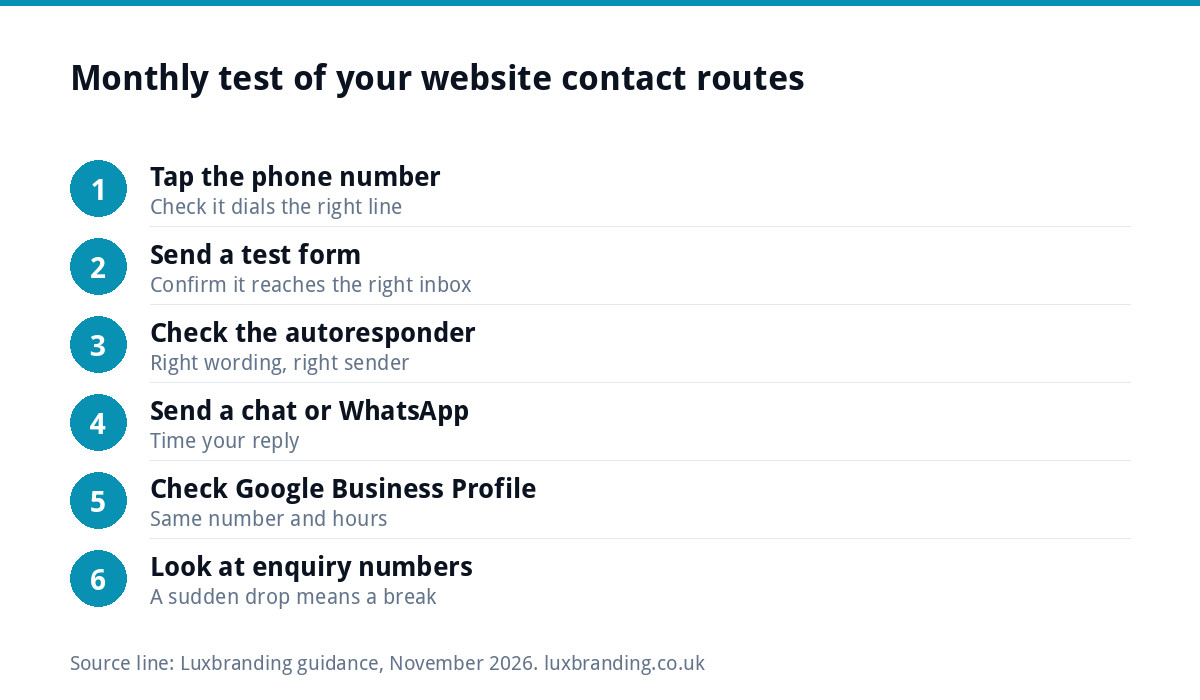
Test every contact route once a month
Contact routes break quietly: a plugin update, a changed email password, a new phone contract. Put a monthly reminder in your diary and run through this check:
- Tap the phone number on your own mobile and check it dials the right line.
- Send a test form and confirm it arrives in the right inbox, not junk.
- Check the autoresponder reaches the sender with the right wording.
- Send a WhatsApp or chat message and time your reply.
- Check your Google Business Profile shows the same number and hours.
- Look at enquiry numbers: a sudden drop usually means something has broken.
Getting it built properly
Every custom WordPress website we build, £499 one-off for up to 8 pages, is hand-coded and mobile-first, with contact forms connected to your inbox, plus Google Analytics so you can see which pages produce enquiries. For a single service or campaign, a landing page is £199. Our Website Management & Hosting, £20 a month, includes security monitoring and automatic updates, which helps keep forms working. To keep your phone number and hours consistent on Google too, see our Google Business Profile setup. Every fixed price is on our pricing page.
Get the UK Website Project Brief Template (free)
A two-page template for briefing any UK web designer: sitemap, integrations, audience and deliverables. Cuts revision rounds in half.
No spam. UK GDPR compliant. We only use your email to send this resource, unless you tick the box to hear from us.
Frequently asked questions
Is live chat worth it for a small business website? +
Only if someone can reply within minutes during the hours the chat shows as available. An unanswered chat window gives a worse impression than none. Online shops and businesses fielding quick pre-sale questions benefit most. Many trades do better with a phone number, a short form and a messaging button they answer when free.
Should I put my phone number on my website? +
For most local and service businesses, yes, in the header of every page and tappable on mobile, with your opening hours alongside. Urgent jobs in particular go to whoever answers first. If you cannot take calls during the day, say when you will call back, and use a form for less urgent enquiries.
How many fields should a contact form have? +
As few as you can manage: usually name, a phone number or email, and a message, plus one or two questions that genuinely change your reply, such as postcode or job type. The W3C's forms guidance recommends asking only for information needed to complete the task, with every field clearly labelled.
Can I use WhatsApp for business enquiries? +
Yes. WhatsApp Business offers a business profile and ways to respond when you are away, and a message button on your site lets customers send photos of a job from their phone. Set expectations about reply times, keep business messages on a business account and avoid it for confidential matters.
Why have my website enquiries suddenly stopped? +
A sudden drop often means a contact route has broken quietly, such as a form sending to the wrong inbox, emails landing in junk after a settings change, or a phone number edited by mistake. Send a test enquiry through every route, check your spam folder and confirm your Google Business Profile details match.