
Quick answer
Boost a post when you want a quick, small push, say £20 behind a post that is already doing well, to reach more local people. Use Ads Manager when you want enquiries or sales: it gives you proper objectives, website-visitor audiences, several ad versions, conversion tracking and placement control. Anything ongoing belongs in Ads Manager.
This guide explains what each option really does, where boosting is genuinely fine, why it wastes money as a strategy, and how to move from boosting to a simple Ads Manager setup without a big learning curve.
What boosting actually is
Boosting is the quick button under a post on your Facebook Page or Instagram profile. You pick the post, a goal, an audience, a daily or total budget and how long it runs, and Meta turns it into an ad. Meta’s help centre has a short guide on how to boost a post.
It is designed to be simple, and that is its strength and its weakness. You can do it in two minutes from your phone. But it hides most of the settings that decide whether advertising money turns into customers.
What Ads Manager adds
Ads Manager is Meta’s full advertising tool, and boosted posts are a cut-down version of it. Meta’s own help page on the difference between boosted posts and Meta ads covers the official comparison. In practical terms, Ads Manager lets you:
- Choose a campaign objective, such as leads or sales, so Meta looks for people likely to take that action rather than just like a post.
- Use custom audiences, including people who visited your website, and exclude existing customers.
- Run several versions of an ad at once and see which works.
- Send people to a specific page, or use an instant lead form, and track the result with the Meta Pixel.
- Choose or exclude placements, such as Stories or the Audience Network.
- See detailed reporting on cost per enquiry, not just reach and likes.
Boosting vs Ads Manager compared
| Question | Boost post | Ads Manager |
|---|---|---|
| Time to set up | A couple of minutes, on your phone | Longer, best done on a computer |
| What it optimises for | Mostly engagement, messages or visits | The objective you choose, including leads and sales |
| Audiences | Basic location, age and interests | Website visitors, customer lists, exclusions, lookalikes |
| Creative | One existing post | Several ads, formats and versions |
| Tracking | Reach, engagement, clicks | Conversions through the Pixel, cost per lead |
| Best for | Quick awareness of a post or event | Ongoing enquiries and sales |
When boosting is genuinely fine
Boosting is not always wasted money. It does a decent job when:
- A post is already performing. A finished project photo getting lots of local comments deserves a small push to more people nearby.
- You are announcing something time-bound. A Saturday open day, a new opening or a seasonal slot that is filling up.
- The goal really is awareness. A new café wanting people within two miles to know it exists.
- You are testing which posts land before turning the best into a proper ad.
The common thread is a small budget, a short time and no expectation of measurable enquiries.
Treat a boost as a top-up for content that is already working, never as a way to rescue a post nobody engaged with. If a post did not interest your own followers, paying to show it to strangers rarely changes that.
Why boosting fails as a strategy
The trouble starts when boosting becomes the only way a business advertises.
- Engagement is not enquiries. Likes and comments are cheap to get and rarely turn into booked jobs.
- No learning. Each boost is a one-off, so nothing builds up about who your customers are.
- Wrong people. Broad interest targeting often reaches people outside your area or with no need for your service.
- No follow-up. You cannot easily show ads to people who visited your website and did not enquire.
- Untracked spend. Without conversion tracking, you cannot tell which pounds produced work.
There is also a quieter cost. Each boost sends a different post to a different loose audience, so Meta never builds up a clear picture of who your customers are. A campaign that runs continuously in Ads Manager, with the same objective and tracking, gets steadily better at finding people who enquire. Ten scattered boosts across a year rarely add up to anything, while the same budget in one well-tracked campaign usually tells you exactly what each enquiry costs and which message brings them.
Which to use for each goal
| Your goal | Better choice | Why |
|---|---|---|
| More people to see a popular post | Boost | Fast, cheap, no tracking needed |
| Fill an event or open day this weekend | Boost, or a short Ads Manager campaign | Time-bound, local, simple message |
| Steady enquiries for a service | Ads Manager | Leads objective, tracking, several ads |
| Online shop sales | Ads Manager | Sales objective, product ads, Pixel data |
| Win back website visitors | Ads Manager | Only Ads Manager offers website-visitor audiences |
| Recruit staff locally | Ads Manager | Control over audience, form questions and placements |
One more point is worth making. If people already search for what you do, such as “emergency electrician near me”, social ads may not be the best first channel at all. Search ads catch people at the moment they need you, while social ads interrupt people who were not looking. Many trades get better results starting with Google Ads and using Meta for awareness and remarketing alongside it.
Five questions to choose
- Do you want enquiries or attention? Enquiries point to Ads Manager.
- Will this run for more than a week or two? If yes, use Ads Manager.
- Do you need to reach past website visitors? Only Ads Manager can.
- Do you know your cost per enquiry today? If not, set up tracking before spending more.
- Is the post already doing well on its own? If yes, a small boost is reasonable.
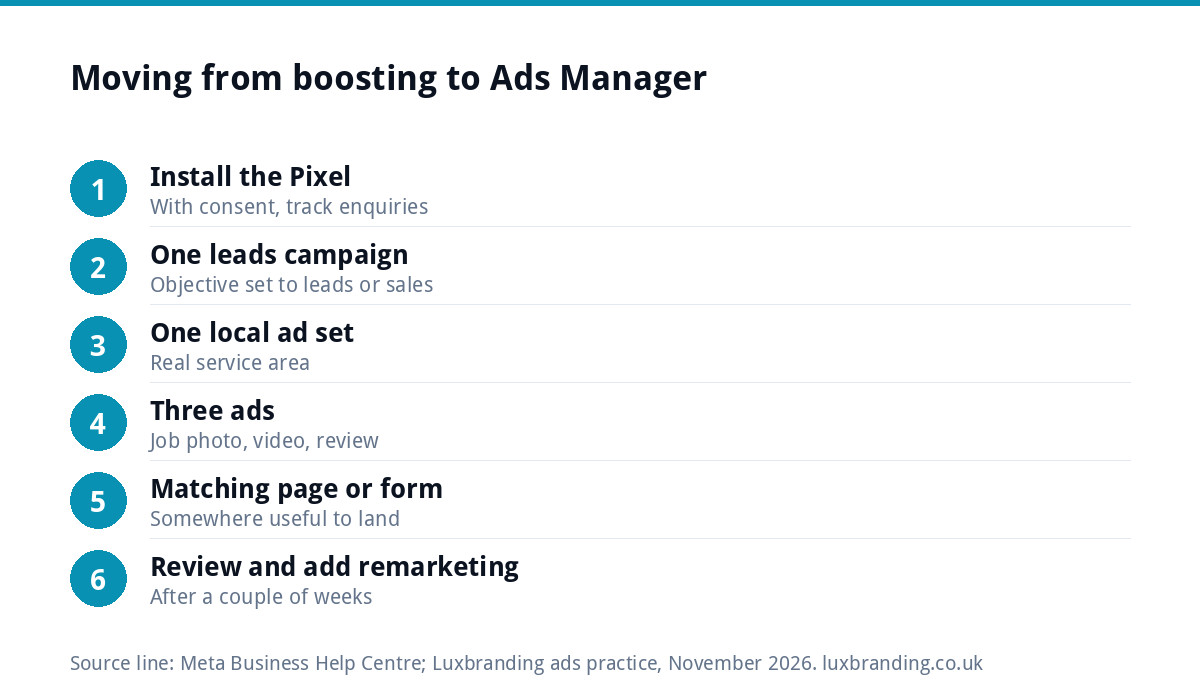
Moving from boosting to Ads Manager
You do not need a complicated setup. A simple first structure for a local business:
- Install the Meta Pixel on your website, with cookie consent, and track your enquiry form or thank-you page.
- Create one campaign with a leads or sales objective.
- Set one ad set for your real service area and a sensible daily budget.
- Add three ads: a finished job photo, a short video and a customer review graphic.
- Send clicks to a matching page or use an instant form with a few questions.
- Leave it for a couple of weeks, then pause the weakest ad and add a new one.
- Add a remarketing campaign for website visitors once traffic builds.
Good-looking, consistent creative makes a real difference. Our social media design service covers templates you can reuse across posts and ads, and a focused landing page (£199) gives ad clicks somewhere useful to land.
Be clear it is an ad
Boosted posts and Ads Manager ads are both advertising, and the same rules apply. GOV.UK’s overview of marketing and advertising law says all marketing must accurately describe the product or service and be legal, decent, truthful and honest. That covers prices in your ads, “before and after” photos and any claims about speed or quality. Meta labels paid posts as sponsored, but your words still need to be accurate.
A worked example: a dog groomer’s two approaches
A mobile dog groomer in Bristol boosted her favourite photos every few weeks. The posts gathered likes, mostly from other dog lovers across the country, and the phone barely rang. She moved to Ads Manager with one leads campaign limited to her real service postcodes, three ads (a before-and-after, a short clip of the van and a review graphic) and an instant form asking for the dog’s breed and her customer’s postcode.
Now she can see what each enquiry costs and which ad brings them. She still boosts the occasional post, such as a Christmas slot announcement, but treats it as a bonus rather than the plan.
The biggest change was not the tool itself but what she measured. Instead of asking how many people saw a post, she now asks how many grooming bookings came from each week’s spend. That single question decides whether to keep an ad running, change the photo or stop.
Getting it managed for you
If you would rather not learn Ads Manager yourself, our Meta ads management is from £199 a month, with your ad spend paid directly to Meta and no markup on it. We set up the Pixel, campaigns, audiences, creative direction and reporting on enquiries. If you also want your posts planned and published, see our social media management. Every price is on our pricing page.
Get the UK SEO DIY Audit Checklist (free)
A 32-point checklist UK SMEs can run against their own website in an afternoon. Surfaces the quick wins before paying for a paid audit.
No spam. UK GDPR compliant. We only use your email to send this resource, unless you tick the box to hear from us.
Frequently asked questions
Is boosting a Facebook post worth it? +
For a small, short push behind a post that is already doing well, or a time-bound announcement, it can be. As an ongoing way to get enquiries it usually is not, because boosting mostly optimises for engagement, offers basic targeting and makes it hard to track which spend produced customers.
What is the difference between a boosted post and an ad? +
A boosted post turns one existing post into an ad with simple settings for goal, audience, budget and duration. Ads Manager is Meta's full tool, with campaign objectives such as leads and sales, website-visitor audiences, several ad versions, placement control and conversion tracking through the Meta Pixel.
How much should I spend on a boosted post? +
Keep it small and short, because boosting is best for awareness rather than enquiries. A modest budget over a few days behind a post that is already getting local engagement is a reasonable test. If you find yourself boosting every week, move that budget into an Ads Manager campaign with tracking.
Do I need the Meta Pixel to advertise? +
Not to run a basic ad, but you need it to track enquiries and sales from your website and to show ads to people who visited. Install it with cookie consent, track your thank-you page or form, and choose a leads or sales objective so Meta looks for people likely to enquire.
Can Luxbranding run my Facebook and Instagram ads? +
Yes. Our Meta ads management is from £199 a month, with your ad spend paid directly to Meta and no markup. We set up the Pixel, campaigns, audiences, creative direction and reporting focused on enquiries. A landing page for your ads is £199, and every price is on our pricing page.