
Quick answer
A wholesale portal is a login-only area of your website where approved trade buyers see trade prices, minimum order quantities and payment terms, and reorder without emailing you. Start simple: an application form, manual approval, one trade price list and clear minimums. WooCommerce and Shopify can both do this; fully custom portals are a bigger, separately quoted build.
Small brands usually start wholesale by accident. A gift shop asks to stock your candles, a farm shop wants your chutney, a salon wants to retail your hair oil. At first, a PDF price list and an emailed invoice work fine. By the tenth stockist, you are retyping orders, chasing who is on which price and answering “what is the case size again?” every week. This guide covers when a portal is worth it, the ways to build one, how to set trade prices and terms, and what trade buyers actually need from it.
Do you need a wholesale portal yet?
| Your wholesale today | Best setup | Why |
|---|---|---|
| One to five stockists, occasional orders | PDF trade price list, orders by email, invoice manually | Simple, no build cost, personal service |
| Five to fifteen stockists, regular reorders | Trade login on your existing online shop | Saves retyping; buyers reorder themselves |
| Fifteen or more, several price tiers or payment terms | Full wholesale portal with tiers, terms and order history | Admin time now costs more than the build |
| Integration with stock, accounts or a warehouse | Custom portal or web application | Off-the-shelf tools stop fitting |
The deciding factor is admin time. If you spend more than an hour or two a week turning emails into orders, a portal pays for itself quickly.
What a good wholesale portal does
- Hides trade prices from the public and shows them only to approved accounts.
- Applies minimums: a minimum first order value, a minimum quantity per product, or sales in case packs of six or twelve.
- Supports price tiers if you offer better rates to larger stockists or distributors.
- Offers the right payment options: card upfront for new accounts, invoice terms for established ones.
- Keeps order history so buyers can reorder last month’s order in a few clicks.
- Provides trade resources: product photos, descriptions, barcodes and spec sheets for the stockist’s own shop or website.
Five ways to build one
| Approach | How it works | Good for | Limits |
|---|---|---|---|
| Password-protected price page | One shared password reveals a trade price list | Testing interest | No ordering, shared passwords leak |
| Separate wholesale shop | A second shop just for trade | Very different trade and retail ranges | Two sets of products and stock to manage |
| WooCommerce with trade roles | Approved accounts see trade prices and rules in the same shop | WordPress shops | Needs the right extensions configured carefully |
| Shopify B2B features | Company accounts with their own catalogues and pricing | Shops already on Shopify | Depends on your plan |
| Custom portal | Built around your exact process and systems | Complex pricing, integrations, larger volumes | Highest build cost |
The Shopify route
If your shop already runs on Shopify, check what your plan includes before building anything. At the time of writing, November 2026, Shopify’s help centre on B2B says the B2B features are available on the Basic, Grow, Advanced and Shopify Plus plans, but not on Starter or Retail. B2B customers are set up as companies in the admin, and you can personalise pricing, products and payment methods for each one. Plans and features change, so confirm the current details with Shopify.
The WooCommerce route
On WordPress, WooCommerce handles wholesale through customer roles: a “trade” or “wholesale” role that sees different prices, different minimums and sometimes different payment methods from retail customers. The core shop does not do all of this out of the box, so it usually involves a well-supported wholesale extension or some custom development.
Keep it to one shop where possible. A single product catalogue with retail and trade prices on each product is far easier to manage than two shops with two stock counts. Our Shopify vs WooCommerce guide compares the two platforms more broadly.
Setting trade prices and minimums
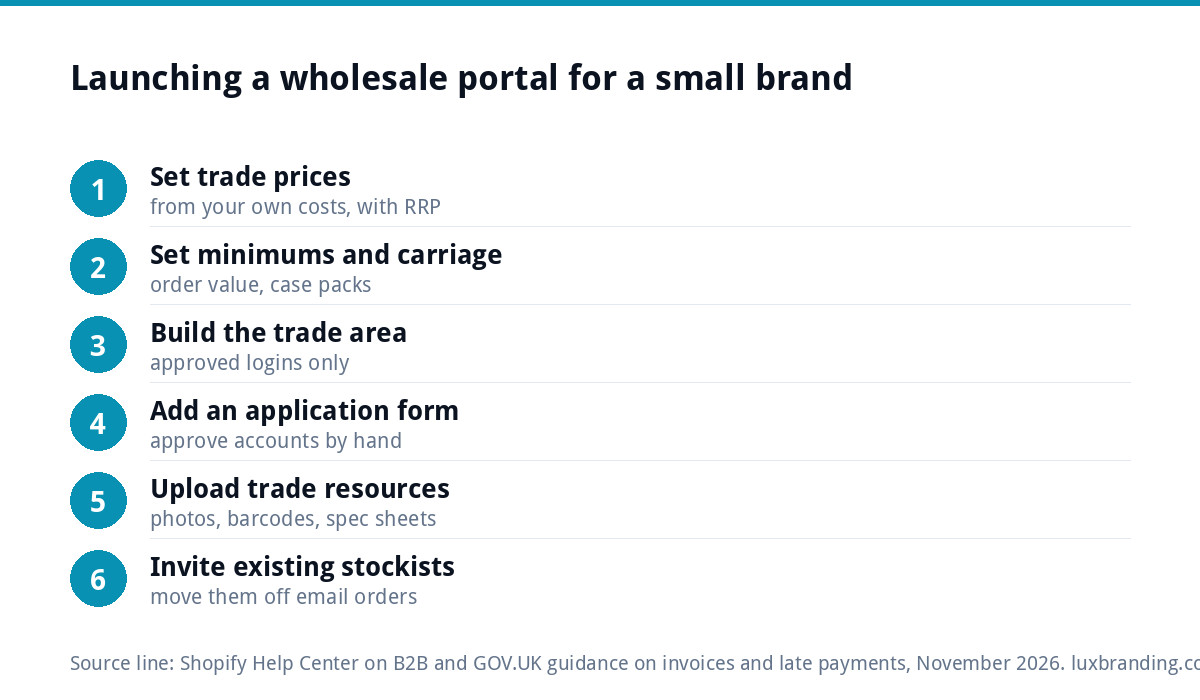
Trade buyers need room for their own margin, so trade prices sit well below your retail price. Many brands publish a recommended retail price (RRP) alongside the trade price, so the stockist can see their margin at a glance. Whatever split you choose, work it out from your own costs, including packaging, postage and card fees, not from what a competitor seems to charge.
- Set a minimum first order by value, so small orders do not cost you more to pack than they earn.
- Sell in case packs where it suits the product, such as six jars or twelve candles.
- Decide on carriage: free above a set order value, a flat charge below it.
- Keep tiers simple: standard trade and distributor is enough for most small brands.
- Write it all on one page inside the portal, so nobody has to ask.
Approving trade accounts
Do not let anyone see trade prices just by registering. Use a short application form that asks for the business name, website or social profile, shop address, type of business and expected order size. Approve accounts by hand: it takes a minute and keeps trade prices away from members of the public looking for a discount. Once approved, the buyer gets a login and sees trade prices immediately.
Payment terms and invoices
New stockists usually pay by card at checkout. Established ones often ask for invoice terms, commonly 30 days. If you offer terms, put them in writing. GOV.UK’s guidance on late commercial payments says that if no payment date is agreed, payment is late 30 days after the customer receives the invoice or the goods are delivered, whichever is later, and you can then claim statutory interest.
Your invoices need the basics set out on GOV.UK’s page on what an invoice must include: a unique number, your business and the customer’s details, a description, the supply and invoice dates, and the amounts. It also says you must use VAT invoices if you and your customer are both VAT registered, which is common with trade buyers.
What trade buyers need from you
Stockists sell your products to their own customers, so give them what makes that easy:
- High-resolution product photos on plain backgrounds, plus lifestyle shots.
- Short and long product descriptions they can reuse.
- Barcodes, case sizes, dimensions and weights.
- Ingredients, allergens or safety information where relevant, matching the packaging. Our product label design guide covers what labels must show.
- Point-of-sale material such as shelf cards or a small display.
Consistent branding across the range helps a small brand look established on a busy shop shelf. If your packaging is a mix of styles from different stages of the business, our packaging guide for small brands is a good place to start.
Moving existing stockists onto the portal
A portal only saves time if your stockists use it, and people who have emailed orders for two years will keep emailing unless you make the switch easy. Set up their accounts yourself, with their pricing and terms already applied, and send each buyer a short personal email with their login link and a one-paragraph explanation of what has changed.
Give them a reason to log in: their full order history in one place, live stock levels, new products shown to trade first, or a small incentive on their first portal order. For a month or two, accept email orders but reply with a link to the same products in the portal, so the habit shifts without anyone feeling pushed.
Ask two or three of your friendliest stockists to try the portal before everyone else and tell you what is confusing. Trade buyers are busy shop owners ordering between customers, often on a phone, so anything that takes more than a couple of minutes will send them back to email. Fix what they find, then invite the rest.
What it costs to build
Our e-commerce website is £499 one-off for up to 20 products on WooCommerce or Shopify, with Stripe and PayPal. A trade area with approved logins, separate prices and minimums is a member area, so it is quoted in writing before any work starts, and you know the full figure first. Fully custom portals that connect to stock, accounting or warehouse systems fall under our web applications, from £1,999. Our guide to client portals for small businesses explains how login areas work more generally, and all our prices are on the pricing page.
Get the UK Website Project Brief Template (free)
A two-page template for briefing any UK web designer: sitemap, integrations, audience and deliverables. Cuts revision rounds in half.
No spam. UK GDPR compliant. We only use your email to send this resource, unless you tick the box to hear from us.
Frequently asked questions
What is a wholesale portal? +
It is a login-only area of your website for approved trade buyers. They see trade prices, minimum order quantities and their payment terms, place orders and reorder from their history without emailing you. Members of the public see only your retail shop. It replaces PDF price lists and orders retyped from emails.
Can WooCommerce do wholesale pricing? +
Yes, usually through customer roles, where an approved trade account sees different prices and rules from retail customers in the same shop. The core shop does not handle every wholesale feature out of the box, so it typically involves a well-supported wholesale extension or some custom development, configured carefully and tested before stockists use it.
Does Shopify have wholesale features? +
At the time of writing, November 2026, Shopify's help centre says its B2B features are available on the Basic, Grow, Advanced and Shopify Plus plans, but not Starter or Retail. B2B customers are set up as companies, with pricing, products and payment methods personalised to each. Check the current details with Shopify, as plans change.
Should I offer trade customers payment terms? +
Many brands ask new stockists to pay by card upfront and offer invoice terms, often 30 days, only to established accounts. Put terms in writing. Under UK rules, if no date is agreed, a business payment is late 30 days after the invoice or delivery, whichever is later, and statutory interest can then be claimed.
How do I stop the public seeing trade prices? +
Do not let anyone see trade prices just by registering. Use an application form asking for the business name, website or address, business type and expected order size, then approve accounts by hand. Only approved accounts are given the trade role, so the public sees retail prices and trade prices stay private.