Quick answer
To find out who owns a domain, run a free lookup: ICANN Lookup for .com and most other endings, and Nominet’s lookup for .uk addresses. Expect the owner’s name to be hidden for privacy, so the record usually shows the registrar instead. Contact the owner through that registrar, or make an offer through a broker.
You have found the perfect name for your business, typed the .co.uk into a browser and found it taken, parked or pointing at nothing. Before you give up on it, it is worth knowing who holds it, whether it is in use and what your options are. This guide walks through the lookup step by step, explains what the record will and will not tell you, and covers what to do next, from a polite approach to a formal dispute.
What a domain lookup actually shows
Every registered domain has a registration record held by the registry for that ending and by the registrar that sold it. A lookup tool reads that record. What you get back depends on the ending and on privacy rules, but the shape is usually the same.
| Field | Usually visible? | What it tells you |
|---|---|---|
| Registrar | Yes | The company the owner bought it from, and your route to contact them |
| Registration date | Yes | How long it has been held; a very old date often means an established owner |
| Expiry or renewal date | Usually | When it is due to renew, which hints at whether it might lapse |
| Status codes | Yes | Whether it is locked, on hold or pending deletion |
| Nameservers | Yes | Where the domain points, which shows if a website or email is in use |
| Owner’s name and address | Often hidden | Redacted for individuals and many businesses |
| Owner’s email | Rarely shown | Often replaced by a contact form or relay address |
ICANN, the body that coordinates domain names, says plainly that results containing personal data may be redacted for privacy, and that what is redacted varies between registrars and registries. So a blank owner field is normal, not a sign that something is wrong.
Step by step: how to look up a domain owner
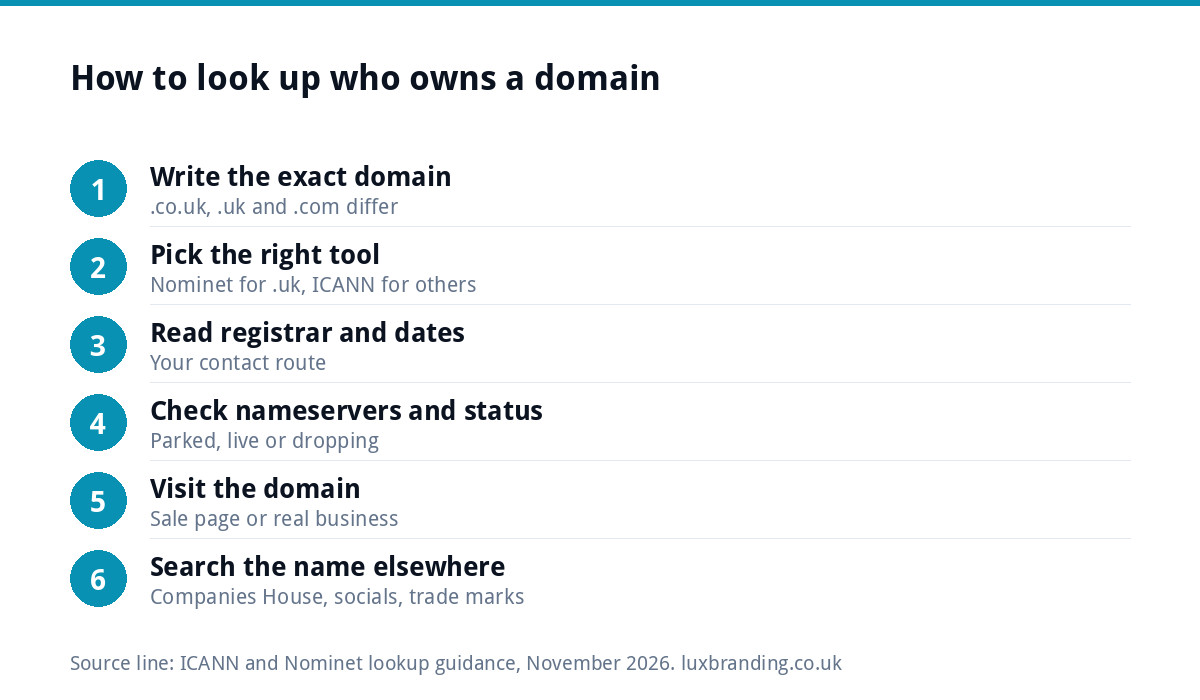
- Write down the exact domain. example.co.uk, example.uk and example.com are three separate registrations that may belong to three different people.
- Choose the right tool. For .com, .net, .org and most newer endings, use ICANN Lookup. For anything ending in .uk, use Nominet’s lookup, because Nominet runs the .uk registry.
- Read the registrar and dates first. These tell you who to approach and how settled the registration is.
- Check the nameservers and status. Parking nameservers or a “for sale” page suggest the owner is open to offers. A live website or working email suggests they are not.
- Visit the domain itself. A holding page, a sale notice or a real business all change your next move.
- Search the name elsewhere. Check Companies House, social handles and trade mark records for the same name, so you know whether the holder has a genuine business behind it.
Looking up a .uk domain
For .uk addresses the rules are a little different. According to Nominet’s consumer site, by default a .uk owner’s name and postal address are not displayed on its lookup tool unless the owner chooses to show them. In practice, a lookup on a .co.uk will usually give you the registrar, the key dates and the nameservers, and rarely a name.
That still gets you a long way. The registrar is the business that holds the customer relationship, and many offer a way to pass a message to the owner without revealing their details.
Looking up a .com and other endings
ICANN Lookup covers the generic endings such as .com, .net, .org, .shop and .online. It uses the newer registration data protocol rather than the old WHOIS system, but the result reads much the same. Look for the registrar’s abuse or contact details, which are always listed, and for any “registrant contact” form link provided by the registrar.
If the owner uses a privacy or proxy service, the name shown will be the service, not the person. That is legitimate and common.
Two habits make the result easier to read. First, note the “updated” date as well as the creation date: a record changed last week may mean a recent sale or transfer. Second, look at the registrar’s name on its own website, because some registrars run domain marketplaces and will show the same name listed for sale with a guide price.
Why the owner’s name is usually hidden
Data protection law treats an individual’s name and home address as personal data, and registries and registrars have tightened what they publish as a result. Plenty of sole traders register domains in their own name and do not want their home address in a public database, which is a good thing for you as a business owner too.
It does mean a lookup is the start of the trail, not the end. Treat the registrar as the contact point and the website, if there is one, as the best clue to who is behind it.
What the result means for your plans
| What you find | Likely situation | Sensible next step |
|---|---|---|
| Live website for a real business | In active use | Pick a different name or ending; do not chase it |
| Parked page with “for sale” | Held by an investor | Make an offer through the listed marketplace or a broker |
| Blank page, registered years ago | Forgotten or held for the future | Send a short, polite message via the registrar |
| Status “pending delete” | About to drop | Watch it with your registrar’s back-order service |
| Uses your trade mark to mislead | Possible abusive registration | Take advice on a dispute before contacting them |
How to approach the owner
If you decide to make contact, keep it short and businesslike. Say who you are, that you are interested in the domain, and ask whether they would consider selling. Do not lead with how important it is to you or how much you have already spent on branding, because that sets the price.
- Use the registrar’s contact route or the email on any sale page.
- Set a ceiling before you start and stick to it.
- Never pay outside an escrow or registrar transfer process.
- Get the transfer confirmed in your own account before you treat it as yours.
If the price is out of reach, a slightly different name, a hyphen-free alternative or a different ending is often the better business decision. Our guide to UK domain names covers how .co.uk, .uk and .com compare.
When it might be a dispute, not a purchase
If someone has registered a name that matches your registered trade mark and is using it to trade off your reputation, buying it back is not your only option. For .uk domains, Nominet’s Dispute Resolution Service handles these cases, and from 7 July 2026 new complaints are submitted through WIPO, which now administers the service on Nominet’s behalf. Generic endings such as .com have their own dispute policy.
A dispute needs evidence of your rights in the name and of abusive registration or use. Having a registered trade mark makes that far easier, which is one reason to read our guide on logo copyright and trade marks in the UK before you launch. This is general guidance, not legal advice; for a contested case, speak to a solicitor or trade mark attorney.
Check before you commit to a name
The cheapest domain problem is the one you avoid. Before you pay for a logo or print anything, check the name in one pass: domain availability, Companies House, the main social platforms and the trade mark register. Our free business name checker runs the domain and register checks in seconds, and our list of business name ideas helps if you need a fresh option.
- Is the .co.uk free, and ideally the .com as well?
- Is there a company with the same or a confusingly similar name?
- Are the social handles free, or close enough?
- Is the name already a registered trade mark in your sector?
Keep your own domain safe
While you are thinking about who owns other people’s domains, check your own. Make sure it is registered in your business’s name, not your web designer’s, that auto-renew is on and that the contact email is one you still read. Domains that lapse because a renewal notice went to an old inbox are a common way for businesses to lose their address.
If you want someone to keep an eye on renewals, hosting, SSL and email in one place, our Website Management and Hosting is £20 a month and includes UK hosting, SSL, daily backups and up to three business mailboxes. If the name hunt ends with a new name, our Brand Identity Design at £299 covers the logo, colours, typography and brand guidelines; see our pricing for everything else.
Get the UK Website Project Brief Template (free)
A two-page template for briefing any UK web designer: sitemap, integrations, audience and deliverables. Cuts revision rounds in half.
No spam. UK GDPR compliant. We only use your email to send this resource, unless you tick the box to hear from us.
Frequently asked questions
Is it free to look up who owns a domain? +
Yes. ICANN Lookup and Nominet's lookup tool are both free to use. They show the registrar, key dates, status and nameservers. The owner's name and address are often hidden for privacy, so the lookup tells you who to contact rather than handing you a person's details. Paid services add history and monitoring, which most small businesses do not need.
Why does the lookup not show the owner's name? +
Personal data such as an individual's name and home address is protected, so registries and registrars redact it. For .uk domains, the owner's name and postal address are not displayed by default unless the owner opts in. The registrar is still listed, and many registrars offer a way to pass a message to the owner without revealing who they are.
Can I buy a domain someone else already owns? +
Sometimes. If it is parked or listed for sale, make an offer through the marketplace or a broker, set a ceiling first and only pay through escrow or a registrar transfer. If it hosts a real business, it is rarely worth chasing. A slightly different name or another ending is often the more sensible choice for a new business.
What can I do if someone registered my business name as a domain? +
If they registered it to take advantage of your trade mark or reputation, you may have grounds for a dispute. For .uk domains, complaints under Nominet's Dispute Resolution Service are submitted through WIPO from 7 July 2026. You will need evidence of your rights in the name and of abusive registration or use, so take legal advice for a contested case.
How do I stop losing my own domain? +
Register it in your business's name rather than your web designer's, turn on auto-renew, and keep the contact email current so renewal notices reach you. Check the record once a year with a lookup tool. A lapsed domain can be registered by someone else quickly, taking your website and email address with it.