Quick answer
Uptime monitoring checks your website every few minutes from outside and alerts you by email or text the moment it stops responding. Free plans are enough for most small businesses: at the time of writing, UptimeRobot’s free tier checks up to 50 addresses every five minutes. Monitor your homepage, contact page and any booking or checkout page.
Most small business owners find out their website is down from a customer, a lost enquiry or a quiet week. By then it may have been offline for days. Uptime monitoring turns that into a text message within minutes. This guide explains what monitoring checks, which pages to watch, how to set it up for free, what to do when an alert arrives, and when it is worth handing the job to someone else.
What uptime monitoring actually does
A monitoring service sends a request to your website at a fixed interval, from servers in different locations, and records whether the site answered and how quickly. If it fails to respond, returns an error or responds without the content it expects, the service sends you an alert. When the site recovers, you get a second message, and the outage is logged with its start time and length.
Most services also measure response time on every check, so over a few weeks you build up a simple record of how fast your site answers at different times of day. That record is useful evidence if you ever need to raise a performance problem with your host.
It is not the same as your host’s internal monitoring. Your host can see its own servers; an outside monitor sees what your customers see, including problems with your domain, DNS or certificate that the host would never notice.
Why small business sites go down
Outages are rarely dramatic. The common causes are ordinary:
- The domain or hosting renewal failed because the card on file expired.
- An SSL certificate expired and browsers started blocking the site.
- A plugin or theme update broke the site, showing a blank page or a critical error.
- The host had a server problem or ran out of resources during a traffic spike.
- A DNS change, often made while switching email provider, pointed the domain somewhere else.
- The site was hacked and taken offline, or started redirecting visitors elsewhere.
Several of these leave the site “up” in a technical sense while showing visitors an error. That is why a good monitor checks for content, not just a response.
Free and paid monitoring compared
There are many monitoring services; we use UptimeRobot here as an example because its plans are published clearly. At the time of writing, November 2026, its pricing page lists a free plan for personal and commercial projects with 50 monitors and a five-minute interval, and a Solo plan from €12 a month on annual billing with 60-second checks. Prices change, so check the current page.
| Feature | Typical free plan | Typical paid plan |
|---|---|---|
| Check interval | Every 5 minutes | Every 30 to 60 seconds, or faster |
| Number of monitors | Plenty for a small site | More, plus extra monitor types |
| Alerts | Email and app notifications | Adds SMS, voice and team integrations |
| Keyword checks | Often included | Included |
| SSL and domain expiry warnings | Sometimes included | Included |
| Status page | Basic | Branded, on your own domain |
| History kept | Short | Longer, for reporting |
For a trades or service business, a five-minute interval is fine. The difference between knowing in one minute and knowing in five rarely matters; the difference between knowing in five minutes and finding out next Tuesday matters a great deal.
Which pages to monitor
- Your homepage. The basic “is the site up” check.
- Your contact or quote page. This is where enquiries come from, and it can break on its own.
- Booking or checkout pages. If you take bookings or payments, monitor the page where they happen.
- Any subdomain you rely on, such as a client portal or a shop hosted elsewhere.
- Your domain and certificate expiry dates, if the service offers it, so you get a warning weeks before a lapse.
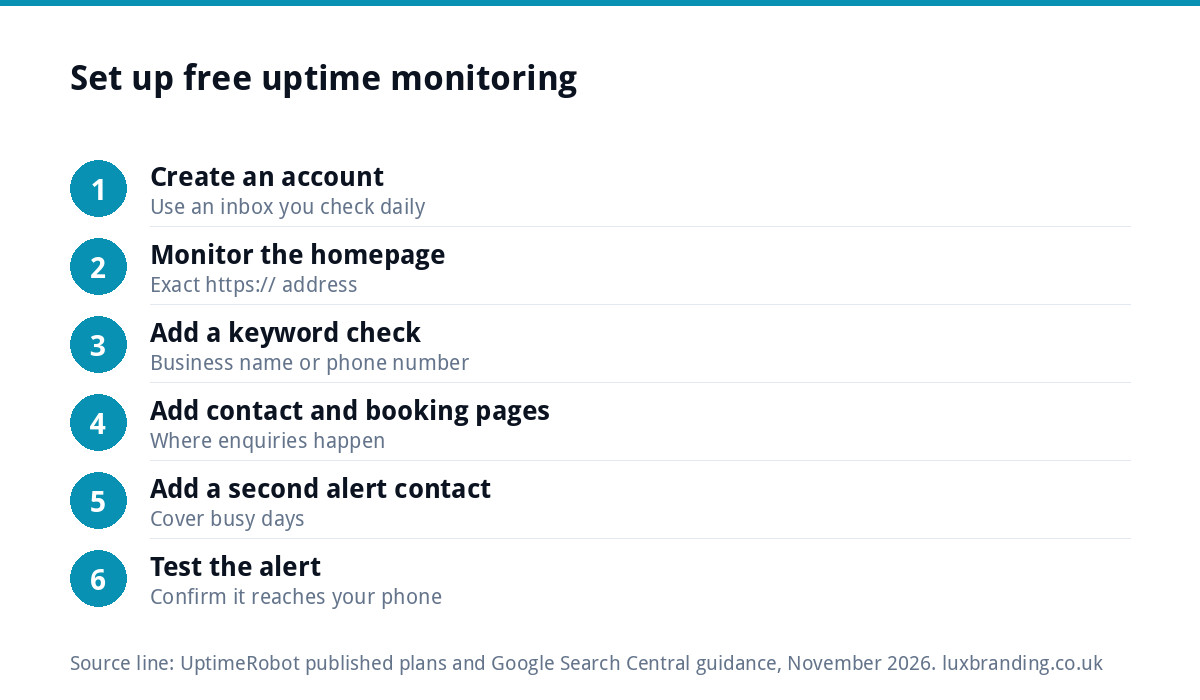
Setting up free monitoring in 15 minutes
- Create an account with a monitoring service, using a business email address you check daily.
- Add an HTTPS monitor for your homepage, using the exact address customers use.
- Turn on a keyword check: choose a phrase that appears on the page, such as your business name or phone number, so a blank or error page counts as down.
- Repeat for your contact page and any booking or checkout page.
- Add a second alert contact, such as a partner or office manager, so alerts are not missed when you are on a job.
- Install the app on your phone and allow notifications.
- Test it: ask your host to pause the site briefly, or point a test monitor at a page that does not exist, and confirm the alert arrives.
What to do when an alert arrives
| What you see | Likely cause | First move |
|---|---|---|
| Site not responding at all | Hosting or DNS problem | Check your host’s status page, then contact their support |
| Security warning in the browser | Expired SSL certificate | Ask your host to reissue it |
| Blank page or critical error | Faulty update or plugin conflict | Restore the last backup or roll back the update |
| Registrar parking page | Domain renewal failed | Renew immediately at your registrar |
| Unexpected content or redirects | Possible hack | Follow a hack recovery plan before anything else |
| Down for a few minutes, then back | Brief server blip | Note it; act if it keeps happening |
If the site has been compromised, our guide to what to do when your website is hacked sets out the order of work.
A worked example
Picture a hypothetical Norwich landscaper who sets up free monitoring on a Friday afternoon: homepage, quote page and the page that holds the garden design booking form, each with a keyword check on the business phone number. The following Sunday morning, the quote page alert fires while the homepage stays green. The cause turns out to be an automatic plugin update that broke the form page. Because the alert arrived within minutes, the update is rolled back from Saturday’s backup before the Monday rush of enquiries. Without the monitor, the first sign would have been a suspiciously quiet week.
Telling customers while you fix it
If an outage is likely to last more than an hour, tell people where they will look. Post a short update on your Google Business Profile and main social account with your phone number, and make sure your voicemail mentions it if calls spike. Customers forgive a short outage far more readily than silence.
Planned downtime: do it properly
Sometimes you take the site down on purpose, for a redesign or a move. Google’s guidance on temporarily pausing a website says that for an urgent one or two days offline, the site should return an informational page with a 503 status code, and that longer pauses need an indexable placeholder page instead. Pause your monitors during planned work so you do not get a flood of false alarms, and remember to switch them back on.
Uptime is one part of resilience
Monitoring tells you something is wrong; it does not fix it. Recovery depends on having a recent backup and someone who knows how to restore it. The National Cyber Security Centre’s small organisations guide to cyber security puts backing up your important data first on its list of steps, alongside protecting devices and accounts. For a website, that means automatic daily backups stored away from the server itself.
Speed matters too. A site that technically responds but takes ten seconds to load loses visitors almost as surely as one that is down; our Website Speed Optimisation service is £99 if your monitor’s response times look slow.
A monthly check that takes ten minutes
- Open your monitoring dashboard and look at last month’s uptime and response times.
- Check the expiry dates of your domain and SSL certificate.
- Confirm alert contacts are still correct after any staff changes.
- Send a test enquiry through your contact form and confirm it arrives.
- Make sure the latest backup exists and is recent.
Our WordPress maintenance guide covers the rest of a sensible routine, and our breakdown of website maintenance costs shows what it costs to hand it over.
Or let us watch it for you
If you would rather not be the person who gets the 2am alert, our Website Management and Hosting is £20 a month and includes UK hosting, SSL, daily backups, security monitoring, automatic updates and up to three business mailboxes. You can see every service price on our pricing page.
Get the UK Website Project Brief Template (free)
A two-page template for briefing any UK web designer: sitemap, integrations, audience and deliverables. Cuts revision rounds in half.
No spam. UK GDPR compliant. We only use your email to send this resource, unless you tick the box to hear from us.
Frequently asked questions
Is free uptime monitoring good enough for a small business? +
Usually, yes. A free plan that checks every five minutes and sends email or app alerts catches outages long before a customer would mention them. Paid plans add faster checks, text and voice alerts, longer history and branded status pages, which matter more to online shops and booking-heavy businesses than to a typical service website.
How often should my website be checked? +
Every five minutes is plenty for most small business sites. Faster checks, such as every minute, suit online shops or booking systems where each minute offline costs sales. What matters most is that someone receives the alert and acts on it, so add a second contact who can respond when you are busy on a job.
What is a keyword check in uptime monitoring? +
A keyword check confirms that a chosen phrase, such as your business name or phone number, appears on the page. It catches situations where the server responds but the page is broken, such as a blank screen, a critical error or a registrar parking page. Without it, a monitor can report a broken site as up.
Should I tell Google when my website is down for maintenance? +
For short planned downtime, Google's guidance is to return an informational page with a 503 status code, which signals a temporary problem. For longer pauses it recommends an indexable placeholder page instead. Pause your uptime monitors during planned work so you are not flooded with alerts, then switch them back on afterwards.
Does my web host already monitor my website? +
Your host monitors its own servers, but it may not notice problems a customer would see, such as an expired domain, a DNS change, an expired certificate or a broken page on a working server. An outside monitor checks your site the way visitors reach it, which is why it is worth having alongside your host's own checks.