Quick answer
Google Sites can work as a simple, low-cost business website: you can connect your own domain, add Google Analytics and publish a few clear pages in an afternoon. It struggles once you need online payments, bookings, strong search visibility or a distinctive design. Treat it as a starting point, then move to a proper site when enquiries matter.
If you already use Google for email and documents, Google Sites looks like an easy win: no developer, little or no extra cost, and a site live by tonight. For some businesses that is exactly right. For others it quietly costs them work. This guide sets out what Google Sites does well, where it falls short for a business, a quick test to decide, and how to move on when the time comes.
What Google Sites is
Google Sites is Google’s drag-and-drop website builder. You build pages from blocks of text, images, buttons and embedded Google content such as Maps, Calendar, Docs and YouTube videos, then publish. It is designed for simplicity, which is both its strength and its limit: there are few settings to get wrong, and few to get right either.
It is widely used for internal team sites, school projects and event pages. As a public-facing business website it is a more modest tool, and it helps to be clear about what you need the site to do before you choose it.
What Google Sites does well
- Cost. The builder comes with a Google account, so for most small businesses the main outlay is the domain. Check Google’s current terms, as they can change.
- Speed of setup. A tidy three or four page site can be built in an afternoon by anyone comfortable with Google Docs.
- Google integration. Maps, Calendar, Forms and Drive files drop straight into pages.
- Your own domain. Google’s help centre confirms you can use a custom domain for a site, connect up to five custom domains to one site, and that changes can take up to 48 hours to become visible.
- Basic analytics. You can add a Google Analytics property to collect basic visitor data.
- Mobile-friendly by default. Layouts adapt to phones without extra work.
Where it falls short for a business
The limits show up as soon as the website has to do more than describe you.
- Selling and payments. There is no shop or checkout in the editor; you would be embedding an outside service or linking away.
- Bookings and quotes. A Google Form can collect enquiries, but proper booking with confirmations, deposits and reminders means another tool.
- Search control. You get far less control over page titles, descriptions, structured data and page addresses than on a full website platform, which makes it harder to compete in local search.
- Design. Themes are clean but limited, and Sites built by different businesses tend to look alike.
- Editing on the go. Google’s own help page on what you need to use Google Sites states that visitors can view sites on a phone or tablet, but editing must be done on a computer. For a tradesperson who runs the business from a phone, that matters.
- Business email. Sites does not give you a mailbox; email on your domain is a separate service.
Google Sites vs a proper business website
| Need | Google Sites | Custom website |
|---|---|---|
| A few pages saying who you are | Good | Good |
| Your own domain | Yes | Yes |
| Contact form to your inbox | Through an embedded Google Form | Built in and branded |
| Online payments or shop | Only via outside tools | Built in |
| Control of titles, descriptions and schema | Limited | Full |
| Distinctive design matched to your brand | Limited | Yes |
| Edit from your phone | No; editing needs a computer | Depends on the build |
| Upfront cost | Domain only | From a few hundred pounds |
Who Google Sites suits
Google Sites is a sensible choice if most of these are true:
- You are testing an idea and do not yet know if it will become a business.
- Most work comes from word of mouth, and the site just needs to confirm you are real.
- You do not take payments or bookings online.
- You are not trying to win new customers from Google search.
- You are happy to edit from a laptop.
Examples include a club, a one-off event, an internal staff hub, or a sole trader who wants a simple online business card while getting started.
| Your situation | Google Sites? | Why |
|---|---|---|
| Testing a side business idea | Yes, to start | Free and quick; easy to replace later |
| Busy trade fed by word of mouth | Possibly | Fine as proof you exist, but weak for new local customers |
| Want to rank for local searches | No | Too little control over search settings |
| Take bookings or deposits online | No | Needs outside tools bolted on |
| Sell products online | No | No shop or checkout in the editor |
| Internal staff or club hub | Yes | This is what it does best |
A worked example
Picture a hypothetical window cleaner in Swindon who starts out with a three-page Google Site linked from his Google Business Profile. It does its job for the first year: customers who hear about him from neighbours can check he is real and find his number. In year two he adds conservatory and gutter cleaning and wants to appear when people search for those services in nearby towns. He also wants a quote form that asks for property type and postcode. At that point the free site has done its job, and a small custom site with a page for each service and each main area is the better tool.
Signs you have outgrown it
Most businesses that start on a free builder hit the same moments. Our guide to signs you have outgrown a DIY website covers them in detail, but on Google Sites the common triggers are:
- Competitors with similar services appear in local search and you do not.
- Customers ask to book or pay online and you have to send them elsewhere.
- You want a quote form that asks the right questions and lands in your inbox in a tidy format.
- Your logo, van and printed material look professional, and the website does not.
- You are spending evenings fighting the layout instead of running the business.
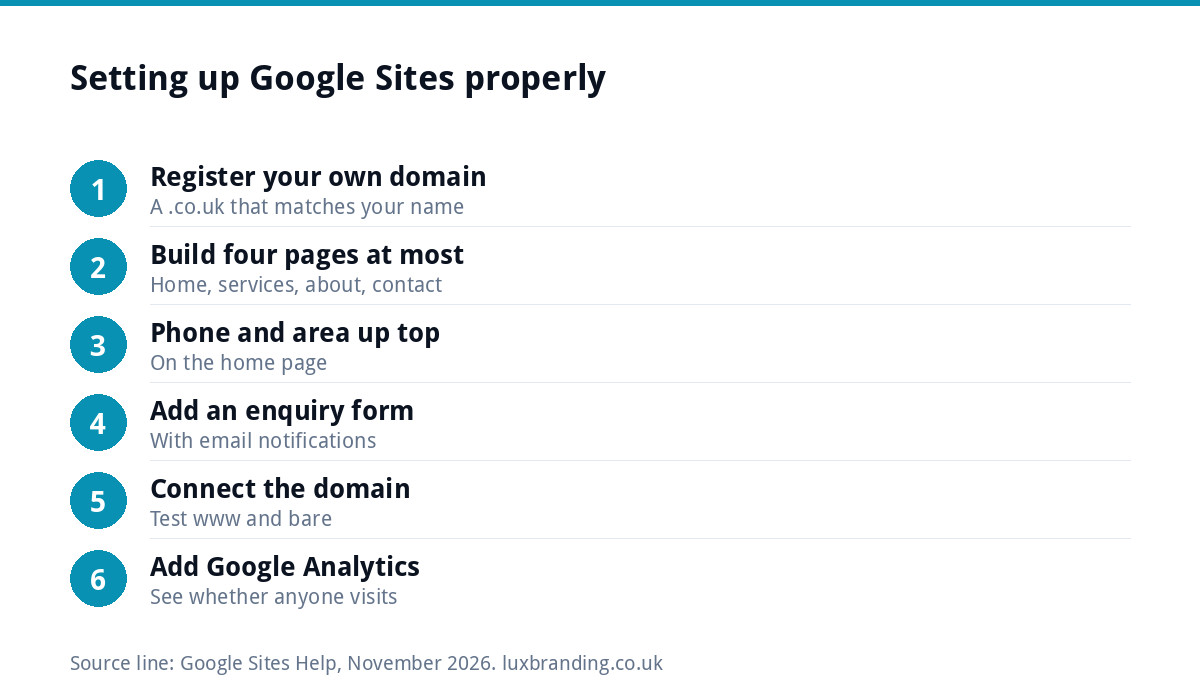
Setting up Google Sites properly, if you start there
- Register your own domain first, ideally a .co.uk that matches your business name. Our guide to UK domain names explains the choices.
- Build four pages at most: home, services, about and contact.
- Put your phone number and service area at the top of the home page.
- Add a Google Form for enquiries and set up email notifications so responses do not sit unread.
- Connect your custom domain and test both the www and bare versions.
- Add Google Analytics so you can see whether anyone visits.
- Link it from your Google Business Profile, which will do more for local enquiries than the site itself.
Moving on from Google Sites
There is no one-click way to move a Google Sites build onto another platform, so moving means rebuilding the pages elsewhere. The good news is that a small Sites build is quick to recreate. Keep the same domain, recreate the pages with better structure and search settings, and point the domain at the new site. Because you own the domain, you keep your address, your email and your Google Business Profile link throughout.
Before you go, list every page and every form, note which pages get visits in Analytics, and make sure anything worth keeping, such as text and photos, is saved in your own files.
Alternatives worth comparing
If Google Sites feels too limited but you are not ready for a full website, there are steps in between. Hosted builders offer more design control for a monthly fee; our comparison of AI website builders vs custom sites sets out the trade-offs. A one-page site can be the right first proper website for a sole trader. And if cash flow is the obstacle, a pay-monthly site spreads the cost.
A proper site without a big bill
Our One-Page Website is £299 and our Custom WordPress Website is £499 for up to eight pages, both hand-coded with no page builder, mobile-first, with an SEO foundation, contact forms connected to your inbox and a written CMS walkthrough. You own the code and can host anywhere. If you would rather spread the cost, our Pay Monthly Website is £79 a month on a 12-month minimum term with hosting included. Use our website cost calculator for a quick estimate, or see every price on our pricing page.
Get the UK Website Project Brief Template (free)
A two-page template for briefing any UK web designer: sitemap, integrations, audience and deliverables. Cuts revision rounds in half.
No spam. UK GDPR compliant. We only use your email to send this resource, unless you tick the box to hear from us.
Frequently asked questions
Is Google Sites free for a business? +
The builder comes with a Google account, so for most small businesses the main cost is their own domain name. Business email on your domain is a separate service, and Google offers domain purchase through a Google Workspace plan. Check Google's current terms before relying on any feature, because what is included can change.
Can I use my own domain with Google Sites? +
Yes. Google's help centre confirms you can connect a custom domain to a published site, and up to five custom domains to one site. Changes can take up to 48 hours to show. If you use a work Google account, your administrator may need to set it up. Test both the www and bare versions afterwards.
Is Google Sites good for SEO? +
It can be found in Google, but it gives you far less control over page titles, descriptions, structured data and page addresses than a full website platform. That makes it harder to compete for local searches. If winning new customers from search matters, a properly built site with an SEO foundation is the better tool.
Can I sell products or take bookings on Google Sites? +
Not with built-in tools. You would embed or link to outside services for payments and bookings, which can feel disjointed for customers. A Google Form can collect enquiries. If online sales or paid bookings are part of the business, a website built for them is usually simpler and more trustworthy.
Can I move my Google Sites website to WordPress? +
There is no one-click transfer, so the pages are rebuilt on the new platform. A small Sites build is quick to recreate. Keep your domain, save your text and photos, note which pages get visits, then point the domain at the new site so your address, email and Google Business Profile link stay the same.