
Quick answer
When your website is finished, your web designer should hand over: the domain registered in your name, your own hosting login, an administrator account on the website, access to Google Analytics, Search Console and your Business Profile, all licences, a recent backup, the design files and fonts, and written confirmation that you own the site.
Most website disputes start years after launch, when the designer has moved on and nobody else can log in. A clean handover on day one prevents that. This guide is the checklist to send before the final invoice is paid, with what each item is for and how to check you really have it.
Why the handover matters more than the launch
A launched website looks finished, but if every login sits with the person who built it, you do not really control your business’s online presence. You cannot change hosts, add a page, fix an email problem or bring in a new developer without going back to them. If they are unavailable, ill or in dispute with you, the site is stuck.
A good designer will expect to hand everything over and will not be offended by a checklist. If you are already in a situation where you cannot edit your own site, our guide to when you cannot update your own website covers how to get control back.
The website handover checklist
| Item | What you should have | Why it matters |
|---|---|---|
| Domain name | Registered in your or your company’s name, with your own registrar login | Whoever controls the domain controls the website and email |
| Hosting account | Your own login, or written terms if the designer hosts it | Lets you move host or restore the site |
| DNS settings | A copy of the records, and access to where they are managed | Email and the website both depend on them |
| Website admin | An administrator account in your name | Lets you add users, pages and changes |
| Google accounts | Ownership of Analytics, Search Console, Tag Manager and Business Profile | Years of data stay with the business |
| Admin access to the business mailboxes | Staff changes and password resets | |
| Licences | Theme, plugin, font and stock image licences in your name or documented | Unlicensed items can stop updating or create legal risk |
| Backup | A recent full copy of files and database | A fallback if anything goes wrong |
| Design files | Source design files, logos, fonts and images used | A future designer can work from them |
| Documentation | A short guide to editing the site and any custom features | Saves paying someone to rediscover it |
| Ownership in writing | Confirmation that copyright in the site transfers to you | Settles any future question |
You can send the request in a short, friendly email before the final invoice. Something like this works:
“Thanks for the work on the new site. Before we sign off, could you send over the handover pack: confirmation the domain is registered to the company with our own registrar login, the hosting login or written hosting terms, an administrator account for us on the website, ownership of the Google Analytics, Search Console and Business Profile accounts, a list of paid licences and whose name they are in, a recent full backup, the design files and fonts, and a line confirming copyright in the site passes to us on payment. Happy to set up a quick call to go through it.”
Sending it before the last payment is not a threat; it simply makes the handover part of finishing the job, which is where it belongs. Most designers will have everything ready within a day or two.
The domain: the one item you cannot skip
The domain is the most important item on the list, because the website address and the business email both depend on it. It should be registered with you or your company as the registrant, not the designer. For .uk domains, the Nominet lookup lets you check the registration status. You also need your own login at the registrar so you can renew it, change where it points and transfer it if you wish.
Diary the renewal date. Domains that expire because the designer’s card lapsed are a common way small businesses lose their website and email overnight. Our guide to UK domain names covers renewals and transfers.
Hosting: your account or written terms
There are two acceptable arrangements. Either the hosting is in an account you own and pay for, with the designer added as a user, or the designer hosts it and you have written terms covering the price, what is included, and how you get a full copy of the site if you leave. What is not acceptable is hosting that only the designer can access, with no written exit route. For typical costs, see our guide to website hosting costs.
The website itself: admin access and licences
On a WordPress site, you need an account with the Administrator role. WordPress’s documentation on roles and capabilities describes an Administrator as somebody with access to all the administration features of a site. An Editor account lets you change pages but not add users, install updates or change settings, so it is not enough on its own.
Ask for a list of every paid theme, plugin, font and stock image used, and whose name each licence is in. Premium plugins tied to the designer’s own licence may stop receiving updates when they stop paying, which can become a security problem. Our WordPress maintenance guide explains why updates matter.
Google accounts and data
Google Analytics, Google Search Console, Google Tag Manager and your Google Business Profile should all be owned by a Google account the business controls, with the designer added as a user if they still need access. If the designer created them under their own account, ask them to transfer ownership before the project closes. Otherwise years of data on visitors, searches and enquiries can be lost when you change supplier.
Files, fonts and the design source
Ask for a folder containing the original design files (for example, Figma or Adobe files), the logo in vector formats, every image used on the site at full size, and the font files or details of where the fonts are licensed. If you ever redesign or extend the site, a new designer can start from these instead of rebuilding from screenshots.
Keep this folder somewhere the business controls, such as a shared cloud drive, not only on one person’s laptop, and check it opens on a second computer.
Ownership in writing
Copyright arises automatically when work is created, as the government’s copyright guidance explains. That means a website built for you is not automatically yours just because you paid for it; the contract or a written transfer settles it. Ask for a short statement confirming that copyright in the design, code and content created for you transfers to you on payment, with any third-party items (such as licensed fonts and stock photos) listed separately.
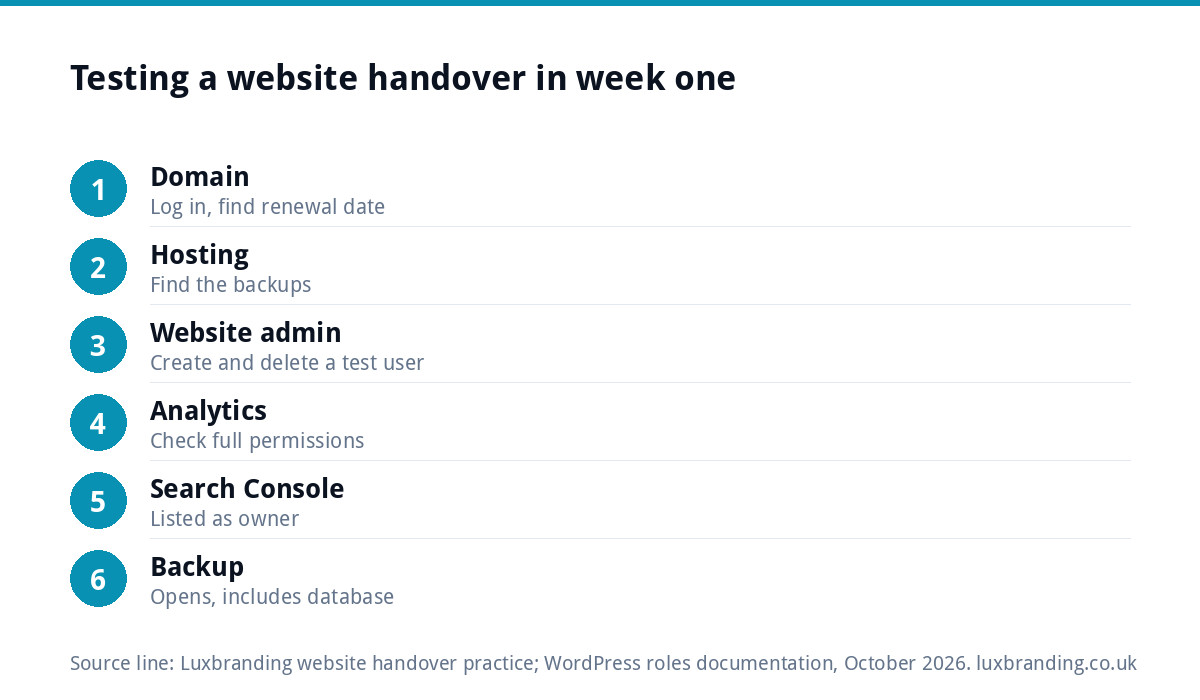
How to check the handover actually worked
| Test | How to do it |
|---|---|
| Domain | Log in to the registrar yourself and find the renewal date |
| Hosting | Log in and find the backups section |
| Website admin | Create a test user, then delete it |
| Google Analytics | Check your account is listed with full permissions |
| Search Console | Check you are listed as an owner, not just a user |
| Backup | Confirm the file opens and includes the database |
Do these tests while the designer is still engaged. It is much easier to fix a missing permission in week one than in year three.
Store the logins safely
Put every login in a password manager the business controls, not a spreadsheet or an email thread. Turn on two-factor authentication for the registrar, hosting and Google accounts. Record who has access to what, and remove former staff and suppliers when they leave. Our guide to WordPress security for small businesses covers the rest of the basics.
How we hand over websites
Our Custom WordPress Website is £499, hand-coded with no page builder and no platform lock-in: you own the code and can host it anywhere, and it comes with a written CMS walkthrough and 30 days of support. If you would rather not manage hosting yourself, our Website Management & Hosting is £20 a month with UK hosting, SSL, daily backups, security monitoring, automatic updates and up to three business mailboxes, while your accounts stay yours. Every price is on our pricing page.
Get the UK Website Project Brief Template (free)
A two-page template for briefing any UK web designer: sitemap, integrations, audience and deliverables. Cuts revision rounds in half.
No spam. UK GDPR compliant. We only use your email to send this resource, unless you tick the box to hear from us.
Frequently asked questions
What should I get from my web designer when the site is finished? +
The domain registered in your name with your own registrar login, hosting access or written hosting terms, an administrator account, ownership of Google Analytics, Search Console and your Business Profile, all licences, a recent backup, design files and fonts, short documentation and written confirmation that copyright transfers to you.
Who should own my website domain name? +
You or your company, as the registrant, with your own login at the registrar. The website and business email both depend on the domain, so if a designer registers it in their own name you can lose control of both. For .uk domains you can check the registration with Nominet's lookup tool.
Is an Editor account on WordPress enough? +
Not on its own. An Editor can change pages and posts but cannot add users, install updates or change settings. WordPress describes an Administrator as somebody with access to all the administration features of a site, so the business should hold at least one Administrator account in its own name.
Do I own my website if I paid for it? +
Not automatically. Copyright arises when work is created, so ownership depends on your contract or a written transfer. Ask for a short statement that copyright in the design, code and content created for you transfers on payment, with third-party items such as licensed fonts and stock photos listed separately.
What does Luxbranding hand over with a website? +
Our Custom WordPress Website is £499, hand-coded with no page builder and no platform lock-in: you own the code and can host it anywhere, with a written CMS walkthrough and 30 days of support. Optional Website Management and Hosting is £20 a month, and your accounts stay yours.


