Quick answer
Give every meaningful image a short, specific alt text that describes what it shows, as you would to someone on the phone, and leave alt empty for purely decorative images. Rename files before uploading, using a few descriptive words joined by hyphens, such as loft-conversion-dormer-bath.jpg. Never stuff keywords into either; Google treats that as spam.
Photos of finished jobs are among the most persuasive things on a trade or small business website, yet most are uploaded as IMG_4127.jpg with no description at all. That leaves search engines guessing and leaves screen reader users with nothing. This guide covers what alt text and file names do, how to write them well, when to leave alt empty, and a checklist for fixing the images already on your site.
Why images matter for search
Images help in three ways. They can appear in Google Images and in image results within normal search, which brings visitors. They support the page they sit on, by confirming what the page is about. And they make a page more useful to people, which is ultimately what Google is trying to reward.
Google cannot fully “see” a photo the way a person does. It combines what it can work out from the image with the text around it. Google’s own image SEO best practices describe alt text as the most important attribute for providing more metadata about an image, used alongside computer vision to understand the subject.
What alt text is and who reads it
Alt text is a short description stored in the image’s HTML code. Visitors do not normally see it. It is read aloud by screen readers for people with sight loss, shown when an image fails to load, and read by search engines.
Because it serves people first, the best test is simple: if you closed your eyes and someone read the alt text to you, would you know what the image shows and why it is there? If yes, it is probably good for search too.
Writing good alt text: examples
| Image | Weak alt text | Better alt text |
|---|---|---|
| Finished bathroom | bathroom | Walk-in shower with grey tiles and a glass screen in a loft bathroom |
| Team at work | plumber plumbers Leeds best plumber | Two engineers fitting a combi boiler in a utility room |
| Before and after driveway | image1 | Cracked concrete driveway beside the same drive relaid in block paving |
| Product photo | candle | Amber glass jar candle with a wooden lid on a linen cloth |
| Logo in the header linking home | logo | Your business name and “home page” |
Good alt text follows a few habits:
- Be specific. Name the materials, the job and the setting where they matter.
- Keep it short. One sentence is usually enough. Long descriptions belong in the body text.
- Skip “image of” or “photo of”. Screen readers already announce that it is an image.
- Use a place name only when it is true and useful, such as a job in a named town shown on a project page.
- Do not repeat the same alt text on every image on the page.
If an image contains words, such as a poster, a price list or a certificate, the alt text should include those words or the page should repeat them as real text nearby. Text baked into an image is invisible to anyone who cannot see it.
Google is direct about the opposite habit: it advises against filling alt attributes with keywords, saying it creates a negative user experience and may cause your site to be seen as spam.
When to leave alt text empty
Not every image needs a description. The W3C’s alt decision tree gives a clear method. Purely decorative images, such as a background texture or a divider, should have an empty alt attribute, so screen readers skip them. If an image repeats text that already sits next to it, an empty alt avoids saying the same thing twice. If an image is a link or button, the alt should describe where it goes or what it does, not what it looks like.
Empty is not the same as missing. An empty alt tells assistive technology to ignore the image; a missing alt can leave a screen reader reading out the file name instead, which is exactly why IMG_4127.jpg is such a poor default.
File names that help
Google suggests file names that are short but descriptive, and advises avoiding generic names such as image1.jpg or pic.gif where possible. Rename photos before you upload them, because changing a file name afterwards can break the places it is used.
- Use lowercase words separated by hyphens: oak-staircase-handrail-fitted.jpg.
- Describe the subject, not the date or camera: not 2026-10-14-001.jpg.
- Keep it to a handful of words.
- Make sure the extension matches the real file type; Google recommends this too.
Format, size and speed
Google Search supports BMP, GIF, JPEG, PNG, WebP, SVG and AVIF images. For photos, JPEG or WebP at a sensible size is the practical choice; PNG suits graphics with flat colour or transparency. The bigger risk for small sites is weight, not format: a 6MB photo straight off a phone slows the page, and slow pages lose visitors before the image ever loads.
Resize photos to roughly the largest size they will display, compress them, and let the website serve smaller versions to phones. Our guide to website speed for small businesses covers the fixes that matter most, and our website speed optimisation is £99 if you would rather have it done.
Captions and the text around images
Alt text is not the only signal. The heading above an image, the paragraph beside it and any caption all help Google and visitors understand it. A gallery of 40 untitled photos tells a search engine far less than a project page with six photos, a heading such as “Garden room in Harrogate” and a short paragraph about the job.
Captions are a natural place for the detail that sells: the materials, the timescale, the problem solved.
Original photos also beat stock images. A stock photo of a smiling plumber appears on thousands of other websites, so it tells Google nothing new about your business and tells a customer nothing about your work. Your own pictures of real jobs, even taken on a phone in good light, are unique to your site and far more convincing. Shoot in landscape, keep the area tidy, and take a wide shot plus one or two close-ups of the finish.
Fixing images on an existing site
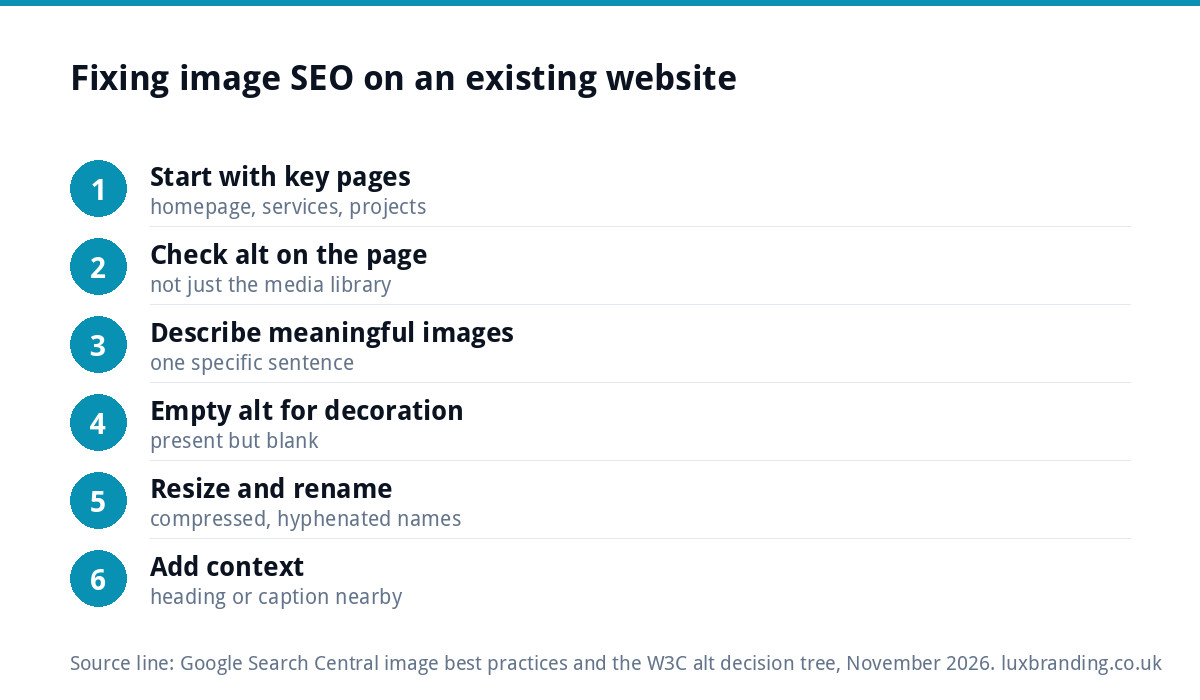
Most sites have a backlog. Work through it in order of value rather than all at once:
- Start with the pages that matter most: homepage, main service pages and your best project pages.
- Check each image’s alt text on the page itself. In WordPress, editing the alt text in the media library often does not update images already placed in pages, so open each page to check.
- Add alt text to meaningful images and set decorative ones to empty.
- Replace oversized images with resized, compressed versions using descriptive file names.
- Add a heading or caption where a gallery has no context.
Our free SEO audit tool counts the images on a page that have no alt text, which gives you a starting list. Ten pages done properly this month is better than two hundred images rushed with copy-and-paste descriptions.
Image SEO checklist
| Check | Good result |
|---|---|
| Alt text on meaningful images | Specific, one sentence, no keyword lists |
| Decorative images | Empty alt attribute, not missing |
| Linked images | Alt describes the destination or action |
| File names | Short, descriptive, hyphenated, lowercase |
| File size | Resized to display size and compressed |
| Context | Relevant heading, caption or paragraph nearby |
| Originality | Your own photos of real work where possible |
Accessibility is not optional
Alt text is first an accessibility feature. GOV.UK’s guidance on accessibility requirements is aimed at public sector websites, but it also notes that all UK service providers have a legal obligation to make reasonable adjustments under the Equality Act 2010. Describing your images is one of the simplest ways to make a site usable for more people, and it costs nothing but a few minutes per page.
Getting help with image SEO
If your site has hundreds of untitled images, or you want images handled as part of a wider plan, our SEO service is £249 a month and covers rankings, content and technical health. For a one-off picture of where you stand, read what an SEO audit costs, and see all our prices on the pricing page.
Get the UK SEO DIY Audit Checklist (free)
A 32-point checklist UK SMEs can run against their own website in an afternoon. Surfaces the quick wins before paying for a paid audit.
No spam. UK GDPR compliant. We only use your email to send this resource, unless you tick the box to hear from us.
Frequently asked questions
Does alt text help SEO? +
Yes. Google's image guidance describes alt text as the most important attribute for giving it more information about an image, used alongside computer vision. It also helps the page it sits on make sense. Its first job is accessibility, though: screen readers read it aloud, so write it for people and search benefits follow.
How long should alt text be? +
Usually one short sentence that says what the image shows and why it is there. Name materials, the job or the setting where they matter. Leave out phrases like image of or photo of, because screen readers already announce an image. Longer explanations belong in the body text or a caption, not in the alt attribute.
Should I put keywords in alt text? +
Only where they describe the image honestly. A photo of a fitted boiler can mention a combi boiler. A list of search phrases or town names is keyword stuffing, which Google says creates a poor experience and may cause your site to be seen as spam. Describe the picture and relevance takes care of itself.
Do image file names matter for SEO? +
They are a small but useful signal. Google suggests short, descriptive file names and advises avoiding generic ones such as image1.jpg. Rename photos before uploading, using lowercase words joined by hyphens, because renaming after upload can break the places the image is already used. Make sure the extension matches the real file type.
Which images should have empty alt text? +
Purely decorative images, such as background textures, dividers and flourishes, and images that repeat text already sitting next to them. The alt attribute should be present but empty, so screen readers skip the image. A missing alt is different and can lead a screen reader to read out the file name instead.