
Quick answer
Host longer videos on YouTube and embed them behind a click-to-play preview, so a £99 speed fix is never needed for them; self-host only short, silent clips of a few megabytes. YouTube streams the right quality to phones for free, while self-hosting avoids suggested videos, YouTube branding and third-party cookies on your pages.
Video is one of the best ways to show a trade or service in action: a finished extension, a before-and-after, a two-minute explainer of how your process works. It is also one of the easiest ways to make a website slow, cluttered or awkward under the cookie rules. This guide compares the two main routes, explains what each does to speed and privacy, and matches each type of video to the right approach.
The two options in plain terms
Embedding from YouTube means uploading your video to YouTube and pasting its embed code into your page. Google’s help page on embedding videos and playlists explains the steps: open the video, choose Share, then Embed, and paste the code. YouTube stores the file, converts it into different qualities and streams the right one to each device.
Self-hosting means uploading the video file to your own web hosting and placing it with the HTML video element. Nothing third-party loads, and you control exactly what appears, but your server delivers every byte and you are responsible for preparing the file properly.
There is a middle route too: paid video platforms that offer ad-free, unbranded players. They work like YouTube embeds but cost a monthly fee, so they mostly suit businesses that publish a lot of video.
YouTube vs self-hosted compared
| Factor | YouTube embed | Self-hosted file |
|---|---|---|
| Cost | Free | Uses your hosting storage and bandwidth |
| Quality on slow phones | Adjusts quality automatically | One file unless you prepare several |
| Page speed | Player scripts are heavy unless deferred | Light if the file is small and not preloaded |
| What viewers see | YouTube branding; other videos may be suggested | Only your video |
| Cookies and consent | Third-party content to account for | No third party involved |
| Discovery | Can also be found on YouTube itself | Only on your site |
| Best for | Longer videos with sound | Short, silent loops and clips |
Why embeds slow pages down
A standard YouTube embed loads a player, scripts and images as soon as the page opens, whether or not anyone presses play. One embed on a page may be tolerable; three or four on a homepage can noticeably slow it down, especially on mobile data.
The usual fix is a click-to-load preview, sometimes called a facade. The page shows a lightweight image with a play button. Only when a visitor clicks does the real player load. Visitors see the same thing, but the page loads as if the video were a single picture. Most well-built WordPress sites can do this without a heavy plugin.
Placement matters as much as the method. A video at the very top of the homepage competes with your headline and phone number for attention and for loading time. In most cases the better spot is further down, next to the text it supports: a testimonial beside your reviews, an explainer on the service page it explains. Ask of every video whether it helps a visitor decide to get in touch; if not, it probably belongs on your YouTube channel or social media rather than on the page.
If your site already feels sluggish, test it in Google’s PageSpeed Insights and look for third-party scripts in the report. Our guide to website speed for small businesses explains what the scores mean.
Privacy-enhanced mode and cookies
YouTube offers a Privacy Enhanced Mode. Google’s help page says it prevents views of embedded content from influencing the viewer’s browsing experience on YouTube, and you switch it on by changing the embed address from youtube.com to youtube-nocookie.com. It reduces tracking but does not make an embed a purely first-party feature.
The UK rules matter here. The ICO’s guidance on cookies and similar technologies says consent for non-essential cookies must be actively given, and that you need appropriate arrangements for any third-party cookies. A click-to-load preview helps on both counts: nothing from YouTube loads until the visitor chooses to play. Your cookie banner and privacy policy should still mention embedded video.
Self-hosting done properly
Self-hosting is ideal for short background loops and silent clips, provided the file is prepared well. MDN’s reference for the HTML video element covers the settings that matter:
- Poster image. The poster attribute shows a still image while the video loads. Without it, nothing appears until the first frame arrives.
- Preload. Setting preload to none or metadata stops the browser downloading the whole file before anyone presses play. MDN notes it is a hint that browsers may not always follow.
- Autoplay needs muting. MDN notes that modern browsers block videos with sound from autoplaying, so background clips must be muted.
- Captions. Captions can be added with a track element pointing to a WebVTT file.
Keep the file small: a short clip, compressed, at a sensible resolution. A 20-second loop does not need 4K. If the file is more than a few megabytes, it probably belongs on YouTube instead.
Preparing the video before it goes anywhere
Whichever route you choose, a little preparation makes the video work harder:
- Trim it hard. Cut the first few seconds of fumbling and the last few of walking towards the camera. Most website videos are better at half their original length.
- Lead with the result. Show the finished job, the happy customer or the product working in the first five seconds, then explain how you got there.
- Shoot steady and bright. A phone on a cheap tripod in daylight beats an expensive camera held by hand in a dim room.
- Record clean sound. If someone is talking, a small clip-on microphone makes a bigger difference than any camera upgrade.
- Pick a good thumbnail. On YouTube, choose a clear still frame or upload a custom one; for self-hosted clips, the poster image does the same job.
- Name it properly. Give the file and the YouTube title plain descriptions, such as the service and the town, not “IMG_4471”.
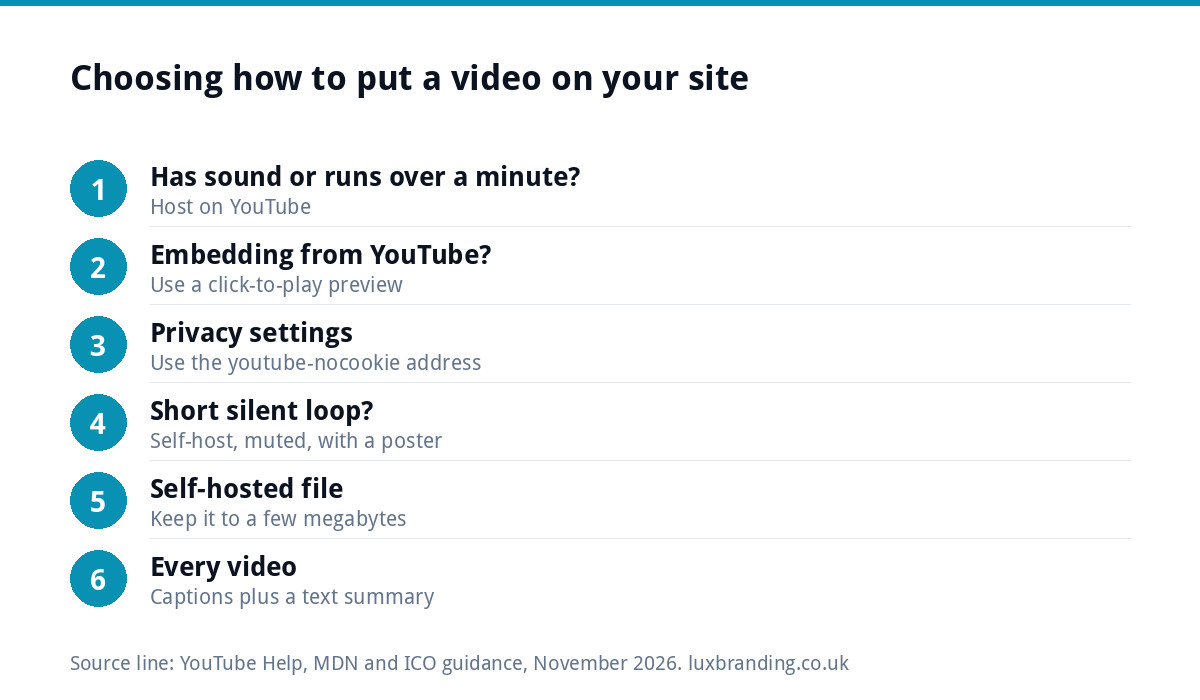
Which route for which video
| Video | Recommended route | Why |
|---|---|---|
| Silent background loop in a hero | Self-hosted, muted, with a poster | No player chrome; small file |
| Customer testimonial with sound | YouTube with click-to-load | Streaming handles length and quality |
| Two-minute “how we work” explainer | YouTube with click-to-load | Also discoverable on YouTube |
| Short product demo on a shop page | Self-hosted if under a few MB | No suggested videos pulling buyers away |
| Long talk or webinar recording | YouTube, linked rather than embedded | Too heavy to self-host |
| Before-and-after time-lapse | Either: self-host short, YouTube if long | Depends on length and sound |
Captions, sound and accessibility
Many people watch with the sound off, and some cannot hear it at all. Add captions to every video with speech: YouTube can generate them automatically, but check and correct them, because trade terms and place names often come out wrong. Never autoplay sound. Background video should be gentle, and visitors should be able to pause anything that moves for long. Our guide on what to check before a website launch includes accessibility basics.
Does video help SEO?
Video can help indirectly: people stay on a page longer when it answers their question well, and a YouTube copy can be found in YouTube search. But a video does not replace text. Put a short written summary next to every video, covering what it shows and where, so search engines and skim-readers get the point without pressing play. The page still needs a clear heading, a useful description and a call to action.
If you do publish on YouTube, treat the channel as a second shop window. Use the same name, profile image and colours as your website, add your web address to each video description, and group videos into playlists by service. Then the visitor who finds you on YouTube recognises the same business when they land on your site.
A quick checklist
- One purpose per video, and only where it helps the visitor decide.
- Longer videos on YouTube behind a click-to-load preview, using privacy-enhanced mode.
- Short silent clips self-hosted, muted, with a poster image and preload set to none or metadata.
- Captions checked and corrected.
- A text summary and a clear next step beside every video.
- Cookie banner and privacy policy updated to mention embedded video.
Getting it set up
If video has slowed your site, our Website Speed Optimisation is £99. If you are building or rebuilding, our custom WordPress website is £499 for up to 8 pages, hand-coded with no page builders, so video is placed the lightweight way from the start. For a single campaign page with a video, a landing page is £199. Every fixed price is on our pricing page.
Get the UK Website Project Brief Template (free)
A two-page template for briefing any UK web designer: sitemap, integrations, audience and deliverables. Cuts revision rounds in half.
No spam. UK GDPR compliant. We only use your email to send this resource, unless you tick the box to hear from us.
Frequently asked questions
Is it better to embed YouTube videos or upload them to my website? +
For most small businesses, embed longer videos with sound from YouTube, because it streams the right quality to each device for free. Self-host only short, silent clips such as background loops, kept to a few megabytes. Uploading long videos to ordinary web hosting tends to make pages slow and uses your bandwidth.
Do YouTube embeds slow down a website? +
They can. A standard embed loads YouTube's player and scripts as soon as the page opens, even if nobody presses play. Several embeds on one page add up, especially on mobile. Showing a lightweight preview image that only loads the real player when clicked keeps the page fast.
What is YouTube privacy-enhanced mode? +
It is a version of the embedded player served from youtube-nocookie.com. Google says it prevents views of embedded videos from influencing the viewer's experience on YouTube. It reduces tracking, but it is still third-party content, so mention embedded video in your cookie banner and privacy policy and consider click-to-load.
Can a background video autoplay on my website? +
Yes, if it is muted. Modern browsers block videos with sound from playing automatically, so background clips must be silent. Keep the file short and compressed, add a poster image so something shows while it loads, and set preload to none or metadata so the full file is not downloaded upfront.
Can Luxbranding fix a site that video has slowed down? +
Yes. Our Website Speed Optimisation is £99 and addresses the things that slow a site, including heavy embeds and oversized media. If you are rebuilding, our custom WordPress website is £499 for up to 8 pages, hand-coded without page builders, so video is placed the lightweight way from the start.